
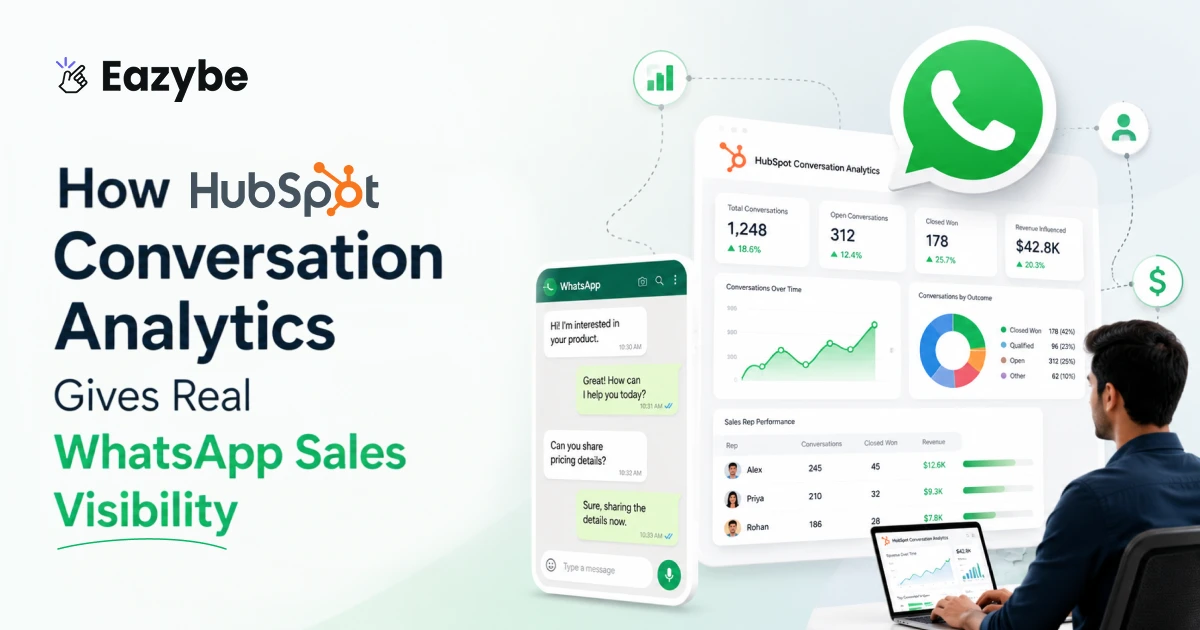


HubSpot Conversation Analytics is changing how sales teams understand what is really happening inside their WhatsApp conversations. Today most customer interactions happen on WhatsApp quick replies and voice notes and late-night follow-ups. It’s fast and natural for customers, but without proper tracking, all that activity stays scattered and hard to measure.
For managers, this creates a visibility gap. You can see that conversations are happening but not how they’re impacting deals. HubSpot Conversation Analytics solves this by bringing WhatsApp chats directly into your CRM, turning everyday messages into clear insights.
And when tools like Eazybe - WhatsApp AI Agent With CRM integration automatically handle follow-ups, organize chats and keep CRM data updated without manual work. This means faster responses, better tracking, and a sales system that runs with more clarity and less effort.
HubSpot Conversation Analytics For WhatsApp
Most teams don’t struggle because reps don’t communicate. They struggle because the communication isn’t visible anywhere. When WhatsApp lives only on the rep’s device, you get fragments of updates instead of a complete picture.
HubSpot conversation analytics helps fix that by bringing WhatsApp conversations in HubSpot into one place. You’re no longer depending on what the rep remembers or chooses to show. You see the real messages, the actual back-and-forth, and the timing of everything.
This matters because:
- Deals move based on conversations, not based on CRM notes
- Follow-ups get forgotten when chats stay buried in a phone app
- Managers can’t coach what they can’t see
- Pipeline reports become unreliable when half the activity lives outside HubSpot WhatsApp integration
Once WhatsApp is connected, you get straightforward HubSpot WhatsApp tracking - every message, reply, and call is logged in the right contact timeline. You finally get a view of your actual sales team WhatsApp management, not just the cleaned-up version that shows up during weekly meetings.
Why Missing WhatsApp Sales Visibility Costs You Deals
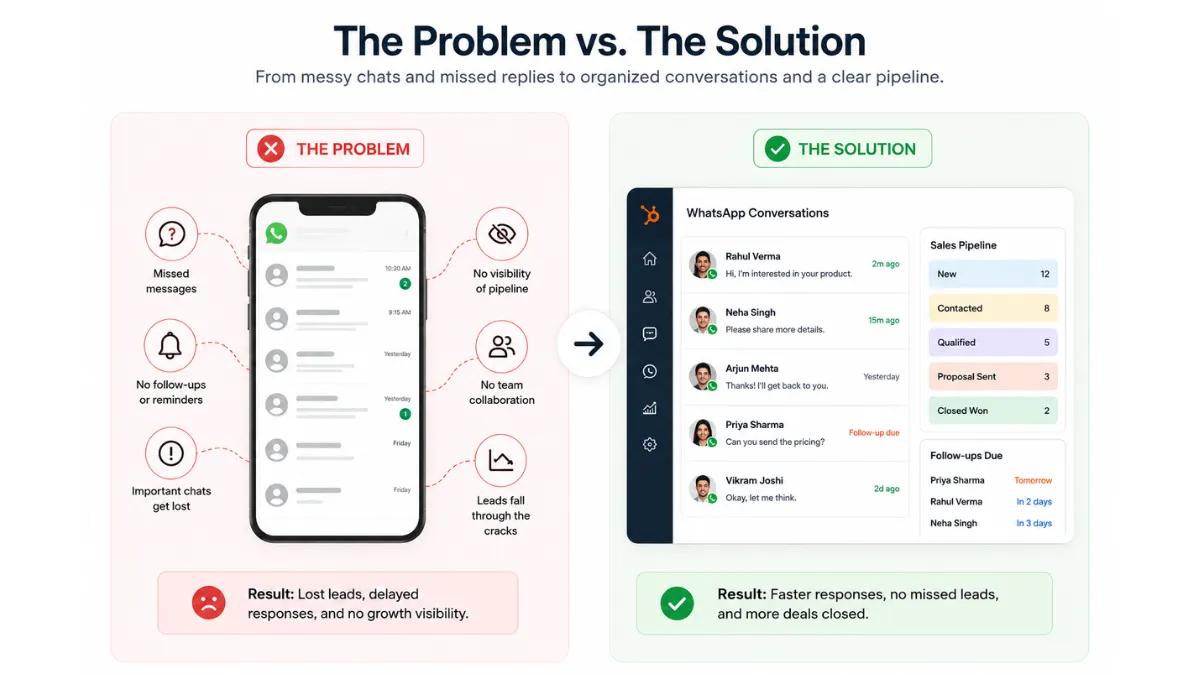
When you can’t see conversations, you miss the early signals. On the surface, everything sounds fine. A rep says, The lead is interested, or the deal is moving. But when you actually look closer, maybe that lead replied just once in three days, or an important question from the customer never got answered.
This is where WhatsApp sales visibility starts to matter. It helps you clearly spot what’s really happening in WhatsApp sales performance analytics:
- Deals that are moving too slowly
- Leads that suddenly go quiet
- Replies that took too long
- Miscommunication that could’ve easily been avoided
- Opportunities that were there but never pushed forward
It’s not about micromanaging HubSpot conversation analytics. It’s about having the right information in front of you. When sales rep WhatsApp activity is visible, you don’t have to depend on updates or assumptions. You can see the real picture and understand exactly what’s happening inside your pipeline.
Also Read: How To Send WhatsApp Messages To Hundreds Without Getting Banned
HubSpot WhatsApp Tracking: Making Conversations Easy To Understand
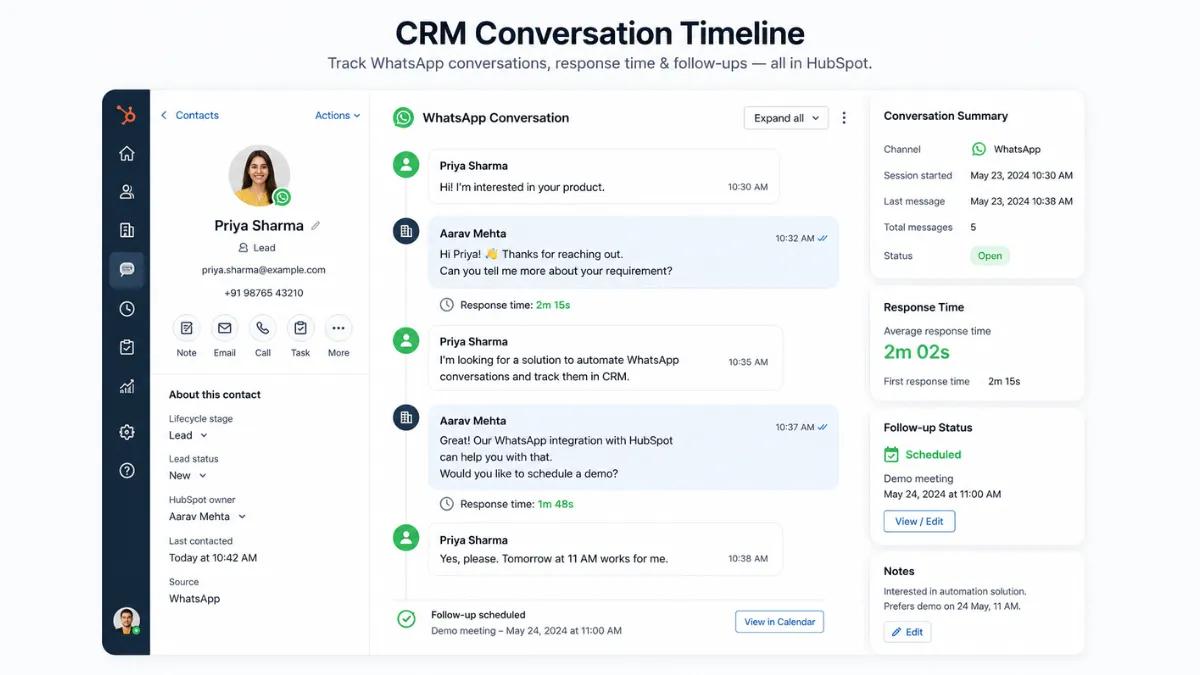
Once WhatsApp data starts living inside HubSpot conversation analytics, something important changes managers finally get context. Instead of relying on updates or assumptions, you can open a contact and see the full story as it actually happened with integrations.
You can:
- Read the real conversation
- See how quickly the rep responded
- Check if the follow-up was done
- Know exactly where the deal slowed down
With proper HubSpot WhatsApp tracking, conversations also become easier to understand. A short message might be a simple inquiry, while a long exchange could mean the customer is raising objections. Even a delayed reply can signal frustration. This is where Hubspot WhatsApp chat tracking helps—it organizes everything neatly instead of leaving it scattered across chat threads.
And once all this data sits inside your WhatsApp CRM, your HubSpot sales pipeline insights start to make sense. You’re no longer guessing what’s happening. The numbers actually reflect real conversations and real progress.
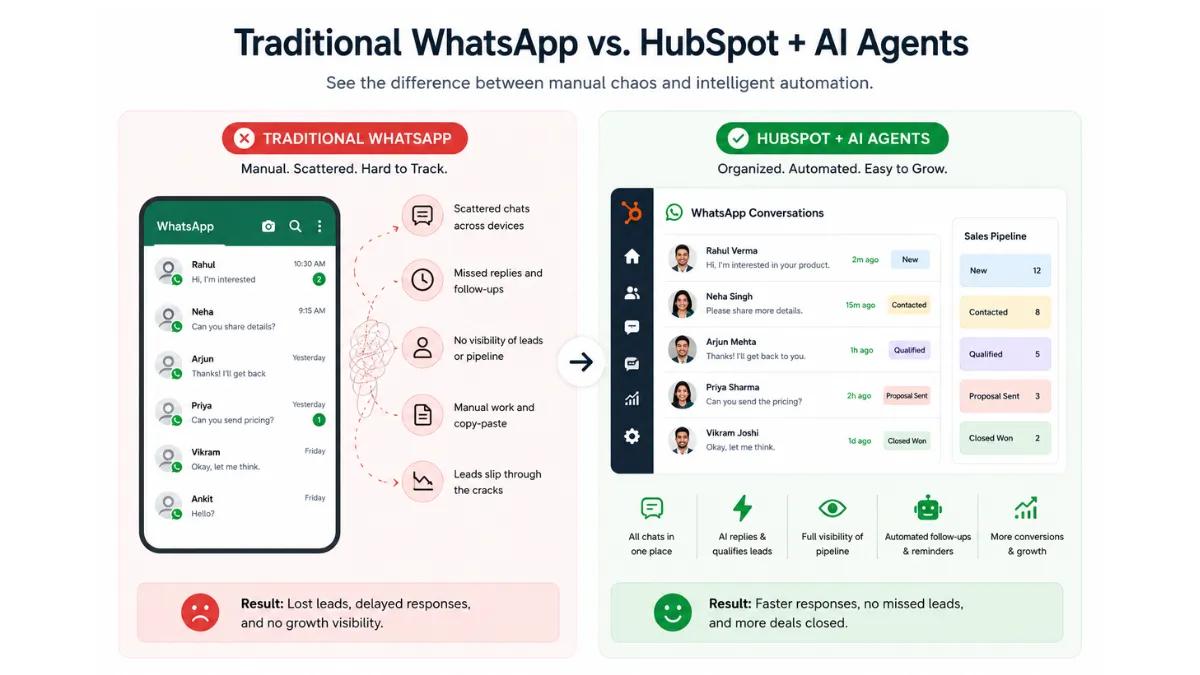
HubSpot Conversation Analytics vs Traditional WhatsApp Sales Tracking
When teams rely only on WhatsApp without proper tracking most of the work stays unstructured and hard to measure. But with HubSpot conversation analytics, everything becomes visible or organized and easier to act on.
Here’s a simple comparison:
| Aspect | Traditional WhatsApp Usage | HubSpot Conversation Analytics |
|---|---|---|
| Visibility | Conversations stay in personal chats | Full WhatsApp sales visibility inside CRM |
| Follow-ups | Manual, often missed | Tracked and consistent |
| Sales Rep Activity | Hard to monitor | Clear sales rep WhatsApp activity tracking |
| Pipeline Insights | Based on assumptions | Real HubSpot sales pipeline insights |
| Team Management | Scattered and unclear | Organized sales team WhatsApp management |
| Data Tracking | No proper records | Complete HubSpot WhatsApp tracking |
| Automation Mostly | Mostly manual work | Supported by WhatsApp automation & AI agents |
This shift is what makes the difference. Instead of working with scattered chats and guesswork, teams start working with clear data, better follow-ups, and a system that actually supports how modern sales happens.
Also Read: WhatsApp vs Email Marketing
Centralizing WhatsApp HubSpot Conversation Analytics
When WhatsApp isn’t connected to HubSpot, simple things start breaking. A rep goes on leave and no one knows what the lead last said. A customer escalates, but the manager has no context. A deal gets delayed, and no one can trace which message caused it. And if a rep leaves, the entire conversation history can disappear with them.
That’s where centralizing WhatsApp HubSpot conversation analytics makes a real difference. Once WhatsApp conversations are inside HubSpot with WhatsApp copilot, everything stays connected. Every incoming and outgoing message is linked to the right lead. Nothing depends on memory, and nothing is stuck inside someone’s phone. Even calls and voice notes become part of the same timeline.
For managers, this makes sales team WhatsApp management much easier. Instead of chasing updates or piecing things together, everything is already there clear, complete and easy to follow inside HubSpot.
HubSpot Sales Pipeline Insights From WhatsApp Conversations
Pipeline reviews become far more honest and actually useful when you have clear visibility. Without it, most updates are based on what reps say. But with HubSpot conversation analytics, you start seeing real patterns from actual WhatsApp conversations also with zoho WhatsApp integration.
You can clearly understand:
- Which deals move faster when reps reply quickly
- Which leads need more consistent follow-up
- Where communication starts breaking down
- How often objections are handled properly
- When deals get stuck because the customer wasn’t updated
These HubSpot sales pipeline insights make coaching more practical. Instead of giving generic advice like follow up more, you can point to exact moments where things slowed down or were missed.
It’s not guesswork anymore. It’s improvement based on real conversations, helping your team close deals with more clarity and confidence.
Improving Sales Team WhatsApp Management With HubSpot Conversation Analytics
Managing a team that sells heavily on WhatsApp can get overwhelming. You know conversations are happening but you don’t always know what kind, how many, or how effective they really are.
With HubSpot conversation analytics, that starts to change. You can:
- Track the pace of each rep’s activity
- Notice unanswered messages before they turn into lost leads
- Understand how many chats each rep handles daily
- See which reps maintain quick response times
- Compare different reps’ communication styles and effectiveness
When activity is visible, reps manage their time better, and managers can guide them with real context instead of assumptions.
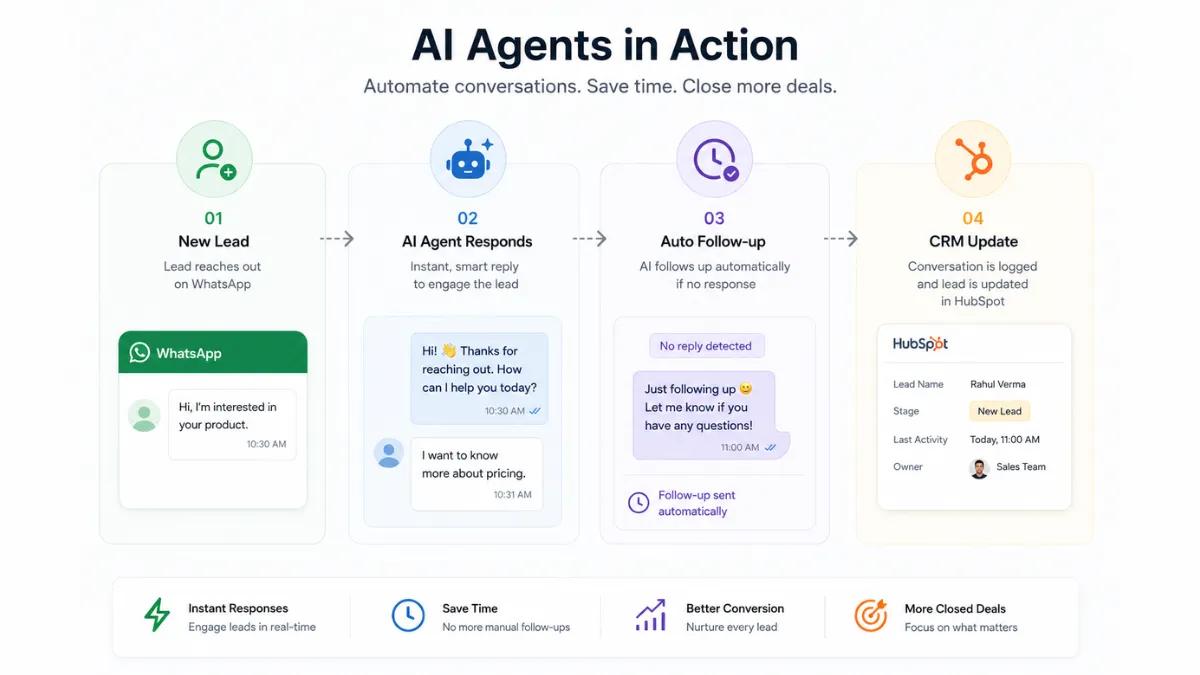
And when AI sales agent are added, the process becomes even smoother. They handle follow-ups automatically, keep conversations moving and reduce delays. Combined with Hubspot WhatsApp chat tracking, this makes accountability simple and fair—because everything is based on actual conversation history, not guesswork.
Key Benefits Of Using HubSpot Conversation Analytics With WhatsApp
When WhatsApp is properly connected to your CRM, the difference shows up in daily work. You start getting complete WhatsApp sales visibility, and sales rep WhatsApp activity becomes easier to track. This leads to better clarity, smoother follow-ups, and more reliable HubSpot sales pipeline insights.
Here are the key benefits teams experience with best sales enablement tools:
- Complete WhatsApp sales visibility
- Clear sales rep WhatsApp activity tracking
- More accurate HubSpot sales pipeline insights
- Better and more consistent follow-ups
- More organized sales team WhatsApp management
- Fewer missed opportunities
- Clearer and more reliable reporting
- Stronger handovers between reps
All of this leads to one important outcome—fewer surprises in your pipeline. You don’t have to guess which deals might close. You can clearly see where each deal stands and what needs attention.
Suggested Read: Top 5 WhatsApp Automation Tools
Why Teams Perform Better With HubSpot Conversation Analytics
Once WhatsApp is connected to your CRM, improvement starts to happen naturally. With HubSpot conversation analytics, nothing important gets missed, and overall sales efficiency begins to improve.
- Reps know their follow-ups won’t be forgotten
- Managers can give specific advice instead of generic suggestions
- Deals move faster because conversations are tracked
- Misunderstandings reduce because all the context is visible
- Better visibility leads to higher sales efficiency across the team
It’s not that HubSpot conversation analytics magically improves sales. It simply shows what’s already happening. And when everything is clear, improving sales efficiency and fixing small gaps becomes much easier and more practical.
Best Practices For Using HubSpot WhatsApp Tracking
To keep everything running smoothly, teams need a few simple habits. When used along with the right WhatsApp Business tools, HubSpot WhatsApp tracking becomes much more reliable and easier to manage.
Here are some practical best practices:
- Make sure all reps use the connected WhatsApp number with HubSpot conversation analytics
- Keep all conversations inside HubSpot avoid switching to personal phones
- Use the right WhatsApp Business tools to keep chats structured and consistent
- Label or categorize chat types whenever possible
- Check pending messages daily
- Review conversation timelines before pipeline discussions
- Use weekly dashboards to track team activity
- Coach reps using real examples from chat interactions
- Keep notes inside HubSpot so future handover stay smooth
These small habits make a big difference. They keep your Hubspot WhatsApp chat tracking clean or organized and reliable while helping your team work more efficiently every day.
Conclusion: Why HubSpot Conversation Analytics Is Becoming Essential
WhatsApp is no longer just another channel—it’s where most real sales conversations happen. Deals start there, move forward there, and often close there. But when those conversations stay outside your CRM, you lose visibility, miss context, and leave opportunities on the table.
HubSpot conversation analytics changes that by bringing everything into one place. It connects WhatsApp directly to your pipeline, turns daily chats into clear insights, and gives both managers and reps a complete view of what’s actually happening. With HubSpot WhatsApp tracking, sales rep WhatsApp activity, HubSpot sales pipeline insights, and structured sales team WhatsApp management, your sales process becomes more organized and easier to trust.
When you combine this with WhatsApp automation and AI agents the impact goes even further. Follow-ups happen automatically, conversations stay active and no lead gets ignored. Instead of chasing messages your team focuses on closing deals while the system keeps everything updated in the background.
If your team is still handling WhatsApp separately, this shift makes a real difference. It removes guesswork, improves consistency and keeps your entire pipeline clear, predictable and under control.