
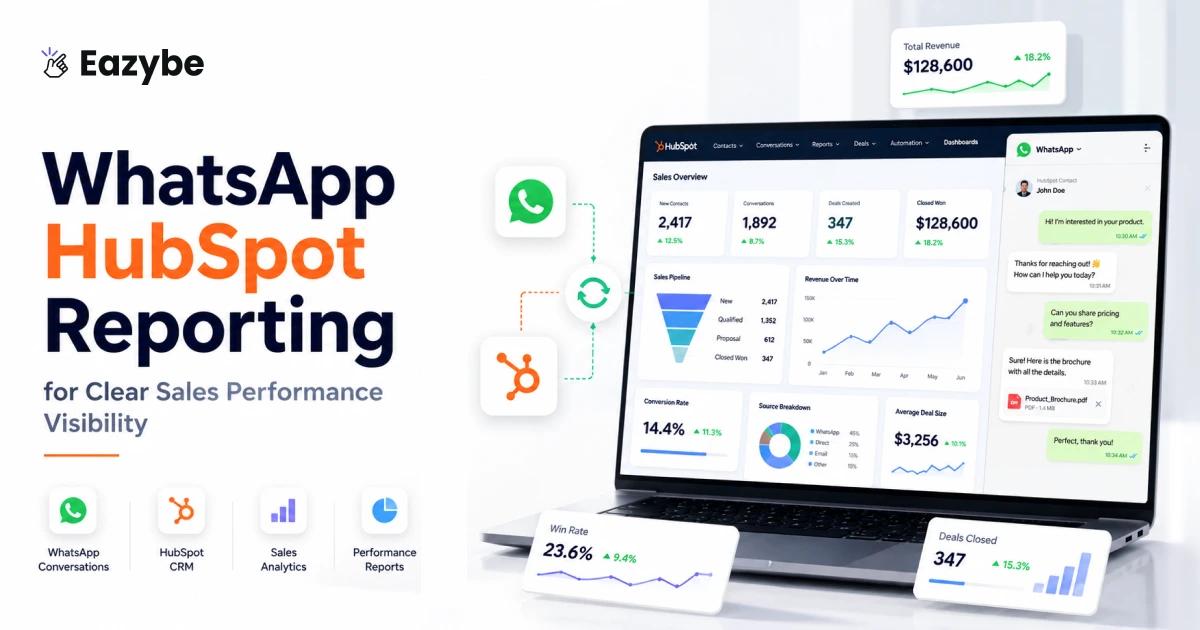


WhatsApp HubSpot reporting helps sales teams see their WhatsApp chats inside HubSpot. Since most sales conversations and follow-ups happen on WhatsApp and tracking them in HubSpot makes it easier to see what is going on and manage deals better.
But for sales managers this creates a gap you can’t ignore.Your team is active, but the results of all that activity aren’t always visible inside HubSpot. You know conversations are happening, but you don’t always know how those conversations are shaping deals.
This is where Eazybe - WhatsApp AI Agent With CRM integration - WhatsApp HubSpot reporting becomes a turning point. When WhatsApp activity finally enters HubSpot in a structured way, you get the kind of WhatsApp sales visibility that replaces assumptions with actual data.
WhatsApp HubSpot Reporting for Real Visibility
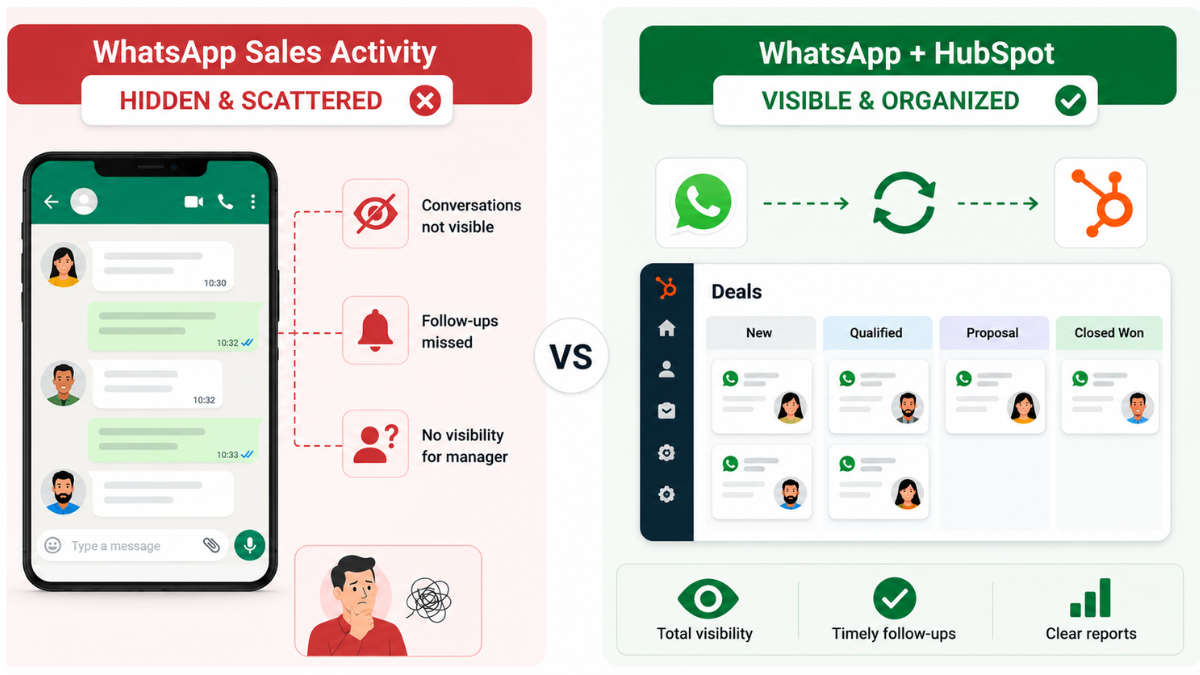
Most teams don’t struggle because reps aren’t communicating. They struggle because the communication is invisible. When WhatsApp conversations stay locked inside a rep’s phone, managers only get fragments instead of the full story.
WhatsApp HubSpot reporting fixes this by pulling actual WhatsApp activity into HubSpot with automatically by AI. You’re no longer relying on memory, screenshots, or vague updates. You see real messages, real timings, and real rep behavior.
This matters because:
- Deals move based on conversations, not CRM notes
- Follow-ups get forgotten when chats stay buried in WhatsApp
- Managers can’t coach performance they can’t see
- Pipeline accuracy drops when half the communication never touches HubSpot
Once WhatsApp is connected, HubSpot WhatsApp integration tracking logs every message in the contact timeline.You finally get real, structured WhatsApp conversation insights for your entire team. What you see with WhatsApp Hubspot Reporting
Why WhatsApp Sales Visibility Matters For Every Team
A rep may say The lead is warm, but maybe the lead replied once in two days. Another rep radar may say The deal is moving, but you can’t see if they missed an important follow-up.
True WhatsApp sales visibility helps you spot with :
- Deals moving too slowly
- Leads going quiet
- Long reply-time gaps
- Missed follow-ups
- Unanswered questions
- Opportunities that should’ve been pushed
This isn’t about micromanaging. It’s about replacing guesswork with reality. Once sales rep behavior tracking in HubSpot becomes clear, coaching and decision-making become sharper and fair with AI.
HubSpot WhatsApp Reporting With Agent of AI
When WhatsApp data lives inside HubSpot, managers get something they rarely have: context.
You can open any contact and instantly see:
- the full WhatsApp conversation
- how quickly the rep responded
- whether follow-ups happened
- where the deal slowed down
Good HubSpot WhatsApp tracking also helps classify chats — short inquiries, objections, long discussions, stalled messages. Because HubSpot WhatsApp reporting organizes the data instead of leaving it in scattered threads, your pipeline starts reflecting actual activity instead of guesses with Automated ai work. Your HubSpot sales pipeline insights suddenly become clearer and more accurate.
Also Read: Best AI Agents For Customer Support.
WhatsApp HubSpot Reporting For Better Team Management
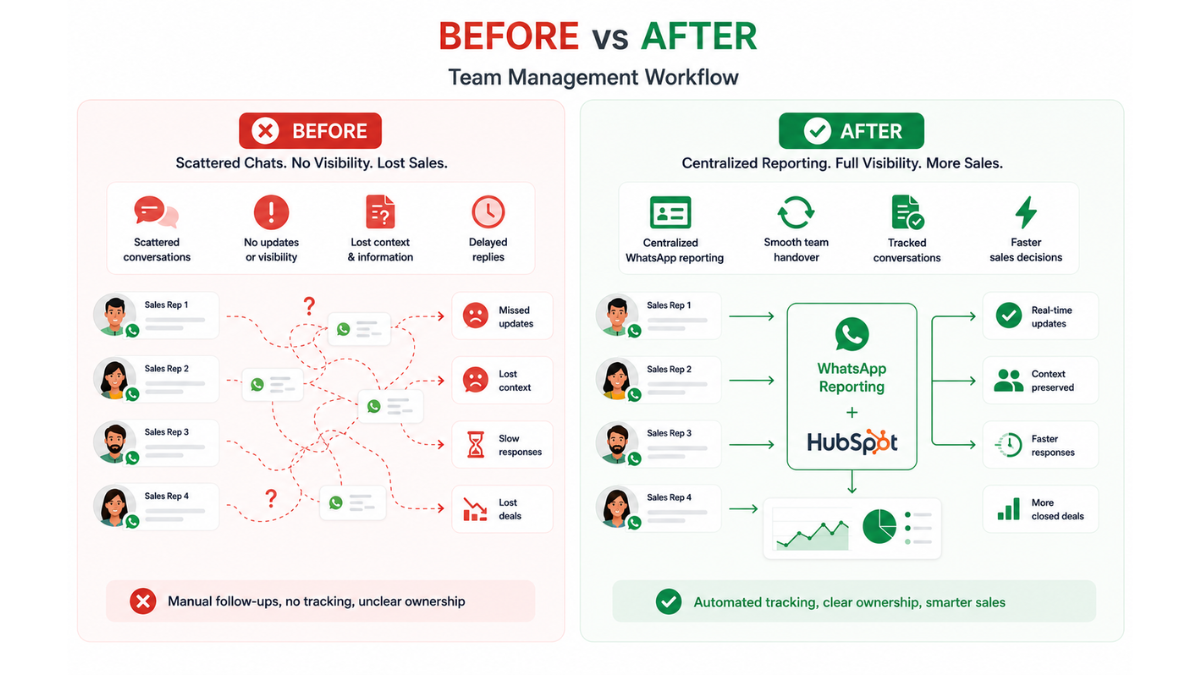
When WhatsApp isn’t connected to HubSpot, avoidable problems appear:
- A rep goes on leave → nobody knows the last update
- A customer escalates → the manager has no context
- A deal slows → no one remembers the cause
- A rep resigns → all WhatsApp history disappears
Bringing WhatsApp into HubSpot using Eazybe WhatsApp CRM integration with AI Agent solves all of this. Every message links to the right lead. Nothing depends on memory. Nothing stays hidden. For managers, this simplifies sales team WhatsApp monitoring dramatically with AI Sales Agents.
HubSpot Sales Pipeline Insights Powered By Automated AI WhatsApp Reporting
Pipeline reviews become more useful when conversations are visible. With accurate WhatsApp HubSpot reporting, managers can see:
- patterns tied to fast vs slow replies
- leads that require more nurturing
- common breakdown points in conversations
- how well reps handle objections
- which deals are stuck due to lack of updates
These HubSpot sales pipeline insights help leaders coach with precision and how to increase sales. Instead of “follow up more,” you can show the exact points of delay. Practical improvement becomes easier because the data is real.
What You See With WhatsApp HubSpot Reporting
With WhatsApp HubSpot reporting, you no longer have to guess what is happening in sales conversations. It gives you clear visibility into chats, follow-ups, and deal progress directly inside HubSpot.
| Before | After |
|---|---|
| Guessing updates | Real WhatsApp chats in HubSpot |
| Missed follow-ups | Pending replies visible |
| No clear deal status | Full conversation view |
| Asking reps for updates | Data already available |
| Hidden delays | Reply time visible |
Improving Sales Team WhatsApp Management With HubSpot Reporting
WhatsApp Hubspot Reporting Flow be Managing a WhatsApp-heavy team can feel chaotic. You know conversations are happening Automated with AI you just can’t always see the quality or timing. And you can see the whatsapp sales performance analytics.
With WhatsApp HubSpot reporting, that changes. You can:
- Track each rep’s message pace
- Find unanswered chats before they go cold
- See how many leads each rep handles
- Compare reply speeds
- Review communication styles
- Identify bottlenecks
This isn’t pressure — it’s clarity. With HubSpot WhatsApp tracking, everyone works with the same visibility and the same expectations.
WhatsApp HubSpot Reporting With AI Agents
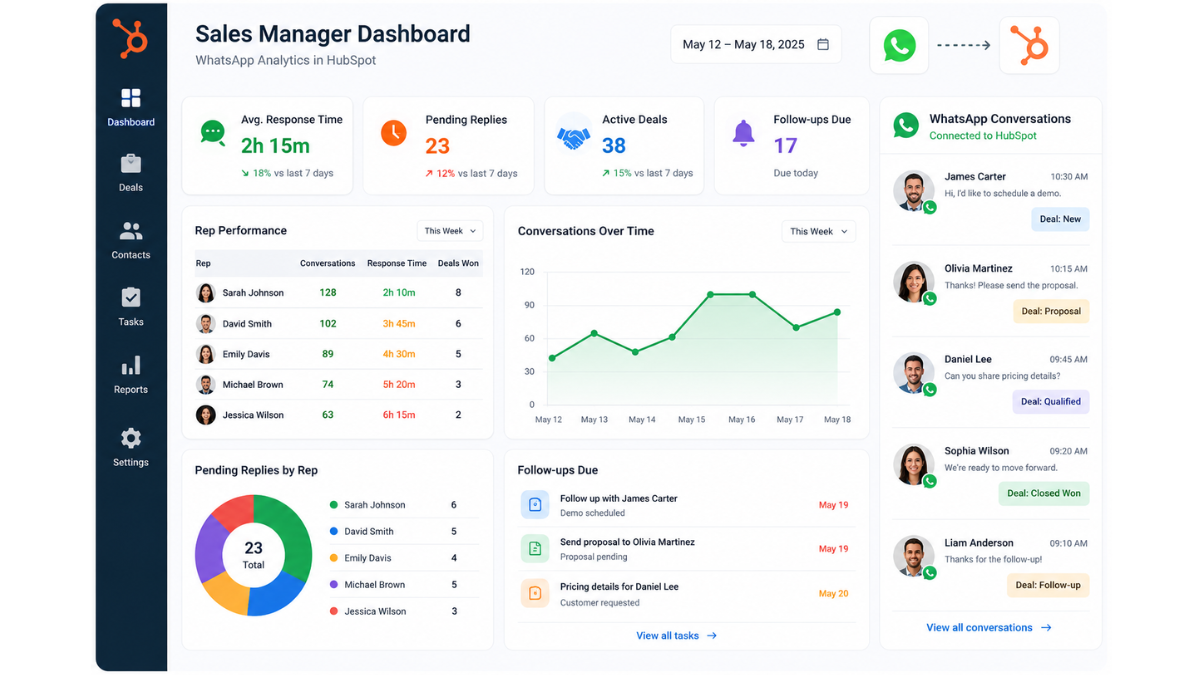
AI agents automatically log WhatsApp conversations, track follow-ups, and update HubSpot without manual work. This gives sales teams full visibility into conversations, activities, and deal progress in one place.
Key Benefits of WhatsApp HubSpot Reporting
When WhatsApp activity finally syncs into HubSpot, reporting becomes far clearer and easier to trust. You can see what reps are doing, how conversations move automated by ai, and which deals need attention — all without checking anyone’s phone with whatsapp copilot. It turns everyday WhatsApp chats into clean, usable sales insights.
Here are the major advantages teams experience:
- Complete WhatsApp sales analytics
- Reliable sales rep behavior tracking HubSpot
- Accurate HubSpot sales pipeline insights
- More structured follow-up habits
- Cleaner sales team WhatsApp monitoring
- Fewer lost opportunities
- Clear, honest reporting
- Smooth handovers between reps
Together, these create one major outcome: No more blind spots.
Why WhatsApp HubSpot Reporting Makes Teams Perform Better
With WhatsApp HubSpot reporting, reps naturally improve because their conversations, follow-ups, and response times become visible and easier to understand and do automation work by 24/7 by AI Agents. Managers can coach using real examples instead of assumptions, and reps stay more consistent because nothing gets lost in private chats. This clarity leads to faster deals and smoother teamwork.
Once WhatsApp activity enters HubSpot, performance naturally improves:
- Follow-ups don’t get forgotten
- Coaching becomes specific
- Conversations move faster
- Miscommunication drops
- Managers get clarity without chasing updates
WhatsApp HubSpot reporting doesn’t magically boost sales — it simply reveals what’s already happening with whatsapp integration. With clarity, improvement becomes simple.
Best Practices For Using HubSpot WhatsApp Reporting
To get the most value from WhatsApp HubSpot reporting, teams need a few consistent habits. When every rep uses the connected number, keeps chats inside HubSpot, and reviews their timelines regularly, the data stays clean and dependable with whatsapp automation. These small practices ensure reporting remains accurate and useful for everyday decision-making.
To keep whatsapp hubspot reporting accurate with Qualify leads with AI, detect deals going cold, and automate follow-ups by AI Agents.
To keep your system clean and reliable, follow these habits:
- Ensure all reps use the integrated WhatsApp
- Keep all chats inside HubSpot
- Categorize chat types when possible
- Check pending messages daily
- Review WhatsApp timelines before pipeline meetings
- Use dashboards for weekly tracking
- Coach reps using real chat examples
- Document notes for smooth handovers
These habits keep HubSpot WhatsApp tracking organized and effective.
Conclusion: Why WhatsApp HubSpot Reporting Is Now Essential
WhatsApp isn’t a side channel anymore — it’s the main conversation hub for most sales teams. But when those chats stay outside HubSpot, you lose visibility, accuracy, and opportunities.
WhatsApp HubSpot reporting gives you the full picture. It connects WhatsApp to your pipeline and helps turn conversations into clear insights so teams can act faster. With Eazybe, simple pricing makes it easy to use WhatsApp tracking, automation, and AI without high costs.
With HubSpot WhatsApp tracking, WhatsApp sales analytics, sales rep behavior tracking, HubSpot sales pipeline insights, and organized sales team WhatsApp monitoring, you turn WhatsApp into a controlled, trackable, revenue-driving channel — not a hidden one its all controlled by AI automated work 24/7.
If your team still handles WhatsApp separately from HubSpot, this is the upgrade that removes the guesswork and gives you complete visibility.