








Upload a spreadsheet
Use an Excel or CSV file with up to 1,000 contacts per sheet. Sample files show which columns you need.
Upload a contact list and press start. Eazybe calls one contact at a time, with the gap you set between calls, and saves the recording and outcome back to the contact.
Illustrative example
 Physics Wallah

 WanderOn



 Uniacco

An auto dialer works down a call list for you, so a rep stops typing numbers between conversations. The saved minutes help, but the bigger gain comes after the call, when nobody has to remember what to type into the CRM.
In Eazybe, you upload the list as an Excel or CSV file, check it and choose which number to call from. Each recording and outcome goes back to the contact, and the next step is set there too.
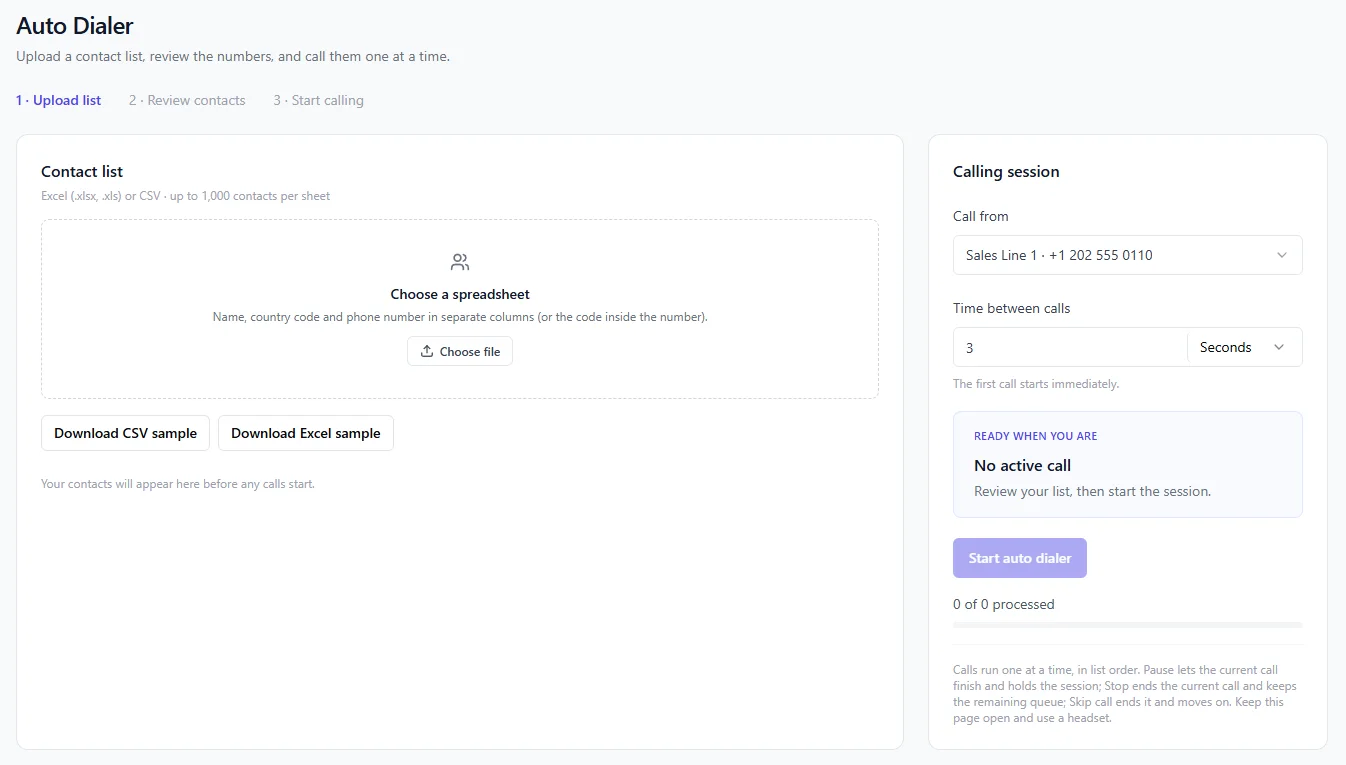
These are the parts of the dialer reps use every day.
Use an Excel or CSV file with up to 1,000 contacts per sheet. Sample files show which columns you need.
Eazybe logs your calls in HubSpot, Salesforce, Zoho or Eazybe CRM.
Choose how long to wait before the next number rings, so a rep has time to finish up.
Pick which of your Eazybe numbers the session calls from.
Both go back to the contact, so a rep can move to the next call straight away.
The contact shows what happens next, such as a meeting or a call back.
A rep can go from a list to the first call in four steps.
A dialer pays off when reps have long lists and a limited number of calling hours.
Upload your newest leads and call them the same day, while they still remember asking.
Call people who stopped replying, then pick the conversation back up on WhatsApp.
Upload the list from an event or campaign and let the dialer work through it.
Eazybe keeps the call on the same record as the customer's WhatsApp chats, so a rep can send the quote they promised without losing the thread.
You pay for your Eazybe plan, plus a voice number to call from if you need one. Ask on a demo which plan suits the size of your lists.
See PricingWhat sales teams usually ask before they load their first call list into the Eazybe dialer.
An auto dialer is software that calls through a list of phone numbers for you. When one call ends, it moves on to the next number, so reps spend their time talking instead of dialing.
From a spreadsheet you upload, in Excel or CSV format. If your contacts live in a CRM or Google Sheets, export them to a file first.
Yes. Each recording and outcome is saved back to the contact. Recording rules differ by country, so check what your local law requires before you start.
The Eazybe number you choose under Call from, which you set before the session starts.
It depends on where you and your customers are. In the US, for example, the TCPA limits automated calls to mobile phones without consent. Only call people you are allowed to contact, and check with a lawyer for your market.
Up to 1,000 per sheet, as an Excel (.xlsx or .xls) or CSV file. Put the name, country code and phone number in separate columns, or keep the code inside the number. The app has sample files you can download and copy.
Yes. Set the time between calls before you start the session. The first call starts right away, and the gap applies after that.
Yes. Pause lets the current call finish and then holds the session. Stop ends the current call and keeps the rest of the queue. Skip ends that one call and moves to the next contact.
A browser with microphone access and a voice number to call from. Keep the page open during the session. We suggest a headset, since reps may be on calls for a long stretch.
It calls one contact at a time, in list order, with a gap you set. That is closest to a power dialer. It does not ring several people at once, so a customer never picks up to find nobody there.
See everything in Eazybe Calling, or go straight to a related topic.
Try Eazybe free for 4 days, or book a demo and we will go through your calling setup with you.