






Saved to the contact
Recordings live on the customer record, so anyone with access can find them.
When a rep calls through the Eazybe auto dialer, the recording and outcome go back to the contact. Find any call from the customer's record, right beside their WhatsApp chats.
Illustrative example
 Physics Wallah

 WanderOn



 Uniacco

Sales call recording software saves the audio of a sales call so someone can listen back later. Teams use it to settle what was agreed, coach new reps and hand over accounts without losing detail.
A recording only helps if someone can find it. In Eazybe, recordings from the auto dialer are saved back to the contact with the call outcome, so you start from the customer instead of searching a folder of audio files.
A recording tied to the customer is useful long after the call has ended.
Recordings live on the customer record, so anyone with access can find them.
Each recording comes with what happened on the call.
The contact shows what should happen next.
See the calls beside the chats, including anything sent after the call.
Managers can pick out real calls to review with a rep.
A new rep can listen to the last call before picking up an account.
Recording is part of the auto dialer workflow, so nobody has to file anything after the call.
The same recording can serve a rep, a manager and whoever takes over the account next.
Listen to real calls together. It beats role play, because the customer's objections are genuine.
Go back to the call when a customer and a rep remember the price differently.
Give the next rep the actual conversation along with the notes.
A call recording tells you what was said on that call. Eazybe keeps the WhatsApp conversation next to it, so you can see what the rep promised and whether they followed through.
Your cost depends on your Eazybe plan and on whether you add a voice number. If recording is the main reason you are buying, ask on a demo which plan to choose.
See PricingRecording raises practical and legal questions, so here are straight answers to the common ones.
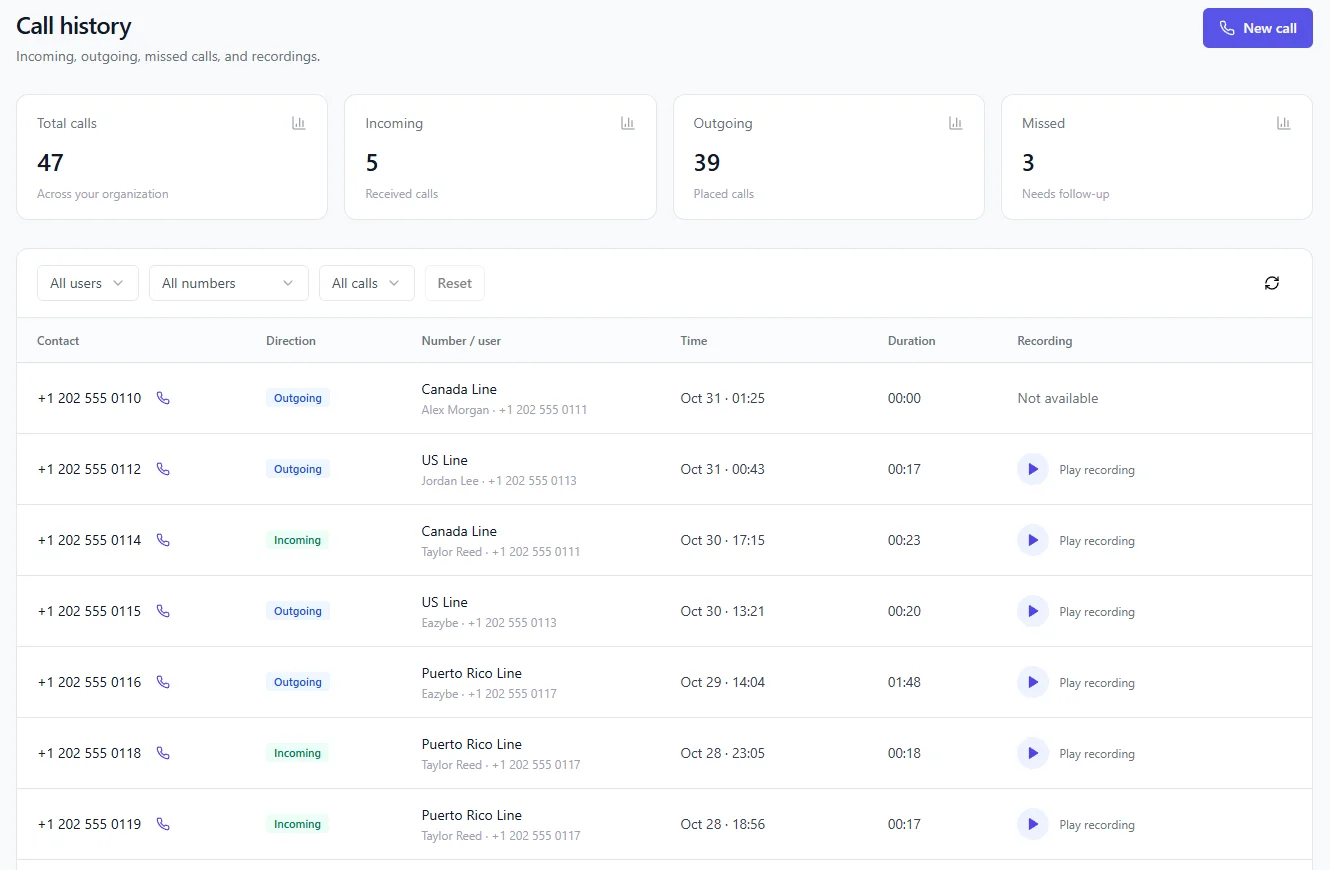
Calls on Eazybe voice numbers can have a recording, both incoming and outgoing, and you play them from call history. Auto dialer calls save the recording back to the contact. Ask on a demo about recording SIM calls.
Open call history and press Play recording on that call. If you have a lot of calls, filter by user or number first.
Call history shows Not available when there is nothing to play, which is what you will usually see on calls that lasted 00:00 because nobody answered.
Yes. Call history covers calls across your organization, so a manager can filter by rep and play the recordings from there.
Pick two or three real calls a week and go through them with the rep. One good call and one that went badly usually teach more than a long review of everything.
Ask on a demo for your setup and devices. Recording support can vary by phone and call type, so test it with your own team before you rely on it.
It depends on the country and sometimes the state. Some places let one party consent, while others need everyone on the call to agree. In the EU, GDPR also applies to recordings. Check the rules for you and your customers. This is general information, not legal advice.
Telling them is the safest habit, and in some places it is required. A short line at the start of the call is usually enough, but confirm what your market needs.
Yes. Recordings go back to the contact, so start from the customer's record.
We do not list WhatsApp call recording as a feature today. Ask on a demo if it matters to your team.
See everything in Eazybe Calling, or go straight to a related topic.
Try Eazybe free for 4 days, or book a demo and we will go through your calling setup with you.