






Time of every call
See when each customer was contacted and how recently.
Eazybe logs every call's time, length and outcome in your CRM, and saves the call beside the customer's WhatsApp chats. Your reps skip the manual call notes.
Illustrative example
 Physics Wallah

 WanderOn



 Uniacco

Sales call tracking gives a manager a log of the calls reps make, with the time, the length and the result of each. Nobody has to fill in a spreadsheet to show what they did that day.
This is different from marketing call tracking, which uses special numbers to show which ad produced a phone call. Eazybe is built for the sales side. It logs calls against the customer in your CRM and places them next to that customer's WhatsApp chats.
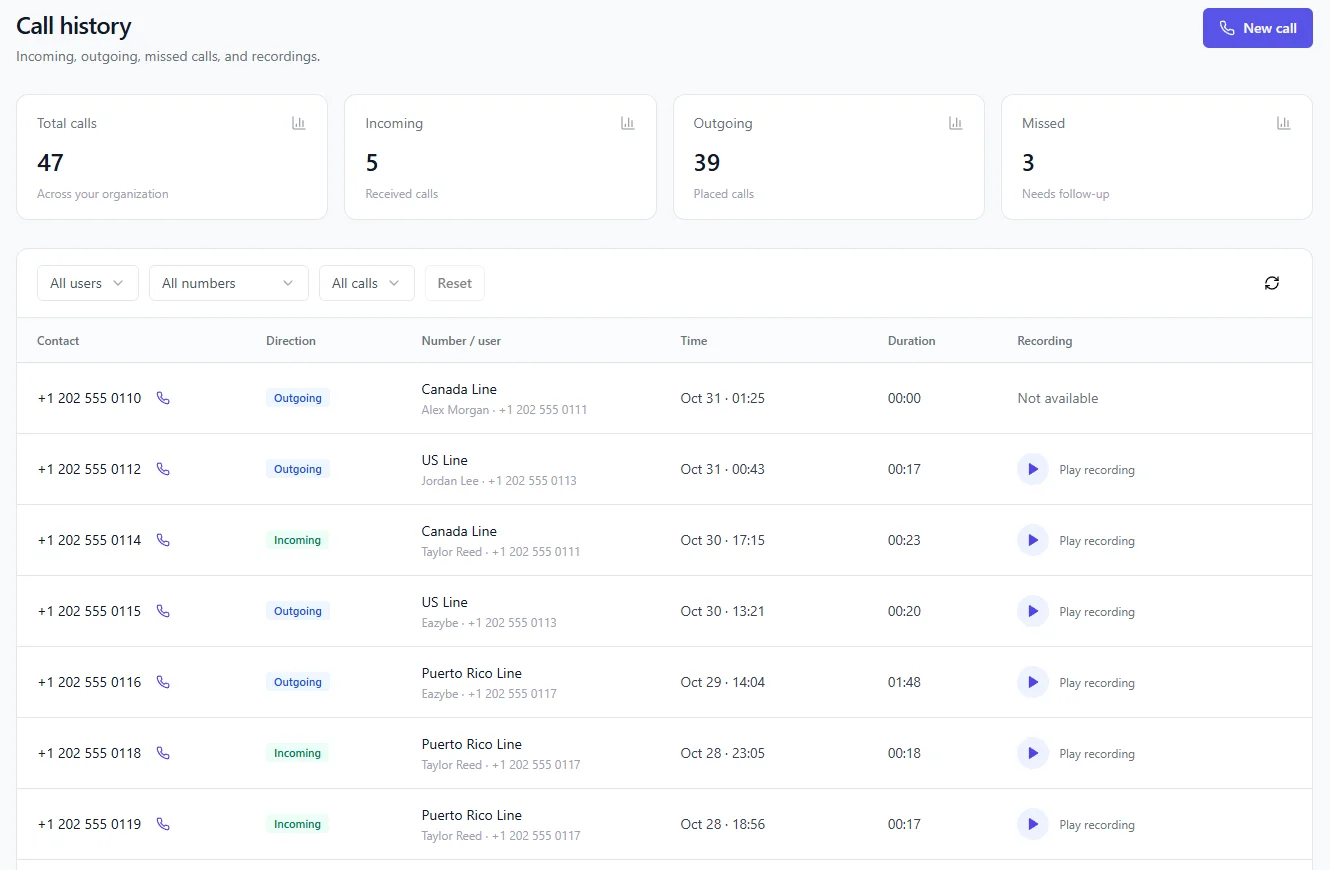
The details a sales manager needs in order to coach and follow up.
See when each customer was contacted and how recently.
A 20-second call and a 20-minute call are very different. The log shows which one you are looking at.
Each call ends with a result on the customer record.
Both call types go to the same place, including SIM calls on Android.
Calls are logged in your CRM, so reps have less to update by hand.
Calls sit beside the customer's WhatsApp chats for the full picture of the deal.
Reps keep calling the way they do today. The logging happens in the background.
It helps anyone who needs to know what happened on a call without being on it.
See who is calling, how long the conversations run and which customers have gone quiet.
Keep sight of activity when reps work from different places on their own phones.
Read the call history and chats before you phone a customer someone else was handling.
A call log alone can make a quiet rep look idle when the deal is moving on WhatsApp. Eazybe shows the calls and the chats together, so you judge the deal on all of it.
Your cost depends on the Eazybe plan your team needs. Voice numbers are extra, and only if you use them. A demo is the quickest way to confirm the right plan.
See PricingQuestions sales leaders usually ask about what is tracked, on which phones, and where the data ends up.
Each call's time, length and outcome, in your CRM. The call is also saved beside the customer's WhatsApp chats.
Yes. Call tracking works with SIM calls on Android and with virtual calls.
SIM call tracking works on Android. If your team uses iPhones, ask on a demo which setup fits. Virtual calling does not depend on the phone's SIM.
The contact, whether the call was incoming or outgoing, the number and user involved, the time and the length. Answered calls can also have a recording you can play.
Yes. Filter call history by user, by number or by call type. Use Reset to go back to the whole team.
Call history has a separate count of missed calls at the top, and the call type filter narrows the list down to them, so you can see who still needs a call back.
Call analytics shows total calls, answer rate, talk time and average call length for the period you pick. You can break the numbers down by phone number or by user.
No. Marketing call tracking shows which ad or keyword drove a phone call. Eazybe tracks the calls your sales team makes and connects them to the customer record.
Eazybe works with CRMs including HubSpot, Salesforce and Zoho, along with Eazybe CRM.
Calls are saved beside the customer's WhatsApp chats. You can also choose which customer chats and groups connect to your CRM, so private conversations stay private.
See everything in Eazybe Calling, or go straight to a related topic.
Try Eazybe free for 4 days, or book a demo and we will go through your calling setup with you.