


WhatsApp automation means using smart software or systems to automatically manage and respond to chat on WhatsApp without doing everything manually. Fast response bring more leads while manual handling causes delays and missed messages.
With best WhatsApp automation, business can handle many conversations at once without losing the personal touch on WhatsApp. Conversations stay organized fast and clear for both customers and teams. Automated WhatsApp replies reminders and updates ensure every message is answered on time while your sales team focuses on more important tasks.
Eazybe - WhatsApp AI Agent with CRM Integration makes automation more advanced on WhatsApp. Automated messages on whatsapp work all the time to reply instantly, check leads, update CRM and help manage chats. WhatsApp automation doesn't replace people, they support them. This helps teams save time and reply to customers faster and more easily.
What Is WhatsApp Automation?

WhatsApp automation is using software to handle your chats and workflows for you. Instead of a person typing out every single reply the system takes care of the routine stuff like answering common questions, sending order updates and qualifying new leads and automated messages on WhatsApp. It’s about getting the manual work off your plate.
Automation on WhatsApp lets you reply instantly and keep your messaging consistent, and stop burning out your team with repetitive tasks. It’s not about replacing your team; it’s about making sure your automated WhatsApp business stays responsive with whatsapp copilot. Even when you’re busy elsewhere.
How To Automate WhatsApp Messages For Faster Customer Engagement
Automating your WhatsApp chats is basically just setting up rule. So, the business keeps moving while you are busy elsewhere. It’s the easiest way to stay responsive without being glued to your phone 24/7 with WhatsApp automation.
In reality this looks like
- Quick replies: Stop typing the same. What are your hours? message fifty times a day.
- Auto-alerts: Customers should get a ping the second their payment goes through or their order ships with WhatsApp automator.
- Smart flows: You can qualify a lead or get a new user set up before a human even has to jump in.
With AI Sales Agent WhatsApp automation becomes smarter on WhatsApp. It helps qualify leads, answer questions and save every conversation automatically in one place. This keeps replies fast organized and active 24/7 while still feeling natural, not robotic.
Choosing The Right WhatsApp Automation Tool
The good WhatsApp automation tool should automatically manage and organize conversations on WhatsApp so nothing gets missed. It helps you reply faster and keep everything clear as chats grow.
For example with HubSpot WhatsApp integration all your chats are automatically saved in your CRM. This helps your team see the full conversation history and manage leads better and make sure nothing gets missed.
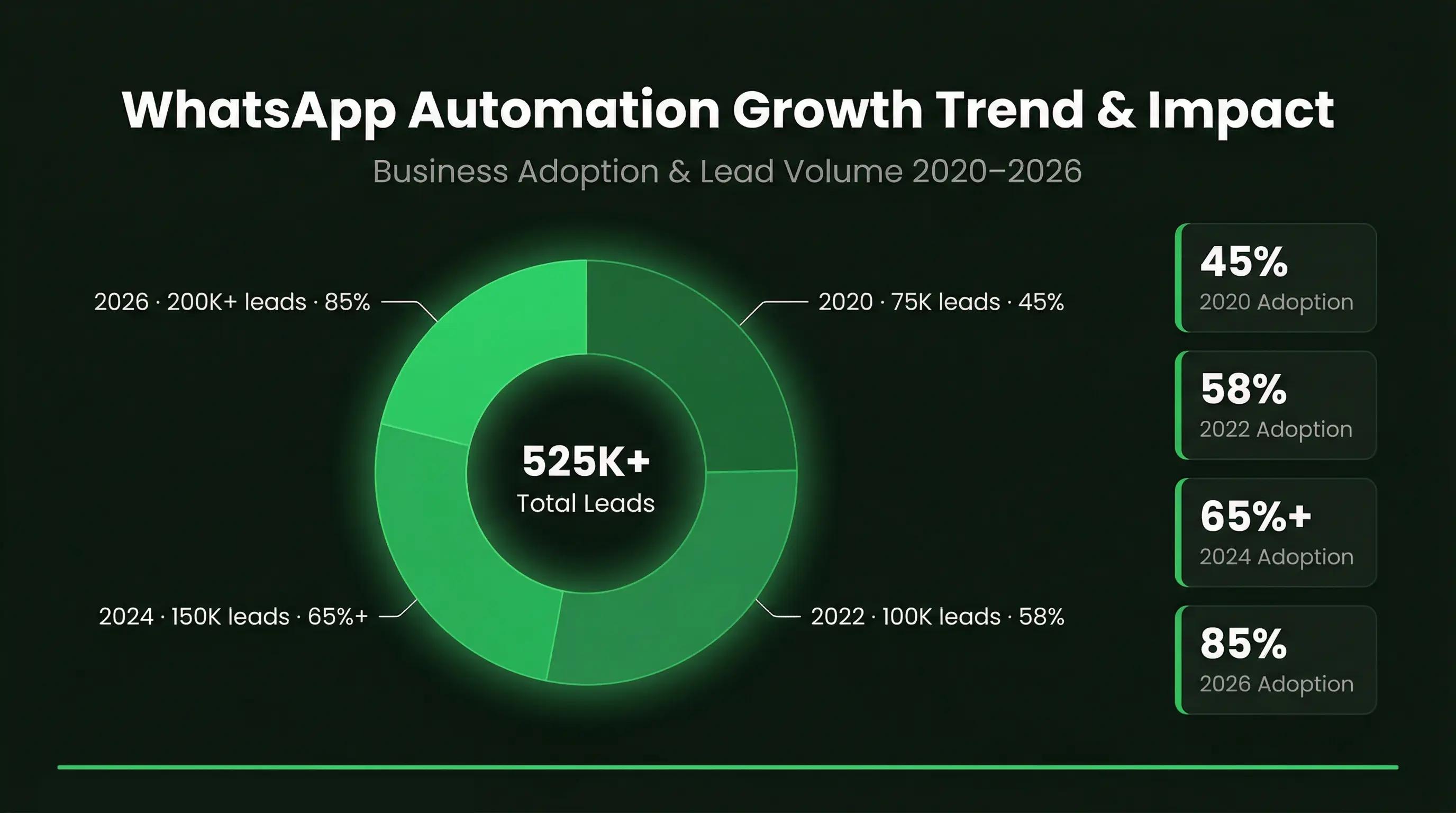
Over 2 billion people use WhatsApp globally and more than 100 billion message are sent on the platform every day. Around 175 million people message a business daily showing how important WhatsApp has become for customer communication.
With millions of businesses already using it many are now moving toward WhatsApp automation and CRM to manage conversations better as volume grows.
WhatsApp Automation With WhatsApp Web
WhatsApp web automation helps teams manage customer conversations directly from their desktops. While staying connected with other WhatsApp business tool. WhatsApp Automation keeps communication simple and organized, without switching between different platforms. With WhatsApp CRM integration all chats are linked to customer data giving teams better visibility and control.
With WhatsApp automation, routine tasks are handled in a structured way:
- Conversations are routed to the right team member
- Customer details are updated automatically through WhatsApp CRM
- Follow-ups and reminders are triggered based on customer actions
Top WhatsApp automation reduce manual work and improves response speed and help teams maintain consistent communication as message volume grows.
Can I Automate WhatsApp Messages With WhatsApp Automation ?
Yes businesses can automate WhatsApp messages using WhatsApp Business. Rather than replying to every message manually you can set up messages that are sent automatically when a customer takes a specific action or reaches a certain step.
Businesses usually use automated messages on WhatsApp for simple everyday communication like welcome messages and payment reminders delivery updates and appointment reminders or following up when someone shows interest but doesn’t respond. This way customers don’t have to wait and they get the information they need on time.
With WhatsApp business automation, teams don’t have to manage every message themselves. It reduces repetitive work and helps them stay responsive, while still keeping conversations simple and clear for customers.
Also Read: Best AI Agents for customer support
How To Automate WhatsApp Business For Sales & Support With WhatsApp Automation
Automating WhatsApp Business accounts for sales and support is about setting up the right system. So, conversations don’t depend fully on manual replies. It usually involves using message templates and setting triggers for common actions and connecting WhatsApp Automation with your CRM. So, everything stays organized.
To get started businesses typically create approved message templates for common interactions like follow-ups or updates and set rules. When messages should be sent and integrate WhatsApp with their CRM for tracking conversations and managing leads. WhatsApp automation helps ensure that no message or opportunity is missed.
With a proper WhatsApp automator setup, all conversations can be managed inside a revenue inbox. Where sales and support teams can see chats, track progress, and respond when needed. Best WhatsAp Automation handles the routine parts, while your team focuses on important conversations that need attention.
Mistakes To Avoid In WhatsApp Automation
WhatsApp automation is meant to make conversations faster and smoother but when it’s not set up thoughtfully, it starts doing the opposite. Messages feel mechanical, customers lose interest, and engagement drops—even when everything looks automated correctly.
A lot of this comes down to a few common mistakes:
- Over-automation: When every reply is instant and scripted, conversations stop feeling real. Good WhatsApp automation should support human interaction, not replace it completely.
- No human fallback: If customers can’t reach a real person when needed, it quickly becomes frustrating. There should always be a clear path from automation to a human reply.
- Too many automated messages on WhatsApp: Sending constant follow-ups or reminders can feel intrusive. More messages don’t mean better results than relevant messages do.
- Bad timing: Message sent too early too late or too frequently break the natural flow. Automation on WhatsApp should feel like a continuation of the conversation not an interruption.
- Using WhatsApp like a broadcast channel: WhatsApp is built for conversations not bulk pushing. Treating WhatsApp business automation like email marketing reduces response rates.
In the end, the goal of WhatsApp automation is simply to keep conversations natural while reducing manual work. When done right, it feels helpful. When done wrong, it feels like spam.
Benefits Of WhatsApp Message Automation
When message volume starts increasing, handling everything manually becomes difficult. Teams end up replying late, missing follow-ups, or repeating the same answers again and again. WhatsApp message automation helps avoid this by taking care of routine conversations and keeping things moving.
WhatsApp Automation mainly helps in a few practical ways:
- Replies go out faster, even when the team is not available
- Common answers don’t have to be typed again and again
- Messages stay clear and consistent
- Customers get updates on time instead of asking again
- Pricing, plans, or quotes can be shared instantly when needed
Overall, it just makes daily work easier. Teams feel less busy with repetitive tasks and customers get quicker, more reliable responses.
Use Case Of WhatsApp Business Automated Messages
Businesses use WhatsApp automation for everyday tasks so they do not have to do everything manually. It helps handle simple repeated messages and keeps conversations moving without delays.
Here are some common use cases
| Use Case | Description | How It Helps |
|---|---|---|
| Payments & Reminders | Sending payment follow-ups | Reminders go on time without manual effort |
| Welcome & Onboarding | First message to new users | Helps customers know what to do next |
| Abandoned Carts | Following up on incomplete orders | Brings some customers back to buy |
| Delivery Updates | Sharing order status | Reduces repeated questions |
| Sales Conversations | Handling initial queries | Helps manage leads better |
| Customer Support | Answering common questions | Saves time on repeated replies |
| Appointment Booking | Confirming and reminding bookings | Fewer missed appointments |
It simply helps teams handle routine work faster while keeping things clear for customers.
How To Measure WhatsApp Automation Performance
Most businesses set up WhatsApp automation and then just let it run. Messages go out, replies come in but, there’s no clear sense of what’s actually working.
That’s the gap.
Automation only adds value when you can see its impact with the team inbox. Otherwise, you’re just sending automated WhatsApp messages without knowing if they’re helping your sales or support.
What You Should Actually Track
You don’t need complex dashboards. A few simple signals are enough to understand if your WhatsApp automation is doing its job.
- Response time: Are customers getting replies faster than before, or still waiting?
- Reply rate: Are people engaging with your messages or ignoring them?
- Conversion rate: Are conversations turning into actual leads or sales?
- Drop-offs: At what point do customers stop replying or lose interest?
- Follow-up performance: Are your automated follow-ups bringing people back into the conversation?
When you start tracking these, WhatsApp business tools for automation become easier to improve. You can adjust your messaging, timing, and flows based on what’s actually happening not guesswork.
That’s what turns WhatsApp business automation from just a setup into something that actively supports growth.
Best Practices For Automate WhatsApp Messages That Feels Human
When using WhatsApp message automation to automated messages on WhatsApp. The goal is to keep messages simple and natural and not robotic. People should feel like they’re having a normal conversation not talking to a system.
A few basic things help keep it that way
- Write messages the way you normally speak
- Personalize messages where it makes sense
- Always give an option to talk to a real person
- Don’t send too many messages one after another
- Respect customer choices like opt-outs
When these basics are followed, automating whatsapp messages feels helpful instead of forced and conversations stay smooth for both teams and customers.
Also Read: How to increase sales
Setting Up WhatsApp Business Automation Step by Step
Understanding WhatsApp automation is one thing. Setting it up properly is where most people slow down. The process isn’t complicated and you just need to start simple and build gradually.
Greeting Messages, Away Messages and Quick Replies
Start with the basics inside the WhatsApp Business app. Set up your greeting message, away message and a few quick replies. These handle a big part of your daily conversations without any extra effort.
The key here is how you write them.
- Avoid messages that sound too formal or robotic. People can tell immediately.
- Instead of something like: “Thank you for contacting us. We will get back to you shortly.”
- Keep it natural: “Hey thanks for reaching out. Are you looking for pricing, a demo, or support?”
Also, set up quick replies for things you type often—like pricing, business hours, address, or product details. Even saving 20–30 seconds per message makes a difference over time.
Building Simple Automation Flows
Once the basics are in place you can move to simple automation flows.
This usually means setting up messages based on actions. For example:
- When a new user messages → send a greeting and ask a question
- If they show interest → share details or a link
- If they don’t reply → send a follow-up later
- When they respond again → notify your team or take over manually
The idea is to guide the conversation, not overcomplicate it.
Keep flows short and clear. If it starts feeling long or forced, people stop replying.
Connecting WhatsApp with Your CRM
This is something many teams ignore at the start, but it becomes important as conversations grow.
With proper WhatsApp CRM integration, your chats don’t stay scattered. Everything gets tracked in one place.
A good setup should:
- Save WhatsApp conversations inside the CRM
- Keep contact details updated
- Track leads and follow-ups
- Help teams see full conversation history
When this is in place your team doesn’t have to manually update everything and conversations stay organized as your business scales.
If you set things up this way and start simple keeping flows clear and connecting your system properly. WhatsApp automation becomes much easier to manage and actually useful in day-to-day work.
How To Send Automated Messages On WhatsApp Effectively
Sending automated messages on WhatsApp is mostly about setting things up once. So you don’t have to keep doing the same work again and again. Rather than replying manually every time, messages go out on their own. When something happens like a new inquiry or an order update.
Usually, businesses create simple message templates for things they send often, like follow-ups or updates. Then they set when those automated messages on whatsapp should go out. This makes sure replies are not delayed and nothing important is missed.
WhatsApp automation also helps with sales enablement in a practical way. Leads get quick replies, follow-ups happen on time and conversations don’t go cold. Teams can focus on serious buyers instead of handling every small message.
How To Use AI Agents In WhatsApp Automation To Work 24/7
AI agents help you keep WhatsApp conversations running all the time, even when your team is not available. They handle basic chats so customers don’t have to wait.
You can use AI agents to reply to common questions like pricing, product details or availability. This keeps your response time fast without manual effort.
They also help qualify leads by asking simple questions and collecting details before passing the conversation to your team. AI agents can send instant replies and follow-ups, so no message gets missed and conversations don’t go cold.
At the same time, always keep an option for human takeover when the conversation becomes important. Used this way, AI agents make WhatsApp automation simple messages are handled on time, and your team focuses only on the conversations that matter.
Examples Of WhatsApp Automation
Most businesses use WhatsApp automation for simple day-to-day conversations. It help save time and reduce repetitive work and keep replies fast without manually handling every message.
Some common examples of WhatsApp automation are:
- Welcome messages: Automatically greeting customers when they message for the first time.
- Order updates: Sending confirmation, shipping, or delivery messages automatically.
- Lead follow-ups: Reconnecting with people who asked about pricing showed interest earlier.
- Appointment reminders: Reminding customers about demos, meetings or bookings with a message scheduler.
- Customer support replies: Answering common questions like timings, pricing or availability instantly.
- Payment reminders: Sending reminders for pending payment or renewals.
- Abandoned cart messages: Following up when someone leaves without completing a purchase.
- Lead qualification: Asking basic questions before passing the conversation to the sales team.
The main purpose of WhatsApp automation is simply to keep conversations active and organized while reducing manual work for the team.
WhatsApp Automation Software vs WhatsApp Automation Bot
Not all whatsapp web automation works the same way. A basic WhatsApp automation bot usually sends fixed replies based on keywords. It works for simple questions, but it often feels limited and can’t handle real conversations properly.
On the other hand proper WhatsApp automation software goes beyond just replying. It can help with things like managing leads and keeping conversations organized and connecting chats with your CRM. So, everything is tracked in one place. It also supports teams by allowing humans to step in. Whenever needed to whatsapp sales performance analytics.
WhatsApp Automation makes a big difference in day-to-day use. By just sending replies and conversations. Actually, moving forward leads are handled better, follow-ups don’t get missed, communication feels more useful and less mechanical.
Best WhatsApp Automation Software Compared
There’s no shortage of WhatsApp automation tools anymore. Every platform claims to automate conversations, improve response time and help teams manage customer chats better. But once you actually start using them, the difference becomes clear pretty quickly.
Some tools are built for simple automation. Others are better for sales teams and CRM workflows or customer support. The right choice mostly depend on how your business uses WhatsApp sales performance analytics on a daily basis.
Free Automation Tools And Chrome Extensions
A lot of businesses begin with free WhatsApp automation tools or Chrome extensions. They’re easy to install and usually work fine for small tasks like scheduled messages, quick replies, or simple templates.
But after some time, the limitations start showing up.
In most cases:
- CRM connections are missing
- Multiple team members can’t work properly together
- Automation options stay very limited
- Privacy and data handling are often unclear
For testing or light usage, these tools can still be helpful. But once conversations become important for sales or support, businesses usually need something more reliable and structured.
Verdict: Best WhatsApp Automation Tool For Businesses
As your business grows, the number of messages also increases. Handling everything manually starts to slow things down. Replies get delayed, follow-ups are missed and it becomes difficult to keep track of all conversations. This is where WhatsApp automation tools help by keeping communication steady and organized.
Different businesses use WhatsApp automation in different ways and some for sending updates, others for managing leads or support. It also works well when connected with CRM tools. So, conversations stay in one place and are easier to manage.
In the end, automated messages on WhatsApp depend on what the business needs. For some, basic WhatsApp automation is enough. For others a more structured setup works better. Either way it helps keep conversations simple, clear and easier to manage.