
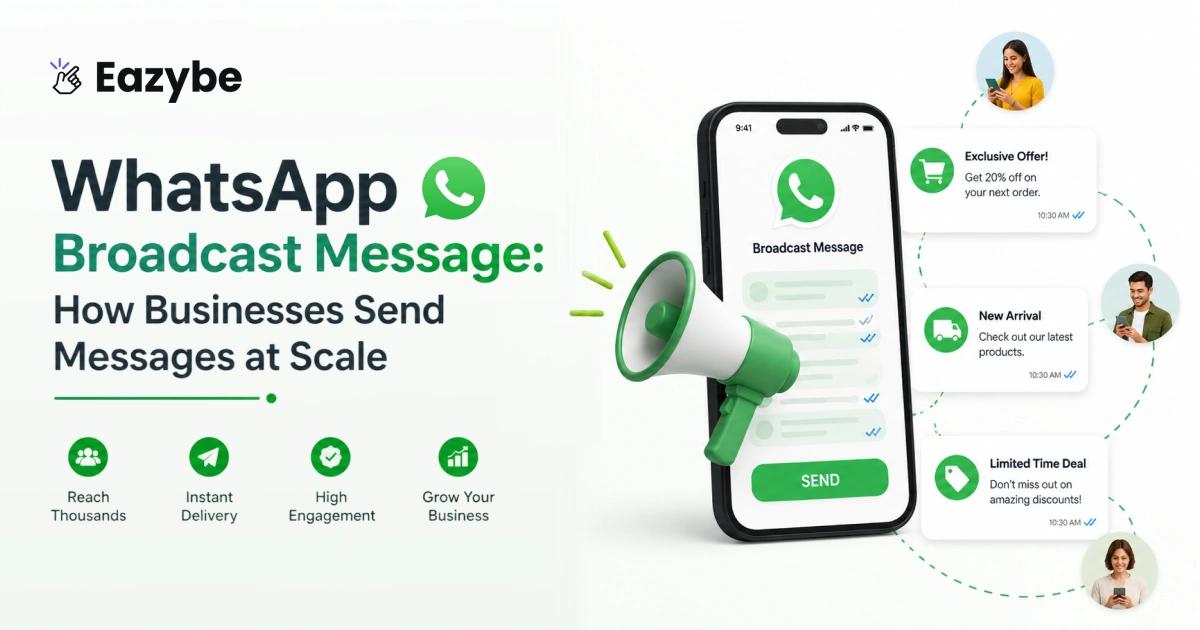


WhatsApp Broadcast lets businesses send the same message to many customer at once without creating a group. The message reaches everyone in a private chat so conversations stay personal and professional. Businesses use it to send offers, updates and reminders and important information easily on WhatsApp.
As customer messages increase, managing everything manually becomes hard. The Eazybe - WhatsApp AI Agent With CRM integration helps by making broadcasts easier to send, organise, and manage. It also helps businesses automate replies and track message performance in one place.
What Is WhatsApp Broadcast?
WhatsApp Broadcast is a feature that let you send the same message to multiple people at once but each person receive it as a private one on one chat.
Think of it like typing the same message 50 time or adding everyone to a noisy group. You write it once you hit send and it lands individually in each person Team inbox. No one knows who else got it.
Why it actually matters:
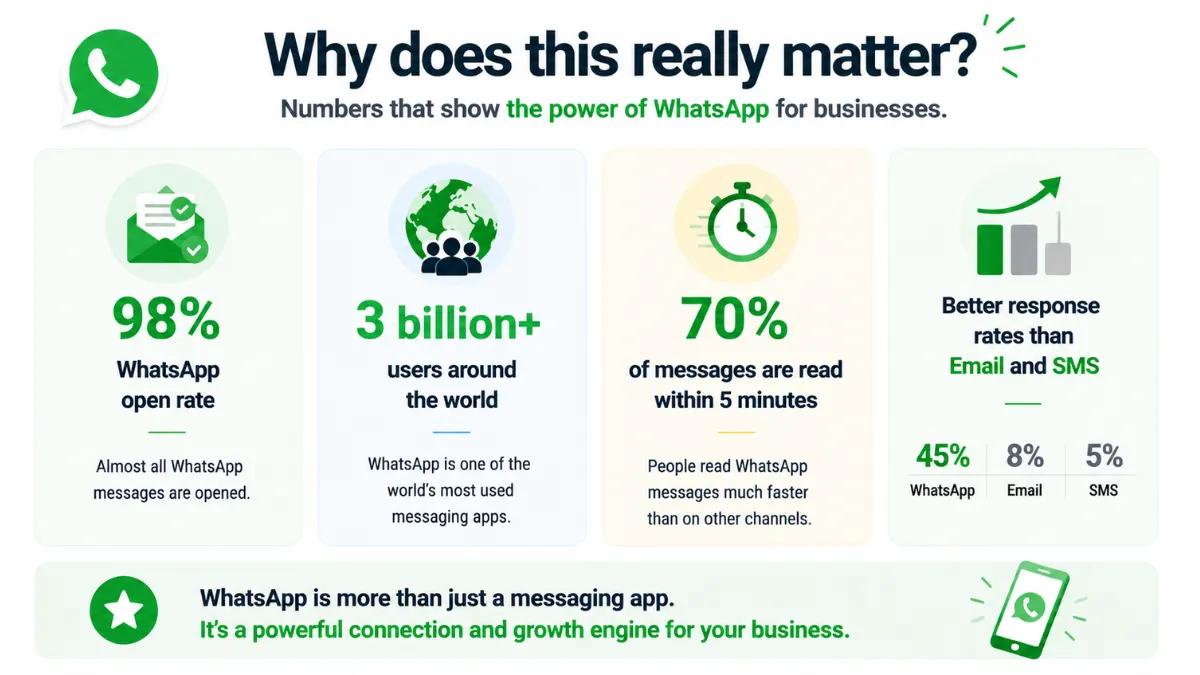
WhatsApp now has over 3 billion active user worldwide as of 2026 making it the most used messaging app on the planet. In India alone there are over 500 million WhatsApp users which means your customers are almost certainly already on it.
And here what makes broadcast worth paying attention to
- WhatsApp messages have an open rate of around 98% compared to just 20-30% for email
- Nearly 70% of messages are read within 5 minutes of being delivered
- Businesses using WhatsApp for customer communication report up to 3x better response rates compared to email or SMS
Also Read: WhatsApp vs Email Marketing
Broadcast Feature In WhatsApp And Why It Is Useful
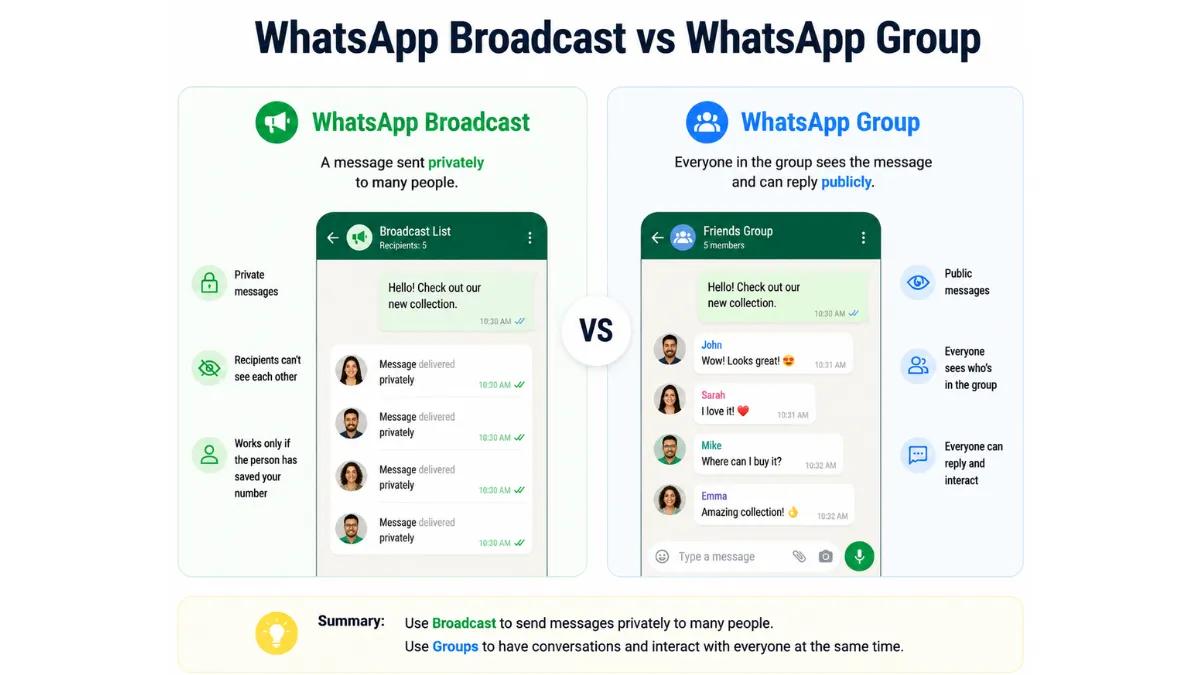
Broadcast Feature In WhatsApp
Most businesses discover WhatsApp broadcasts when they're tired of copy-pasting the same message to 50 different customers. And honestly, that's a fair starting point.
At its core the broadcast feature lets you send one message to many people but each person receives it as a private chat. Not a group scheduler. Not a forwarded mess. Just a clean, direct message sitting in their inbox like you typed it only for them. That small detail makes a huge difference.
What businesses actually use it for:
- Sending out a new product launch or a limited-time offer without spamming a group chat
- Reminding customers about deliveries, appointments or pending payments before they forget
- Keeping things private your customers never see each other's names or numbers
- Adding a personal touch with placeholders like [Name] or [Order ID] so it doesn't read like a bulk blast
A few numbers worth knowing:
- WhatsApp has crossed 3 billion users worldwide your customers are already there
- WhatsApp messages carry an open rate of around 98%. Emails wish they had those numbers and also know WhatsApp sales tracking.
- Most messages get read within 5 minutes of delivery
So if you are still relying only on email for customer updates, you're probably being ignored more than you think.
Where Eazybe comes in
Plain WhatsApp broadcasts do the job for small-scale sending. But once your contact list grows and campaigns get more frequent, things start slipping through the cracks.
Eazybe picks up exactly where basic WhatsApp leaves off:
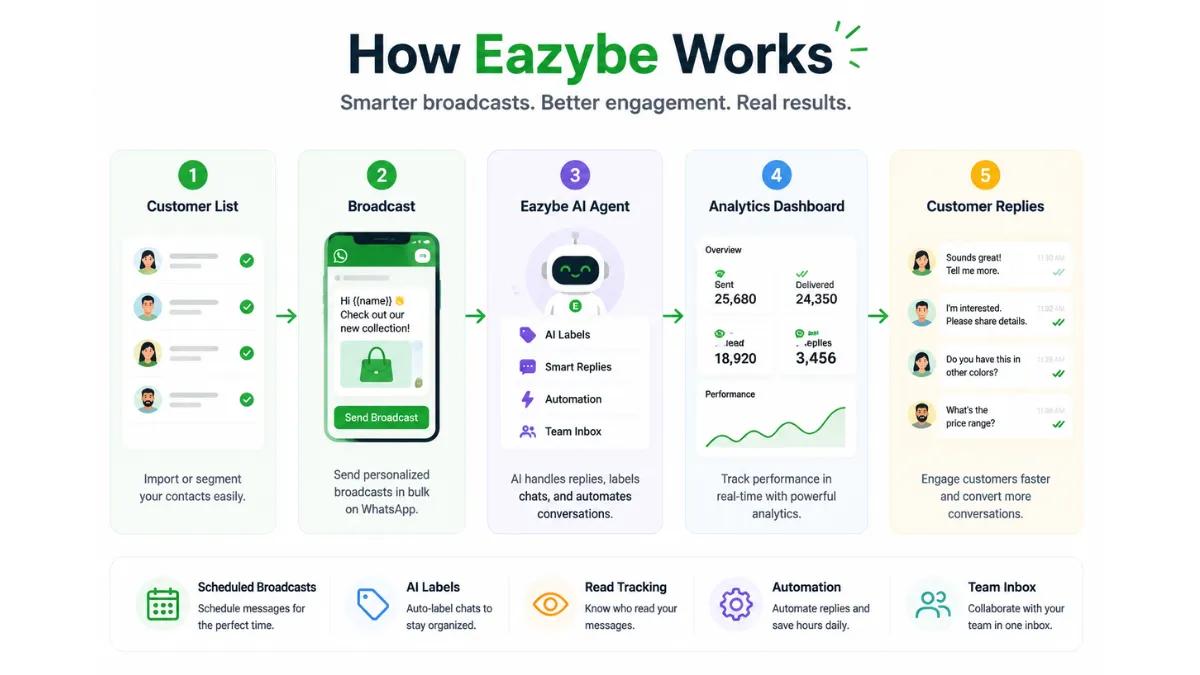
- You can schedule broadcasts ahead of time instead of scrambling to send at the right hour
- AI Sales Agent Labels let you group contacts properly so a payment reminder only goes to people with pending dues, not your entire list
- After every campaign, you see exactly what happened how many messages were sent, delivered, read, or failed no more guessing
It stops being just a messaging tool and starts working like an actual business channel.
WhatsApp Broadcast Limit And WhatsApp Business Broadcast Limit
At some point, almost every business runs into the same wall. You're trying to send a message to your entire customer list and suddenly realise WhatsApp isn't built for unlimited blasting. There are limits and if you don't know them going in, you'll figure them out the hard way through failed deliveries and confused customers.
- Personal WhatsApp: caps you at 256 contacts per broadcast list. That's it. And here's the part most people miss even within those 256, your message only reaches people who have saved your number in their phone. If they haven't, the message simply doesn't go. No error. No notification. It just disappears quietly.
- WhatsApp Business: has the same 256-contact limit per list. The difference is you can create multiple lists and run them separately with WhatsApp crm. But there's still no built-in way to see who read your message, who ignored it, or which campaign actually worked. You're essentially sending blind.
- WhatsApp Business API: is where the ceiling lifts. Reach scales based on your account's engagement history and tier level. This is what growing businesses eventually move to — and tools like Eazybe Coexistence plug into it to give you proper analytics, automation, and contact management on top.
Many users search for broadcast limits in WhatsApp and WhatsApp business broadcast limits. Here is a clear summary:
| Account Type | Broadcast | Limit Notes |
|---|---|---|
| WhatsApp Personal | 256 contacts per list | Only sent to contacts who saved your number |
| WhatsApp Business | 256 contacts per list | Multiple lists allowed, no built-in analytics |
| WhatsApp Business | Scales based on engagement | Tools like Eazybe allow higher reach with analytics |
How To Create List WhatsApp Broadcast Efficiently
Creating a broadcast list on WhatsApp is not complicated but most businesses skip the important parts and then wonder why their messages are not reaching the right people. Getting the setup right from the beginning save a lot of headaches later.
Here is how you actually do it properly
- Open WhatsApp or WhatsApp Web: if you are using Eazybe you will do this directly through the Eazybe dashboard which keeps everything in one place instead of switching between tabs.
- Go to Broadcast Lists: on mobile you will find this in the top menu. On WhatsApp Web it sits in the left sidebar. It takes about three second to find once you know where to look.
- Click Create New List: this is where you start building your audience for that specific campaign and quick reply. Simple step but do not rush past the next ones.
- Add your contacts carefully: only add contacts who have your number saved in their phone. WhatsApp will not warn you if someone hasn't saved your number. The message just won't reach them silently and you will never know it didn't go through.
- Name your list properly: do not call it List 1 or leave it unnamed. Give it a name that actually tells you something like Delhi Leads June or Pending Renewals May. So, three weeks later you still know exactly what that list was for.
Now here is where most standard WhatsApp setups fall short. A static list gets outdated fast. Contacts move through different stages and a list you built last month may not make sense today.
Eazybe solves this with labels. Instead of fixed lists you tag contacts as Leads, VIP Customers, Pending Orders or Renewals and your targeting stays flexible and current without rebuilding lists from scratch every time.
How To Broadcast Message On WhatsApp Business
To send a broadcast message on WhatsApp Business effectively:
- Select a broadcast list or label
- Choose an approved WhatsApp broadcast message template
- Personalize placeholders like name, order number, or appointment time
- Click Send
Ai agent for customer support adds powerful analytics showing sent, delivered, read, and failed messages. This ensures your campaigns are measurable and not blind, unlike standard WhatsApp broadcasts.
How To Remove Contact List From WhatsApp Broadcast
Maintaining clean broadcast lists is critical. To remove contact from broadcast list in WhatsApp by the help of Eazybe to automate this process:
- Open the broadcast list
- Tap Edit
- Select the contact to remove
- Save changes
Eazybe further automates this process by removing inactive or unsubscribed contacts,with WhatsApp automation keeping lists clean and compliant.
How To Use WhatsApp Broadcast Strategically
Most businesses just blast the same message to everyone and wonder why nobody replies. How it Using broadcasts on WhatsApp. Sending smarter messages is what actually gets responses.
Here is what actually works:
- Group your contacts: do not send the same message to everyone. A new customer needs a different message than someone who stopped buying. Split them up and message accordingly.
- Pick the right time: a message at 11pm will be ignored or worse it will annoy people. Send when your customers are actually awake and active. Morning or afternoon on weekday works best for most businesses.
- Use templates: do not write a new message from scratch every time. Use pre-approved whatsapp broadcast message templates. It also keeps your account from getting flagged.
- Do not message daily: if you send something every day people will block you. Simple as that. Send only when you have something worth saying.
- See what is working: check how many people read your message and how many replied. If a message is getting ignored stop sending it and try something different.
More messages is not the answer. Better messages with WhatsApp bulk message sender sent to the right people at the right time is what actually moves the needle.
How To Write A Message On WhatsApp Broadcast Effectively
Write A Message On WhatsApp Broadcast Effectively
A well-written whatsapp broadcast message captures attention, provides value, and encourages responses. Tips include:
- Focus on one purpose per message
- Keep messages short, clear, and readable
- Personalize with placeholders
- Include a clear call-to-action
- Avoid overloading with links or attachments
Example of an effective message → Hello [Customer Name] Your order #[OrderID] has been shipped and will arrive tomorrow Reply if you need to reschedule
What Does WhatsApp Broadcast Do For Business Teams
WhatsApp broadcast helps business teams:
- Save time with automated messages
- Reach multiple contacts simultaneously
- Maintain private one-to-one conversations
- Track performance with analytics
- Segment audiences for better targeting
Eazybe enhances whatsapp broadcast by integrating with CRM systems, Hubspot WhatsApp integration providing team access, and offering detailed reporting, making campaigns more strategic.
Difference Between Broadcast And Group In WhatsApp Broadcast
A lot of businesses end up using WhatsApp groups when they should actually be using WhatsApp broadcast. It is an easy mistake to make but once you understand the difference between broadcast and group in WhatsApp you will not go back.
When you send a message in a WhatsApp group everyone sees everyone. Every reply, every reaction, every name and number is visible to the whole group. That works fine for internal team chats or community discussions but it is a disaster for customer communication with WhatsApp chat sync. Your customers do not want to be in a chat with 200 strangers.
WhatsApp broadcasts works the opposite way. You send one broadcast message on WhatsApp and it lands in each person's private chat individually. They have no idea who else received it. It feels like you typed it just for them. That is exactly what makes broadcasts on WhatsApp more effective for customer communication.
Here is how the two actually compare:
| Feature | WhatsApp Broadcast | WhatsApp Group |
|---|---|---|
| Delivery | One to one, private | Visible to everyone |
| Privacy | High, contacts never see each other | Low, all members see each other |
| Replies | Come back to you privately | Everyone in the group sees them |
| Use Case | Broadcast messages, offers, reminders, announcements | Team chats, community discussions |
| Limit | 256 contacts per broadcast list | 1024 participants |
If you are sending anything to customers and a WhatsApp broadcast message for a promotion, a payment reminder, or an order update broadcast is always the better choice over a group. WhatsApp groups are for conversations. WhatsApp broadcast is for communication that needs to feel personal and stay private.
WhatsApp Broadcast Message Template Examples
Templates are critical for scaling messages while staying compliant. Examples include:
- Your order #[OrderID] is confirmed. We really appreciate you choosing us and will keep you updated on what happens next.
- Event Reminder Template: Reminder Your appointment with [Service] is scheduled at [Time]
- Payment Reminder Template: Your payment of [Amount] is due tomorrow Please reply to confirm
Eazybe makes selecting and managing templates easy, ensuring all broadcasts are consistent and approved.
Benefits Of WhatsApp Broadcast Service Provider
When your contact list is small you can handle everything yourself. But once your business starts growing and you are sending hundreds of broadcast a week things get out of hand quickly. Messages get missed, lists become a mess and nobody really knows what is actually working. That is when you need a proper WhatsApp broadcast service provider.
A good WhatsApp broadcast service provider does not just help you send more messages. It helps your whole team work smarter. Here is what you actually get from it:
- Team collaboration: instead of one person doing everything your whole team can manage campaigns together. No more one person handling every single WhatsApp broadcast message while everyone else waits around.
- CRM integration: your contacts, their history and where they are in their buying journey all sit in one place. You stop jumping between five different tools just to send one WhatsApp broadcast campaign.
- Scheduled and automated broadcast: you set everything up once and it runs on its own. Nobody needs to be sitting at their laptop at a specific time just to hit send on a WhatsApp broadcast message.
- Analytics and reporting: you can see how many people got the message and how many opened it and how many replied. You stop guessing and start making decisions based on real numbers from your WhatsApp broadcast campaigns.
- Template management: every message your team sends goes through an approved WhatsApp broadcast message template. Nothing random goes out and everything stays consistent and compliant.
Doing all of this manually works for a while. But at some point it just stops being manageable. The right WhatsApp broadcast service provider takes that weight off your team so they can focus on actually talking to customers instead of just trying to reach them.
WhatsApp Broadcast Analytics And Why It Matters
Analytics are crucial for understanding broadcast performance. Eazybe provides metrics such as:
| Metric | What it shows |
|---|---|
| Sent | Messages delivered to WhatsApp servers |
| Delivered | Messages received by recipients |
| Read | Messages opened by recipients |
| Failed | Messages that did not reach recipients |
| Campaign | Status Finished, In Progress, or Failed |
This makes whatsapp broadcast measurable and allows teams to optimize campaigns for engagement and conversions.
Auto Broadcast WhatsApp Explained
Auto broadcast WhatsApp lets businesses schedule messages and automate follow-ups. Scheduling messages in advance and automating follow ups sounds like the obvious solution and it is. But, only when it is done right.
The problem is a lot of businesses go too far with automation. They set everything on autopilot, stop paying attention and suddenly customers are getting robotic messages at the wrong time about the wrong things. That is when people start ignoring you or blocking you. Automation should make your communication faster and WhatsApp business tools smarter and not make it feel like a machine is running your business.
Here is how to actually use auto broadcast WhatsApp the right way:
- Use automation to support your team not replace them: automated WhatsApp broadcast messages should handle the repetitive stuff like reminders, confirmations and follow ups. The actual conversations with customers should still have a human behind them.
- Segment your contact before automating: do not automate the same message to everyone. Split your contacts into the right groups first so the automated WhatsApp broadcast goes to people who actually need that specific message at that specific time.
- Keep tracking engagement even after automating: just because message are going out automatically does not mean you stop paying attention. Check how many people are reading your broadcast messages and how many are replying. If engagement drops something needs to change.
Getting auto broadcast WhatsApp right is about finding the balance. Automate the routine. Stay human for the conversations. That balance is what keeps your customers engaged and your account in good standing with WhatsApp.
Best Ways To Send WhatsApp Broadcast Messages Without Spamming
Send WhatsApp Broadcast Messages Without Spamming
Nobody likes getting spammed. If you send too many useless WhatsApp broadcast message people will block you. And if enough people block you WhatsApp can ban your account. So getting this right actually matters.
Here is what you should do
- Name your broadcast lists clearly: do not save it as "List 1". Name it something like "Delhi Leads June" so you always know who is getting your WhatsApp broadcast message before you send it.
- Only send useful messages: if the WhatsApp broadcast message is not helpful or interesting to the person receiving it do not send it. Useless messages get ignored every time.
- Send different messages to different people: a customer who just bought from you needs a different WhatsApp broadcast message than someone who has not bought in months. Do not send everyone the same thing.
- Use approved templates: random messages look spammy and can get your account flagged. Always use approved WhatsApp broadcast message templates to stay safe.
- Do not message every day: sending a WhatsApp broadcast message daily will make people block you fast. Only send when you have something worth saying.
- Check what is working: if people are not reading or replying to your WhatsApp broadcast messages something is wrong. Fix it before it gets worse.
Businesses that follow these steps build real relationship with customers. People actually look forward to WhatsApp sales performance analytics to get their next WhatsApp broadcast message instead of ignoring it.
Final Thoughts On WhatsApp Broadcast
WhatsApp broadcast is one of the easiest ways to reach your customers today. You write one message, it reaches hundreds of people, and every conversation stays private. It really does not get simpler than that.
But sending better WhatsApp broadcast messages is what gets results. Not sending more of them.
When the right WhatsApp broadcast message reaches the right person at the right time people read it and people reply. It is that simple.
Just group your contacts properly. Use approved WhatsApp broadcast message templates. Check your numbers to see what is working. Let auto broadcast WhatsApp handle routine things like reminders and follow ups so your team can focus on real conversations.
WhatsApp broadcasts saves time, feels personal and gets real results. Businesses that are using it right are already ahead. If you are not using it properly yet and now is the time to start.