
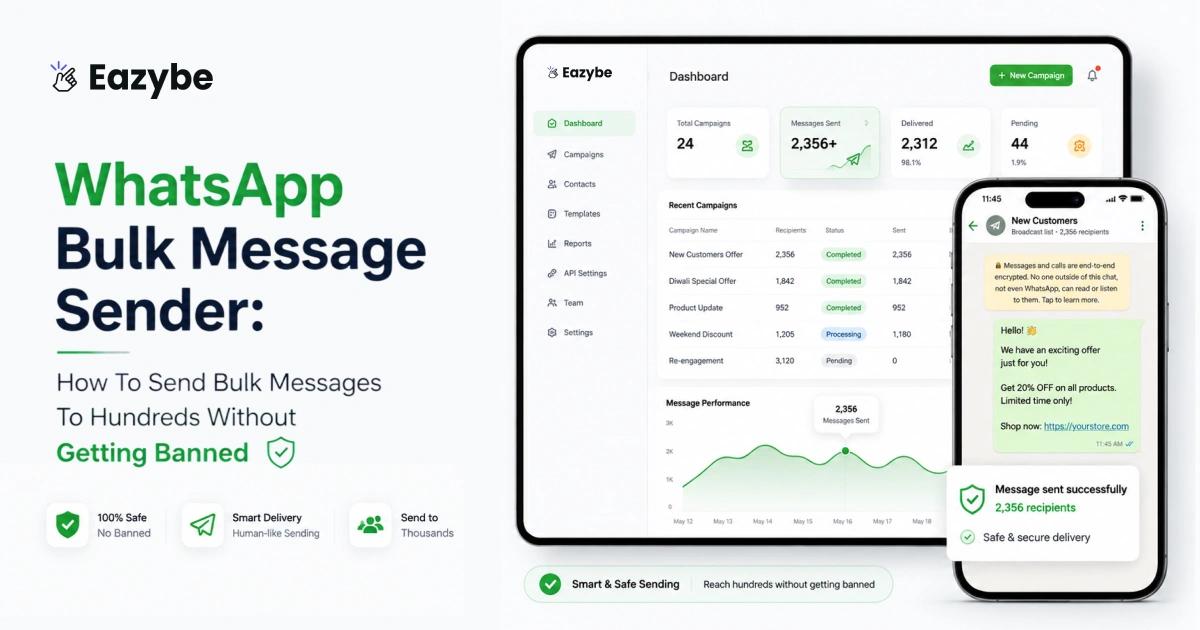


What Is a WhatsApp Bulk Message Sender?
A WhatsApp bulk message sender is a tool that lets you send one message to many people at once. You upload your contacts, write a message and send it in a few clicks. This can include simple tools that automate WhatsApp Web up to the official WhatsApp Business API used by big companies for safe and large-scale messaging.
Tools like Eazybe - WhatsApp AI Agent With CRM integration make it easier. They help you personalize messages, reply automatically and keep chats organized. So instead of just sending messages you can handle conversations in a simple and safer way.
Bulk Messaging vs Broadcast Lists vs WhatsApp Business API
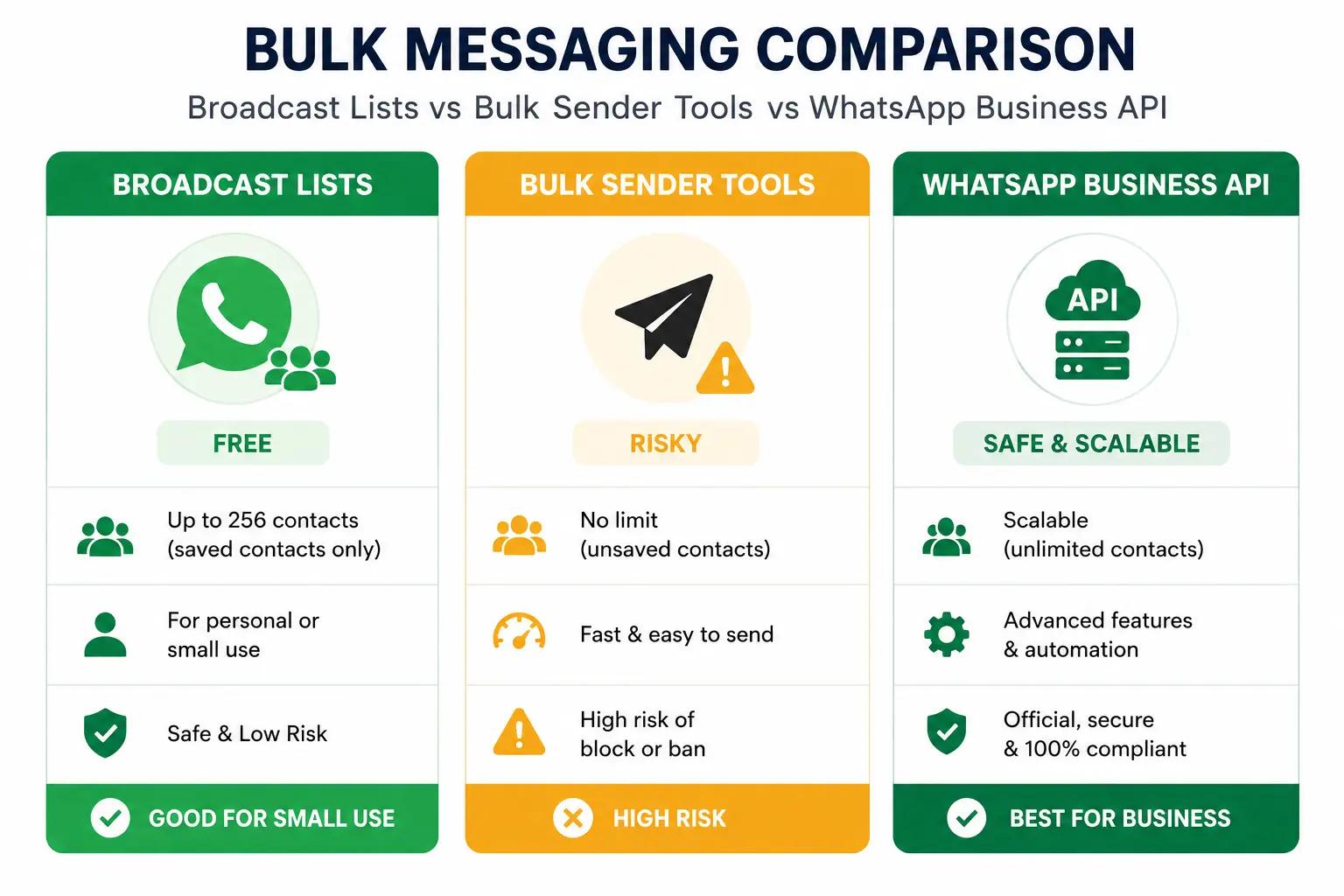
Side-by-side: Broadcast vs Bulk Sender vs API
People mix these up all the time but they’re not the same. Each one works differently and is meant for a different level of usage.
1. Broadcast Lists (Built Into WhatsApp)
WhatsApp broadcast message Lists are built directly into WhatsApp. They’re free and easy to use, with a limit of 256 contacts per list. The catch is that only people who have saved your number will receive your message also with a quick reply. That makes them fine for small, known audiences but not useful if you’re reaching new customers.
2. Bulk Sender Tools (Third-Party Software)
Bulk sender tools are third-party software that automate WhatsApp Web. They let you send messages to thousands of contacts, even if they haven’t saved your number. It’s faster and more flexible, but also riskie respecially with low-quality tools since WhatsApp can detect and block them.
Good for: small known audiences (your family WhatsApp group, your existing 50 best customers). Useless for: scaling, prospecting, marketing.
3. WhatsApp Business API
WhatsApp Business API is the official solution for large-scale messaging. You need to apply, get approved and send messages through authorized providers. It’s the safest option with no ban risk if used correctly with the whatsapp api broadcast, but it comes with higher costs and a more complex setup.
Some tools sit in between. Eazybe, for example, combines AI replies and CRM sync on top of WhatsApp Web. So you get the bulk messaging experience, along with smarter conversation and better tracking without relying on unsafe or low-quality extensions.
Who Needs A WhatsApp Bulk Message Sender (And Who Doesn’t)
Not every business needs a WhatsApp bulk message sender. If you’re sending fewer than 50 messages a week and simple broadcast lists are enough. No need to overcomplicate things.
But you’ll likely need a bulk WhatsApp sender tool if you:
- Run an e-commerce store and send regular promotions or order updates
- Manage a clinic or salon with appointment reminders at scale
- Work in real estate or education and nurture leads over time
- Handle customer support and need to send quick updates to many users
- Want to track and manage conversations inside a CRM like HubSpot WhatsApp integration, Zoho CRM or Salesforce CRM
That last point is where most businesses struggle. Sending messages is only half the job tracking replies, follow-ups and deal progress is what actually drives results. Tools like Eazybe help by syncing WhatsApp chats directly with your CRM with WhatsApp automation. So, you don’t have to manage everything manually or rebuild your pipeline every week.
And one thing to be clear about if, your plan is to spam random people. No WhatsApp bulk messaging tool will help. WhatsApp’s system is built to catch that quickly.
What Bulk WhatsApp Sender Really Means Today
Bulk messaging isn’t what it used to be. A few years ago, it meant blasting thousands of messages in one go. Today, that approach gets your number banned fast. Modern WhatsApp bulk messaging is more controlled - it’s about sending to smaller groups (200–500 at a time), adding personalization, spacing messages out and only targeting people who have opted in. That’s what actually works now with team inbox. Anything else is a risk.
Is Sending Bulk WhatsApp Messages Legal and Safe?
The answer is it depend. Bulk messaging itself is not illegal but you must follow data protection laws like General Data Protection Regulation GDPR in Europe and Digital Personal Data Protection Act (DPDP) in India and California Consumer Privacy Act (CCPA) in the US. This means users must opt in to receive messages and should always have a way to opt out. That part is straight forward. The tricky part is safety.
WhatsApp Policy and Ban Risks Explained
Know WhatsApp Policy and Ban Risks
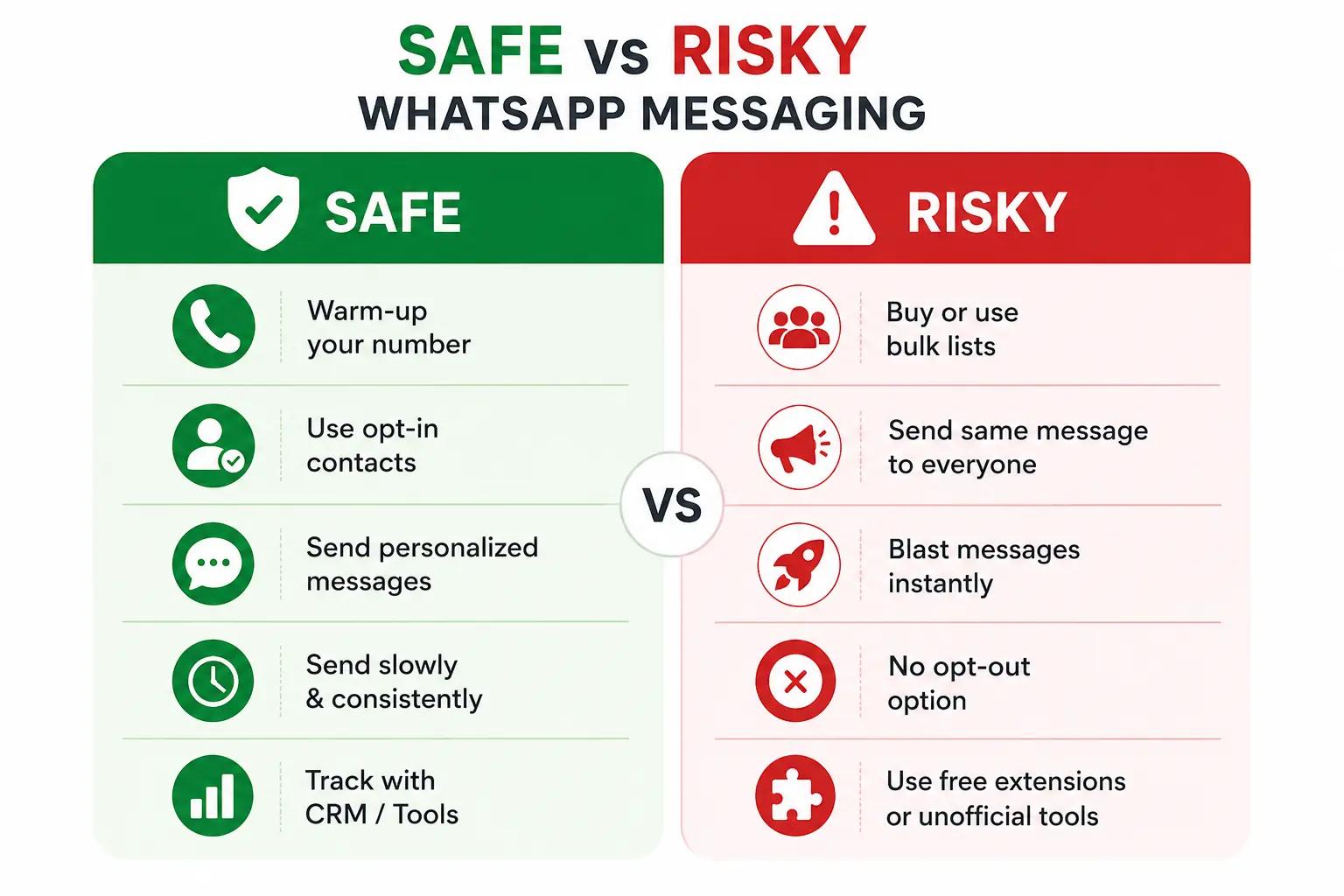
WhatsApp’s rules are strict - no unsolicited messages, no scraping numbers and no unauthorized automation. The only fully safe option is the official WhatsApp Business API. Everything else operates in a gray area. Some accounts run fine for months, others get banned within days.
Most bans happen for common reasons:
- Sending too many messages too quickly especially from a new number
- Sending the exact same message to large lists without personalization
- High block or spam report rates
- Using low-quality tools that WhatsApp can detect
Avoiding bans is less about the tool and more about behavior. Send messages gradually, personalize content and only message with this features people who actually want to hear from you. Simple rules - but they work.
Why AI-Based Bulk Senders Are Becoming Popular
This is where tools like Eazybe stand out. Instead of just sending messages, they use AI sales agent to make conversations feel more natural by varying replies and adding context. This keeps engagement high and reduces the chances of getting flagged. Better engagement means fewer blocks and fewer blocks mean your number stays safe.
Personal WhatsApp vs WhatsApp Business vs WhatsApp Business API
Choosing the right WhatsApp account type solves half your problems before you even start.
- Personal WhatsApp: Not meant for business use. Using it for bulk messaging is risky and you can easily lose a number you’ve had for years. Best to avoid it completely for anything beyond personal chats.
- WhatsApp Business App: Free and good for small businesses. Works well if you’re handling under 500 contacts and basic messaging. But as your volume grows, limits start showing. Manual work increases and scaling becomes difficult.
- WhatsApp Business API: Built for serious scale. It’s a paid solution with features like verified business profiles, message whatsapp api templates and structured sending. If used correctly, there’s no ban risk. Setup takes time, but it’s the most reliable option for growing teams.
For most businesses, the natural path is simple start with the Business app, then move to the API once you cross around 1,000 contacts. That’s usually the point where scaling, automation and reliability start to matter more.
Top WhatsApp Bulk Message Sender Tools Compared
The market is crowded and honestly a bit confusing. There are hundred of WhatsApp bulk message sender tools but many of them are just similar Chrome extensions with different branding with the best whatsapp business tools. So instead of looking at individual names it is better to understand the main categories and how they actually differ.
Free Chrome Extensions: What Works (and What’s Risky)
There are plenty of free tools that promise unlimited bulk WhatsApp messaging. Sounds great but, most come with hidden risks.
Some of these tools work for a short time. The ones that last a bit longer usually:
- Add random delays between messages
- Allow message variation (spintax)
- Limit daily sending automatically
But the problem is trust. Free tools often make money in other ways sometimes by collecting your data, injecting ads, or worse. And many eventually get detected by WhatsApp, which can lead to your number being blocked. If you use them with pricing, it’s safer to avoid using your main number.
Paid Bulk Sender Software for Small Businesses
This is the middle ground and where most growing businesses fit. These tool usually cost between $20 and $100 per month and offer a better balance of features and safety.
Tools like Eazybe fall into this category. They go beyond just sending messages by offering AI WhatsApp agents that handle replies, personalization and follow-ups. They also sync conversations directly with WhatsApp CRM like HubSpot CRM, Zoho CRM, Pipedrive CRM and Salesforce CRM so every interaction is tracked automatically. This means you’re not just sending messages you are actually managing leads and conversations in one place.
Other tools like WAPlus or WASender can handle bulk sending fairly well. But many of them fall short when it comes to what happens after the message is sent like managing replies, follow-ups and CRM tracking. And that’s the part that actually drives results.
WhatsApp Business API: Best Option For High-Volume Messaging
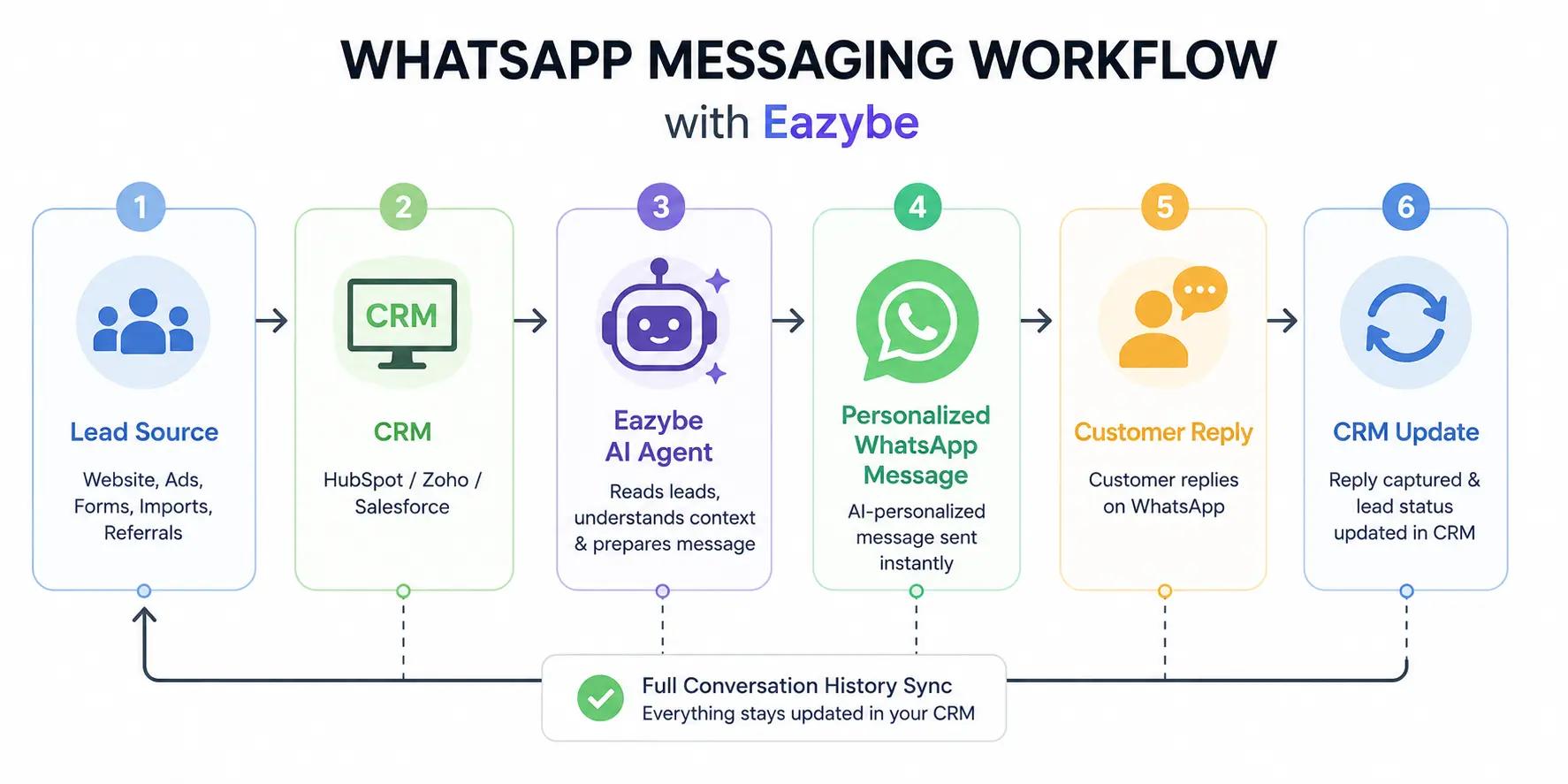
WhatsApp Messaging Workflow With Eazybe
Once you cross around 2,000 messages a day the WhatsApp Business API becomes the most reliable option. It’s built for scale, stability and compliance something basic bulk sender tools can’t guarantee.
Popular WhatsApp API Providers:
- EazyBe: Best WhatsApp API provider for teams that want to start with bulk sending and smoothly shift to API without changing tools.
- WATI: Simple and beginner-friendly, ideal for non-technical teams.
- Interakt: Popular choice for Indian e-commerce businesses.
- MessageBird: Strong in Europe with advanced communication features.
- Meta’s direct partners: Best suited for large enterprises with complex needs.
What You Need to Set It Up:
- Facebook Business Manager account
- Business verification process
- Approved message templates
- 1–2 weeks setup time (on average)
Why It’s Worth It:
- No ban risk when used correctly
- Built for high-volume messaging
- Better delivery and reliability
- Scales easily as your business grows
Tools like Eazybe also support both WhatsApp Web and the official API, so you can scale without switching platforms later.
Quick Comparison: Pricing, Contact Limits And Ban Risk
There is no single best WhatsApp bulk messaging option. The right choice depends on your message volume and how much risk you are okay with and how important your number is to your business. Here a simple comparison to help you decide:
| Factor | Broadcast Lists | Bulk Sender Tools | WhatsApp Business API |
|---|---|---|---|
| Pricing | Free | Free to $20–$100/month | Paid (per conversation) |
| Contact Limit | 256 per list (only saved contacts) | No fixed limit (but unsafe at high volume) | Starts from ~1,000/day and scales up |
| Reach | Only contacts who saved your number | Can message unsaved contacts | Can message opted-in users |
| Ban Risk | Very low | High (depends on tool quality) | No risk if used correctly |
| Setup | Instant | Very easy | Takes time (verification needed) |
| Best For | Small, known audience | Growing teams testing scale | Large businesses and serious growth |
Simple Takeaway: If you’re small, use broadcast lists. If you’re growing, bulk sender tools can work with caution. But if you want long-term scale without risk, the WhatsApp Business API is the safest path.
How To Send Bulk Messages On WhatsApp (Step by Step)
Sending bulk messages on WhatsApp isn’t just about clicking send. The real work happens before that. If you get the basics right and your list, your message and your timing you can scale safely without getting flagged with sales enablement tools.
1. Build And Clean Your Contact List (Most Important Step)
Everything starts with your contact list. Even the best WhatsApp bulk message sender won’t save a bad list.
Make sure your list is:
- Opted-in → People should have agreed to receive messages from you
- Active → Remove inactive numbers every 3–6 months
- Correctly formatted → Always use full international format (+91, +1, +44)
- Deduplicated → No repeated contacts
Good sources: website forms, checkout pages, appointment bookingsBad sources: bought lists, scraped data, random CSV files
A clean list = better delivery, fewer blocks and safer messaging.
2. Write Messages That People Actually Read
WhatsApp messages get opened a lot. But, only if the first line feels relevant.
What works well:
- Start with value →
Your order has shippedworks better thanHi, hope you’re doing well - Keep it short → ideally under 100 words
- Use the person’s name once (not repeatedly)
- End with a clear action → link, reply, or button
What to avoid:
- ALL CAPS or spammy tone
- Too many emojis
- Generic openings like
Dear Customer - Long paragraphs
Think of it like a real chat, not a marketing blast.
3. Use Personalization, Variables And Media
Modern bulk WhatsApp sender tools let you personalize messages using variables like:
{first_name}{order_id}{appointment_date}
This makes your message feel relevant instead of generic.
Tools like Eazybe go a step further with best AI agents for customer support that adjust the message based on user behavior or past interaction. So instead of a basic Hi Rahul, it feels more like a real, context-aware message.
You can also improve engagement with:
- Images (products, offers)
- Videos (short demos or updates)
- PDFs (menus, brochures)
Just keep file sizes small to avoid delivery issues.
4. Schedule Messages And Avoid Spam Triggers
Timing matters more than people think. Sending too fast is one of the main reasons numbers get flagged.
Follow these best practices:
- Spread messages over time (don’t send all at once)
- Send in batches over 1–2 hours or more
- Avoid late-night messaging (10 PM – 8 AM)
- Don’t run multiple campaigns back-to-back
WhatsApp tracks sending behavior closely. 200 messages over an hour looks natural. The same 200 messages in one minute looks automated. Bulk WhatsApp messaging works when it feels human.Clean list, relevant message and controlled sending. That’s what keeps your number safe and your results strong.
WhatsApp Bulk Messaging Best Practices To Keep Your Number Safe
If you skip everything else, don’t skip this. With WhatsApp bulk messaging, the tool matters less than how you use it. Most bans happen because of behavior, not software.
1. Warm Up Your Number Before Bulk Sending
This is the most ignored step and the biggest reason numbers get banned. New numbers are treated with suspicion because most spam comes from fresh SIMs also you know about whatsapp sales performance analytics.
A simple warm-up pattern that works:
- Days 1–3: Use WhatsApp normally (chat, share media, act like a real user)
- Days 4–7 Send 20–30 messages per day to known contacts
- Days 8–14: Gradually increase to 100–200 messages per day
- After 2 weeks: Start proper bulk campaigns
Skip this and you’re taking a direct risk. Most small businesses lose their number here.
2. Follow Safe Daily Sending Limits
WhatsApp doesn’t officially publish limits but real-world usage shows clear patterns:
- New number: 50–100 messages/day
- 1-month-old number: 300–500 messages/day
- 6-month-old active number: 1,000–2,000 messages/day
- API numbers: Scalable, but tier-based
Watch your block rate closely. If more than 2–3% of users block or report you, slow down immediately. That’s an early warning sign.
3. Handle Opt-Outs and Replies Properly
Every bulk WhatsApp message should include an easy opt-out like: → Reply STOP to unsubscribe And when someone opts out remove them instantly.
But don’t ignore replies that aren’t opt-outs. If people respond, someone should reply back. WhatsApp tracks conversation quality and one-way messaging looks like spam.
Tools like Eazybe help here with AI agents that:
- Handle routine replies (order status, FAQs, timings)
- Keep conversations active
- Route complex queries to humans
This keeps engagement high and high engagement keeps your number safe.
4. Know When to Switch to WhatsApp Business API
At some point, bulk sender tools stop being enough.
You should consider the WhatsApp Business API when:
- You’re sending more than 2,000 messages/day
- Your number has been banned before
- You need verified business status (green tick)
- You want deeper CRM integration
- Compliance becomes a concern
The API costs more, but it removes risk and supports long-term scale. Tools like Eazybe also support both the Business app and API, so you can upgrade without changing your workflow with sales efficiency. Safe WhatsApp bulk messaging is not about sending more. It’s about sending smarter.Warm up your number, control your volume, respect users and scale at the right time.
WhatsApp Bulk Sender Use Cases That Actually Convert
This is where WhatsApp bulk messaging really proves its value. The use cases where ROI is clear and immediate.
- E-commerce promos and abandoned cart recovery: Abandoned cart messages on WhatsApp can convert around 15–25%, much higher than email. A simple message sent 15–30 minutes after someone leaves checkout with their cart details and a small offer. Can recover a significant amount of lost revenue inbox. The same approach works well for sale alerts, restock updates and order notifications. This is where customers actually respond.
- Appointment reminders for clinics and salons: No-shows drop by 30–40% when reminders are sent on WhatsApp. A short message sent 24 hours before the appointment with an easy reply option, makes a big difference. If you're still relying only on SMS you're missing out on both engagement and revenue.
- Lead nurturing for real estate and education: For long sales cycles WhatsApp helps you stay relevant without being pushy. You can share new listings, course updates or event invites at the right time. The key is sending useful information, not constant follow-ups. Tools like Eazybe also sync chats with HubSpot CRM or Zoho WhatsApp integration, so you know which leads are active.
- Customer support updates and broadcasts: For urgent updates like delays or system issues, WhatsApp is the fastest channel. Messages get read within minutes and you can reach many users at once without the effort of calls.
It’s one of the simplest and most effective use cases for bulk messaging.
Common WhatsApp Bulk Messaging Mistakes That Get Your Number Flagged
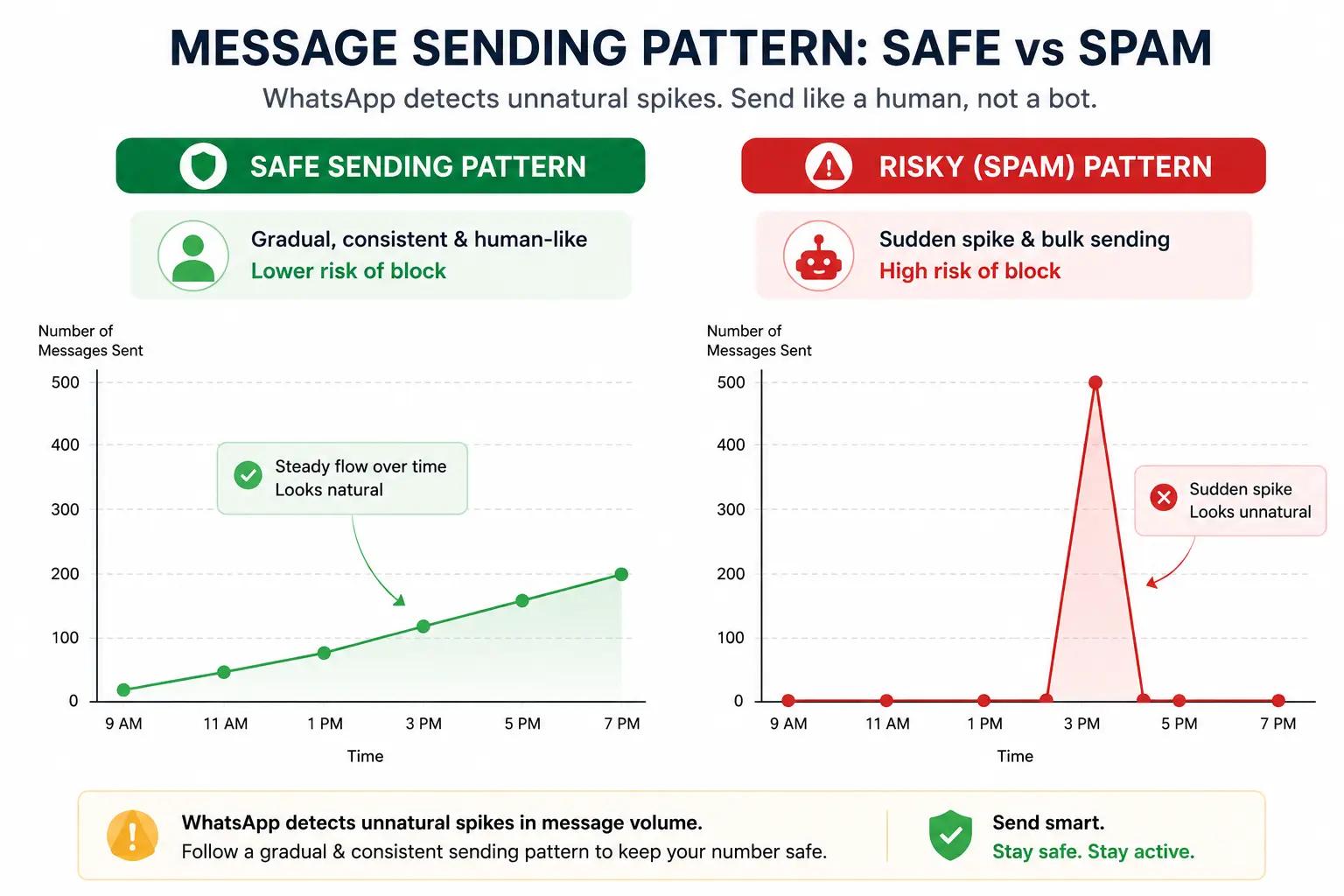
Common WhatsApp Bulk Messaging Mistakes
Most WhatsApp bans don’t happen randomly and they’re self-inflicted. If you’re using a WhatsApp bulk message sender, avoiding these mistakes is what keeps your number safe.
- Buying contact lists (biggest mistake): Purchased lists are the fastest way to get banned. These people never opted in so they’re far more likely to block or report your message. High block rates signal spam instantly and your number can get flagged within days. It may feel like a shortcut but it almost always end with you starting from zero again.
- Sending the same message to everyone: Identical messages sent at scale are easy for WhatsApp to detect. That’s a clear spam pattern. Instead, use small variations and change greetings, rotate message versions, or use variables like names. Even simple change like
Hey {name}vsHi {name}help your messages look more natural and less automated. - Ignoring delivery and read-rate signals: Your numbers tell you everything. If delivery drops below ~90%, something’s wrong with your list or sending pattern. If read rates fall under ~50% your messages aren’t landing well or worse, getting reported. Successful teams treat WhatsApp bulk messaging like email marketing: they track performance and clean their lists regularly and improve messaging over time.
Also Read: How To Appear Offline On WhatsApp (Without Going Offline)
Benefits Of Using A WhatsApp Bulk Message Sender
This is where it starts to make sense. Not just as a tool but as a channel that actually moves numbers.
- Reach at scale without extra effort: You’re not stuck sending messages one by one. One campaign, hundreds of people. Same effort. That alone saves hours every week especially if you’re running promos, message scheduler updates or reminders regularly.
- Messages actually get seen: WhatsApp isn't an email. Messages don’t sit unread for days. Most people check them almost instantly. Which means your message has a real shot at being noticed and acted on.
- Feels like a conversation, not a campaign: When you add even basic personalization, the message stops feeling like a blast. It feels direct with WhatsApp copilot. That’s why reply rates are higher. People respond to messages that feel like they’re meant for them.
- Drives real revenue not just engagement: This is the part that matters. Promotions, abandoned cart recovery, restock alerts these aren’t nice to have use cases. They bring money back. One well-timed message can recover sales you would’ve lost otherwise.
- Makes customer communication faster and simpler: Order updates and appointment reminders and service alerts. All go out instantly. No calls and no back-and-forth emails. Customer stay informed and your team spends less time repeating the same information.
- Everything stays tracked and organized: Once you start sending at scale, tracking becomes the real problem. Tools that connect with CRMs like HubSpot CRM, Zoho CRM or salesforce WhatsApp integration solve that. Every message, every reply, every lead logged properly. No guessing.
- Less manual work, more consistency: You’re not relying on someone to remember who to message and when. Campaigns go out on time. Follow-ups happen. Replies get handled. The system runs even when your team is busy.
Also Read: How To Read Deleted Messages On WhatsApp
Final Thoughts: Winning With WhatsApp Bulk Messaging the Right Way
WhatsApp bulk messaging works. Not in theory in practice. The open rates, the replies, the conversions… they’re on a different level compared to email. But it’s not free space where you can do anything and get away with it.
The teams that actually win treat WhatsApp like a relationship channel, not a blasting tool. They send fewer messages, but to better lists. They personalize with WhatsApp coexistence. They warm up their numbers. They watch block rates and adjust. And most importantly they track everything usually by syncing conversations into tools like HubSpot CRM, Zoho CRM or Salesforce CRM so nothing slips through.
The teams that lose do the opposite. They buy a list, install a random extension, send 5,000 messages in one go and then act surprised when the number gets banned the next day. At that point, it’s not bad luck. It’s just a bad process.
So the move is simple: pick a tool that fits where you are right now. If you’ve outgrown broadcast lists but aren’t ready for the full API setup, a middle-layer tool like Eazybe makes sense. You get bulk sending, AI-powered replies and CRM sync. All without jumping straight into complex API workflows.
And one more thing start building your opt-in list now. Even if you’re not using it yet. That’s the part that compounds over time. Tools will change. Tactics will change. Your list won’t.