

You run ads. Leads start coming into your WhatsApp. Now you want to send offers or follow ups to a few hundred of them. But one question comes up.
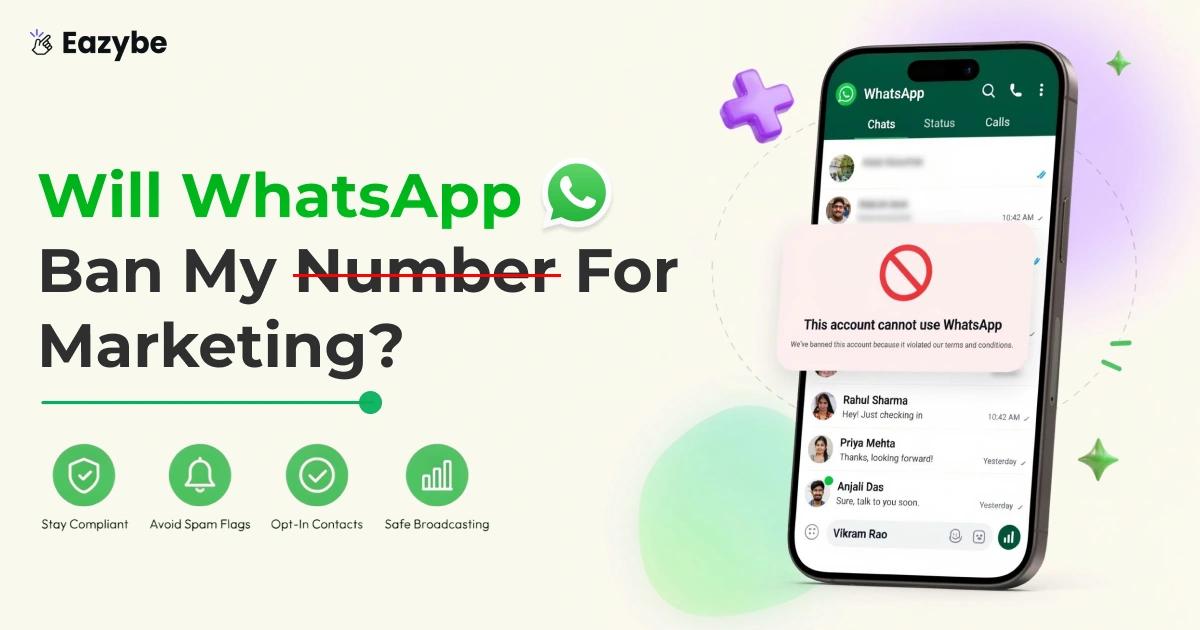
Will WhatsApp ban my number for marketing?
The good news is that WhatsApp allows marketing. What it does not allow is spam. Or messaging people who never gave consent. Or using tools that break its rules.
In this guide you will learn what actually gets a WhatsApp number banned and how to market safely. You will also see why getting customers to message you first is the best long term play. And how Eazybe - WhatsApp AI Agents help you reply faster so blocks stay low and your number stays safe.
What Actually Makes WhatsApp Ban Your Number
WhatsApp does not ban numbers for marketing. It bans numbers that behave like spam. Most bans come down to five habits.
The Five Habits That Get Your WhatsApp Number Banned:
- Messaging people without permission using bought or scraped contact lists.
- Collecting too many blocks and spam reports from the people you message.
- Using unofficial bulk sending tools or automation that breaks WhatsApp policy.
- Blasting a large list from a new or inactive number without warming it up first.
- Putting promotional content in the wrong template category. A marketing offer inside a utility template gets rejected.
What Meta Is Really Measuring When It Bans A Number
Meta does not read your message and decide it is too salesy. Meta watches what people do after they get it.
- Blocks and spam reports pull your quality rating down from green to yellow to red.
- Your limit is not tied to one number anymore. It sits on the whole business portfolio and every number inside it shares the same limit. One careless number can pull down every other number you own.
- Meta also caps how many marketing messages a single person can receive in a day across all brands. It is around two. Cross that ceiling and your message fails with error 131049 even when your own account is perfectly healthy.
What Does Not Get Your WhatsApp Number Banned
Sending a relevant offer to people who already opted in. That is exactly what WhatsApp Business was built for.
So, the safe path is simple. Use the right WhatsApp business tools. Follow Meta's rules. Automate only through official channels. Good WhatsApp automation works with Meta and not against it.
Free WhatsApp Business App Or Official API: Which One Gets Your Number Banned?
Most bans start with the wrong tool for the job.
| Feature | Free Business App | Unofficial Bulk Sender Official | Official WhatsApp Business API |
|---|---|---|---|
| Marketing | Yes but very limited | Not allowed | Yes. Built for it |
| Broadcasts | Up to 256 contacts per list | Unlimited until you are banned | Grows as your messaging tier grows |
| Ban risk | Low if you use it carefully | Very high | Lowest with consent and approved templates |
| Delivery tracking | Basic ticks only | Nothing you can trust | Sent and delivered and read and failed |
| Cost | Free | Cheap at first. Costly once banned | Pay per message by Meta's rate card |
The free app is fine for a small business sending the odd update to people it already talks to. It was never built for real marketing.
Unofficial bulk senders promise unlimited messaging. What they actually do is break WhatsApp policy and put your number in the fastest queue for a ban.
If you plan to run campaigns regularly then the official API is the only safe choice. It gives you approved templates. It gives you real delivery data. And it lets you grow your sending limit while staying on the right side of Meta.
Three Things That Can Get Your WhatsApp Number Banned
Most businesses are aware of the common rules. It's these three overlooked mistakes that usually surprise them.
- Your Meta Business Portfolio Can Get Your Number Banned: Meta tracks quality at the portfolio level. Every number inside shares the same daily limit. So one number with too many spam reports can pull the limit down for all of them. Run different brands or clients in separate portfolios.
- Country Rules Can Get Your Number Banned: The rules are not the same everywhere. Marketing templates to United States numbers have been paused since April 2025. Utility and authentication still work. And do not dress up a marketing message as a utility template. Meta reclassifies it and repeated rejections hurt your account quality.
- The Number You Use Can Get Your Number Banned: A number that only sends and never chats looks like a machine. Virtual and VoIP lines get flagged far more often. Use a real business number. Hold real two way conversations on it. A number that looks alive stays alive.
Also Read: Top 5 WhatsApp Automation Tools
Banned Or Restricted Or Flagged. They Are Not The Same Thing
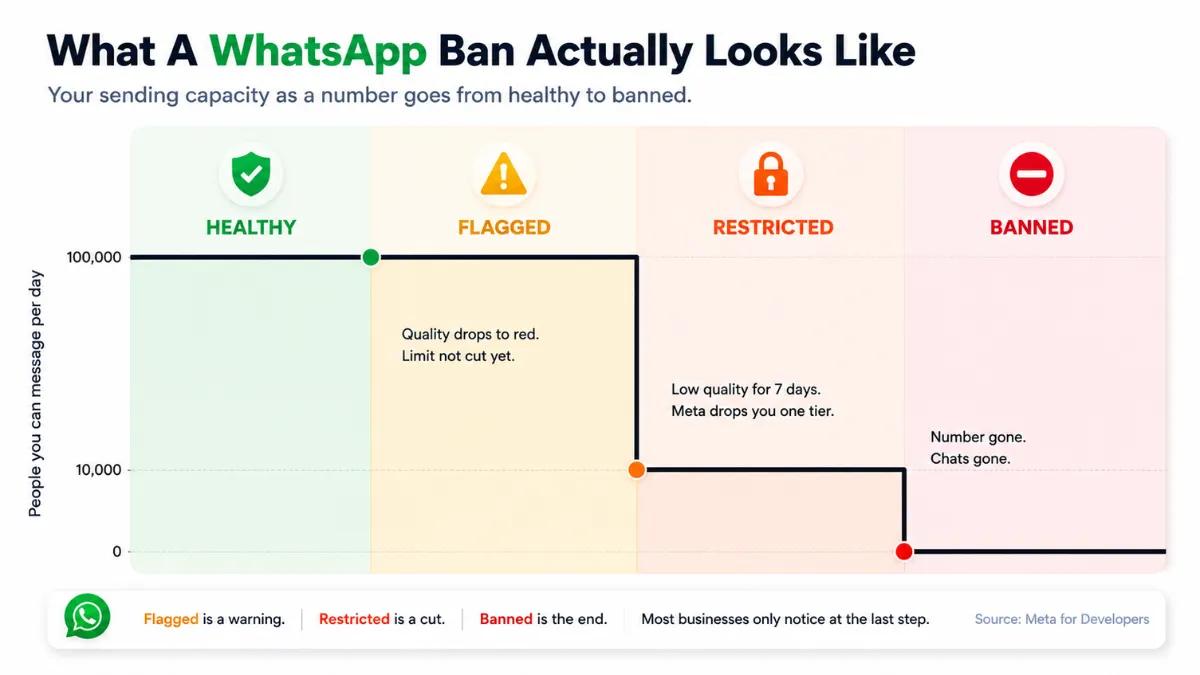
How a WhatsApp ban unfolds: flagged is a warning, restricted cuts your limits, banned ends the number
People use these three words as if they mean one thing. They do not. Knowing which one you are dealing with WhatsApp copilots tells you how worried you are.
- Flagged: means Meta is watching. Your quality rating has slipped to yellow or red. Nothing has stopped yet. You can still send. This is a warning and it is the best place to fix things because nothing has been taken away.
- Restricted: means Meta has cut your sending. Your daily limit drops. You can still message people but far fewer of them. This usually follows a low quality rating that nobody acted on. It is not permanent. Clean up your sending and the limit comes back.
- Banned: means the number is gone. It cannot send. It cannot be received. Your chats and your history go with it. This comes from policy violations rather than a slow quality drop. Scraped lists. Unofficial bulk tools. Repeated warnings that were ignored.
So, the order goes flagged then restricted then banned. Most businesses only look up at the last step. The whole point is to catch it at the first one.
Your Quality Rating Decides Whether Your Number Gets Banned
Every WhatsApp Business API number carries a quality rating. Green for high. Yellow for medium. Red for low. It moves on its own based on how people react to you.
Replies and saves push it up. Blocks and spam reports pull it down. Meta does not grade your writing. It grades your reception.
That rating controls more than your reputation. It controls how many people you are allowed to message.
- A new business portfolio starts at 250 unique people a day.
- Business verification lifts that limit.
- Keep your quality healthy and your limit keeps growing.
- Let your quality sit at low for seven days straight and Meta drops your limit by one tier.
- Meta reviews your account roughly every six hours to decide which way you move.
Meta also watches big campaigns while they run. It sends the first batch. It waits to see the reaction. If too many people block or report you it can stop the rest of the campaign before your full list ever gets it.
So, your first batch is a test whether you like it or not. That is why delivery data matters. Watch sent and delivered and read and failed on every send. Catch a bad campaign in the first hour instead of reading about it a week later.
How To Check If Your WhatsApp Number Is Banned Or Restricted
Most people find out too late. A campaign fails and nobody knows why. You do not have to wait for that. You can check your own status in a few minutes.
Where To Look In Meta Business Manager
Open Meta Business Manager. Go to your WhatsApp Accounts. Click the number you want to check. Three things sit on that screen.
- Status: It says connected or restricted. Connecting is healthy. Restricted means Meta has already cut your sending.
- Quality rating: Green is good. Yellow is a warning. Red means people are blocking you.
- Messaging limit: This is how many new people you can message in a day. A new account starts at 250. It grows once you verify your business and keep your quality green.
If you see yellow then act now. If you see red then a restriction is coming next.
What The Warning From Meta Looks Like
Meta does not always email you. Often the only sign shows up inside the Business Manager and nowhere else. That is why nobody notices.
When Meta does send something it usually says your quality dropped or your number is restricted. It will not tell you which message caused it.
So, do not wait for an email. Check the dashboard yourself once a week.
Why AI Agents Cut The Risk Of A WhatsApp Ban
Look at every ban trigger so far. They are all outbound problems. Cold lists. Cold numbers. Messaging strangers who never asked for you.
So, the real fix is not a safer blasting tool. The fix is a business that gets messaged first.
A click to WhatsApp ad does exactly that. Someone taps your ad and opens the chat themselves. They have already shown interest. That is the cleanest consent there is. It also opens the 24 hour service window where you can reply freely without any template.
The only catch is speed. If the lead waits four hours for a reply they go cold. Then you are back to chasing people who never wanted you.
That is where AI sales agents come in. The agent replies in seconds. It answers the common questions. It qualifies the lead. It books the meeting. It hands the serious ones to your team. After the sale ai agents for customer support take the routine queries so nobody is left waiting.
One rule before you build. Since January 2026 Meta only allows business context bots on WhatsApp. Support. Order tracking. Booking. Sales qualification. A general purpose assistant that chats about anything is not allowed. Keep the agent tied to your business and you are fine.
Now watch what happens. Fast replies mean better engagement. Better engagement means fewer blocks. Fewer blocks mean a green rating. A green rating means a higher messaging limit. So the faster you answer the more you are allowed to send.
Connect it all to a WhatsApp team inbox and your CRM so every lead is tracked and assigned and followed up. Your team replies faster. Nothing slips.
The Checklist That Keeps Your WhatsApp Number From Getting Banned
Boring on purpose. Boring is what keeps numbers alive.
- Only message people who opted in: No scraped lists. No bought data.
- Finish Meta business verification: Without it you are stuck at 250 people a day.
- Send through the official API: Never through an unofficial bulk tool.
- Give the team one window: A shared team inbox means nothing sits unanswered.
- Pick the right template category the first time: Never hide a promo inside a utility template.
- Warm up a new number: Start with your most engaged contacts. Not your biggest list.
- Clean the list often: People who never open and never reply only give you blocks.
- Give an easy exit: A simple reply STOP line lowers your report rate more than clever copy ever will.
- Space out your sends: One person can only receive around two marketing messages a day from all brands together.
- Reply fast: A quick reply library and a Whatsapp Copilots mean nobody waits.
- Send at sane hours: A scheduler keeps you out of somebody's midnight.
- Train the team once: Real sales enablement beats a policy doc nobody opens.
None of this is clever. It just works. Follow it and your quality rating climbs, your limits grow, and your number stays yours.
What To Do If WhatsApp Has Already Banned Your Number
Do not panic. That only digs the hole deeper. Work through this instead.
- Stop all bulk sending right now.
- Go through your list and cut everyone who never opted in and everyone who never engaged.
- Send only to people who genuinely want to hear from you.
- Keep the number active with real conversations. Silence is its own problem.
Recovery is slow and quiet. The quality rating runs on a rolling window so good behaviour pulls it back over time. There is no button that undoes it overnight.
If you plan to scale after this then move to the official API properly. WhatsApp coexistence connects your existing Business App number to the Cloud API without changing the number and without losing your chats. You get safer broadcasting and real delivery tracking. One thing to know first. If you unlink Coexistence and then want the same number back a cooldown of one to two months applies. So plan the move once and do it right.
Before you change anything, protect your history. Turn on cloud backup and check that your WhatsApp chat sync is actually running. A banned number takes years of context with it.
What Most People Get Wrong After A WhatsApp Ban
Can You Just Switch To A New Number. This is what everyone tries first. It rarely works.
Your limit sits on the whole business portfolio and not on one number. So a new number joins the same portfolio and picks up the same problem. The limit does not reset.
The habit follows you too. If cold lists killed the last number they will kill the next one. And you lose everything the old number had. The chats. The saved contacts. The trust you built over years. A new number is not a fix. It is a delay.
What To Do When A Template Gets Rejected
A rejection is a warning shot. Take it seriously.
Most rejections come from the same mistakes. A promo hidden inside a utility template. The wrong category was picked. Broken placeholders. Content that breaks Meta's rules.
Fix the template. Do not resend the same one and hope. Meta also runs checks that move miscategorised templates back on their own. So a promo dressed as a utility message gets caught later anyway.
If rejections keep coming then the problem is your strategy. Not your wording.
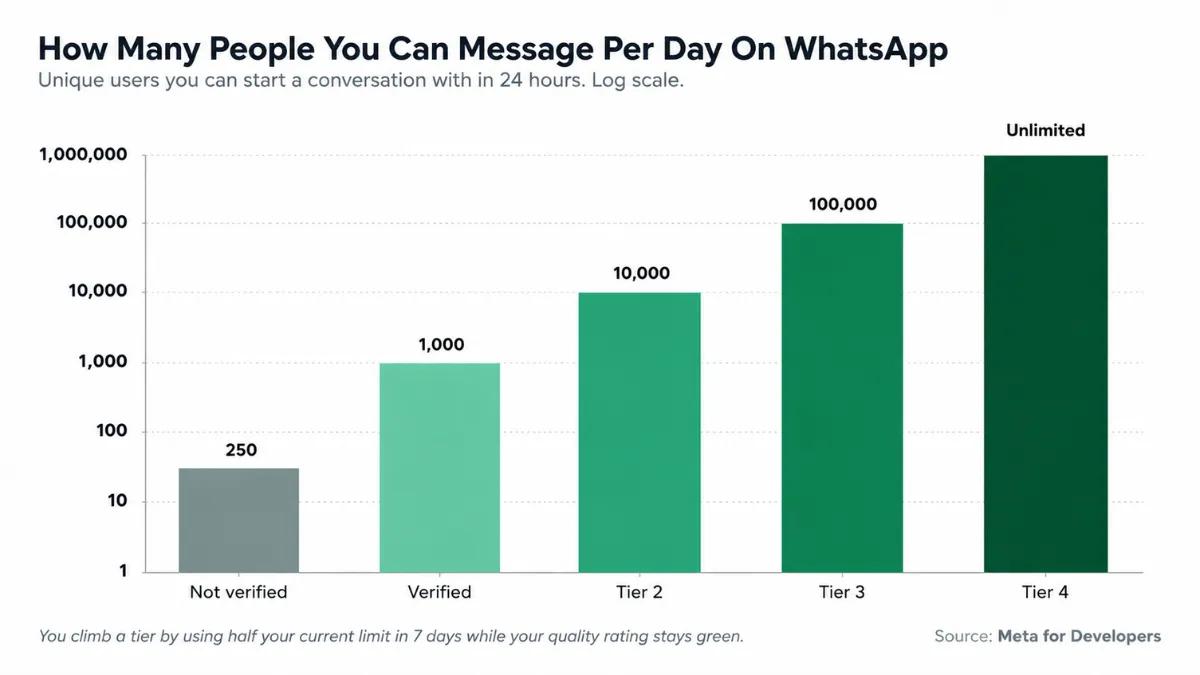
WhatsApp daily messaging limits: you climb tiers by using half your limit in 7 days with a green quality rating.(Source: Meta for Developers. Messaging Limits)
There is no magic number. But there are real limits.
- To grow further you need to use at least half your limit in seven days while your quality stays green.
- One person can only get around two marketing messages a day from all brands together. Past that your message fails with error 131049 even if your account is healthy.
So, here is the honest answer. Two hundred cold messages from a new number is far riskier than two thousand opted-in messages from a healthy old one. Volume is not the danger. The reaction is.
Final Thought On Whether WhatsApp Will Ban Your Number
It all comes down to one thing. WhatsApp is not watching you. It is watching how people react to you.
Cold lists get banned because nobody asked for the message. Ratings drop because someone hits a block. Every rule on this page is really the same rule wearing a different coat.
So, stop asking how much you can send. Ask why someone would want to hear from you at all.
That is why inbound is safer. Run the ad. Let the customer start the chat. Reply in seconds with an AI agent. Then send offers only to people who raised their hand.
Do that and the limits stop feeling like a cage. They start lifting on their own.