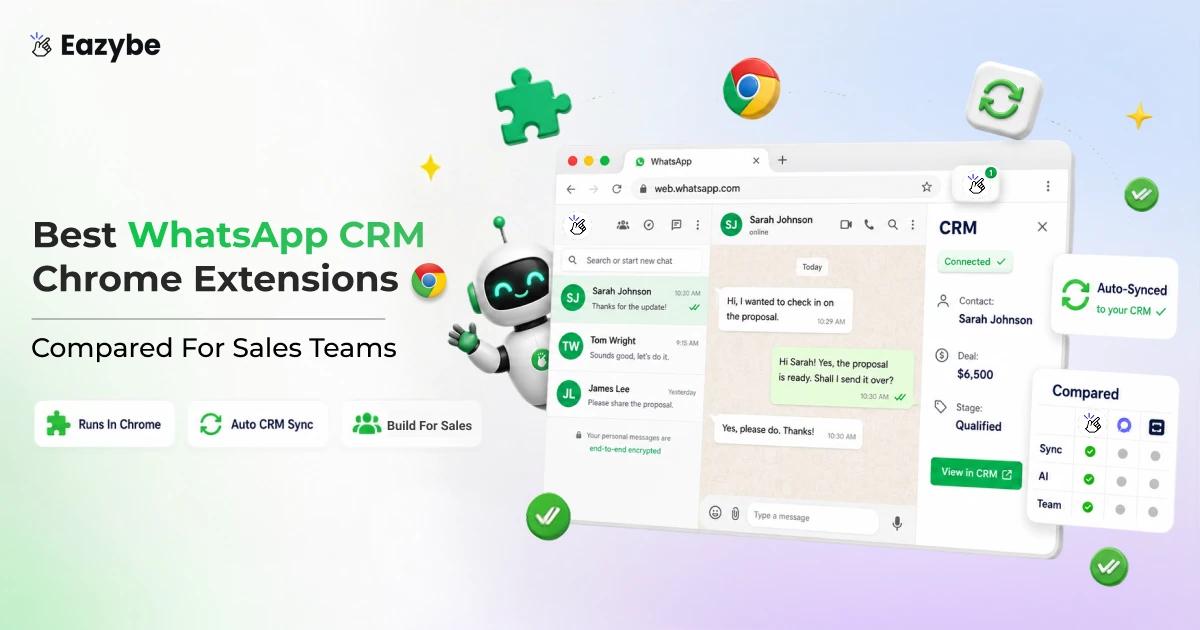


The best WhatsApp CRM Chrome extensions turn WhatsApp Web into something a sales team can run on. On its own it gives you no chat assignment, no proper notes, twenty labels, and nothing that reaches your CRM. A rep finishes a good conversation, closes the tab, and what was agreed lives only in their head.
Eazybe is in this list and it is our own product, so judge it on the specifics. Its WhatsApp AI agents read each conversation and write what mattered into your CRM, which is the one job most extensions here do not do. Below: what each extension does, how they differ, how to install one and which fits your team size.
List of Top WhatsApp Chrome Extensions For Business
- Eazybe: Best WhatsApp Chrome extension with CRM sync for businesses.
- WAPlus: For teams selling across languages.
- Zoko: For Shopify stores, though it runs on the API rather than as an extension.
- Wappi: For marketing teams running WhatsApp campaigns.
What Are WhatsApp Chrome Extension Tools?
A WhatsApp Chrome extension is a browser add-on. That sits on top of WhatsApp Web and adds. What WhatsApp itself does not have:
- Bulk messaging for personalised sends to hundreds of contacts.
- Unlimited labels instead of the twenty the Business App allows.
- CRM syncs to HubSpot, Salesforce, Zoho and others.
- Team assignment with a shared inbox and multi-agent access.
- AI intelligence that summarises threads, reads intent and flags urgency.
- Scheduling so follow ups land at the right hour.
How they work:
- Install the extension from the Chrome Web Store.
- Open WhatsApp Web in Chrome.
- Scan the QR code with your phone, exactly as normal.
- The features appear beside your existing chat list.
It's simpler than people expect. The extension creates no new account and never touches WhatsApp's servers. It runs inside the tab you already have open, which is why it works with a personal number, the WhatsApp Business App or a WhatsApp Business API number, and none of them need to change.
Key advantage: no number migration. The usual route into serious WhatsApp software is the Business API, meaning a moved number, a wait on Meta verification and lost chat history. An extension asks for none of that. If you want the API alongside your existing app, WhatsApp coexistence covers how that works.
Also Read: WhatsApp Chat Sync: Organize Your CRM And Leads Automatically
The Four Jobs WhatsApp Web Extensions Actually Do
Most extensions do one of four jobs well and treat the rest as an afterthought. Knowing which one you need stops you paying for three tools that overlap.
Job 1: Sending At Scale
Built for volume. Import a list, send to hundreds, stagger the sends so the number does not get flagged.
Good for campaigns and announcements. Useless for pipeline work, because a WhatsApp bulk message sender knows nothing about the conversation that follows.
This category also carries the highest ban risk. WhatsApp does not object to the tool, it objects to unsolicited volume.
Job 2: Organising Chats With Labels And Notes
WhatsApp Business gives you twenty labels and no real notes. Extensions in this group add:
- Unlimited or high label counts
- Notes attached to a contact, not typed into the chat
- Filters so a busy chat list becomes workable
This is the easiest thing to build. So, nearly every extension offers it. Rarely a reason to pick one tool over another.
Job 3: Connecting WhatsApp To Your CRM
Here the extension becomes a bridge between two systems. Contacts get created from a chat, conversations log against the right record, and follow ups promised in chat become dated tasks.
This is where the real time saving is. It removes the one step nobody does reliably: the rep typing up what just happened.
Job 4: Reading And Understanding Conversations
The newest and rarest job. Instead of copying a conversation into your CRM as raw text, the tool reads it and writes what mattered into fields you can filter on.
- Buying signals pulled out automatically
- A two line summary instead of a forty message transcript
- Properties like budget and timeline filled in
- Quiet chats flagged before anyone notices
The difference matters. A backup tells you a conversation happened. This tells you what it meant. Your full history still sits in Cloud backup. When you need the exact wording.
Keep these four in mind below, because most tools cover one or two and skip the rest.
WhatsApp Chrome Extension Comparison
Feature lists look similar until you put them side by side. Here is how the main extensions compare on the things that actually decide which one fits your team.
| Feature | Eazybe | WAPlus | Zoko | Wappi |
|---|---|---|---|---|
| Type | Chrome extension | Chrome extension | API platform | Chrome extension |
| Number migration | Not needed | Not needed | Required | Not needed |
| CRM sync | 9 platforms | 3 platforms | Shopify only | None |
| AI agents | Yes | Chatbot only | Chatbot only | No |
| Team assignment | Yes | Yes | Yes | Basic |
| Response time tracking | Yes | No | No | No |
| Chat backup | Your Drive or CRM | Their platform | Their platform | Not stored |
| Bulk sending | Yes | Yes | Yes | Yes |
If you already run a CRM and want your WhatsApp conversations inside it without moving your number, Eazybe covers the most ground.
Best WhatsApp Chrome Extensions For Business
Here are the extensions worth knowing, sorted by the job each one does best. For every tool you get what it covers, who it suits, and one honest limit.
1. Eazybe — Best WhatsApp CRM And AI Agent Extension
Eazybe is built for sales and support teams that already run a CRM and are tired of it being empty. It installs on WhatsApp Web, works on your existing number with no migration, and connects to nine CRM platforms.
What sets it apart is job four. Every other extension here can move your chats somewhere else. Eazybe reads them first and writes what mattered into CRM properties your manager can filter on. Around that sit the features a growing team eventually needs: a shared inbox, chat assignment, response time tracking and reply drafting.
Key features:
- AI agents that read conversations and fill CRM fields automatically
- Shared team Inbox with chat assignment and ownership
- Rep Radar for response times and rep activity
- Cloud Backup to your own Drive or CRM, not our servers
- Quick Reply and Scheduler for daily speed
At a glance
- Covers: all four jobs.
- CRMs: HubSpot, Salesforce, Zoho, Pipedrive, Bitrix24, Freshdesk, LeadSquared, Google Sheets, Monday.com.
- Best for: sales teams of five or more with a CRM already in place.
- Limit worth knowing: it runs on WhatsApp Web, so the browser needs to be open for chats to sync.
- Pricing: See Eazybe pricing plans for the latest rates.
- Free trial: no card required.
2. WAPlus — Best For Multi Language Teams
A broad WhatsApp Web toolkit and one of the more established names in the category. It brings contact management, messaging automation, CRM integrations, AI tools and team collaboration into WhatsApp Web, and its strongest single feature is language: a real time translator supporting over 150 languages alongside a trainable AI chatbot.
The trade off is breadth over depth. You get many small utilities in one place rather than one function done better than anyone else.
Key features:
- Real time message translation across 150+ languages.
- AI chatbot with auto replies and conversation labelling.
- Shared workspace and team inbox.
- Conversation backups and dashboard analytics.
- Multiple WhatsApp account management.
3. Zoko — Best For Shopify Stores (Not An Extension)
Worth including because it shows the alternative route. Zoko is not a Chrome extension, it is a WhatsApp Business API platform built for Shopify stores, used by 3,000+ D2C brands across 70+ countries. Catalog sync, cart recovery, COD confirmation and order notifications are all genuinely strong.
The cost of that route is what the rest of this list avoids. You move your number to the official API and once you do you cannot downgrade back to a normal WhatsApp account.
Key features:
- Shopify catalog synced to WhatsApp for in chat ordering.
- Abandoned cart recovery and COD confirmation flows.
- WhatsApp broadcast message campaigns with dynamic customer segments.
- Order notifications and delivery alerts.
- AI chatbots for FAQs and automated conversations.
4. Wappi — Best For WhatsApp Campaigns
Wappi sits at the volume end of the category. Where the others focus on organising conversations, this one exists to start them, sending personalised messages to a list large enough that no rep could type them individually.
That focus is also its ceiling. Nothing here reaches your CRM, and team collaboration stays basic. So, it's a campaign tool rather than a pipeline tool.
Key features:
- Bulk messaging with CSV import.
- Personalisation variables such as
{{name}}and{{company}}. - Contact segmentation and tagging.
- Campaign analytics covering delivery rate and reply rate.
Top Features To Look For In WhatsApp Chrome Extension Tools
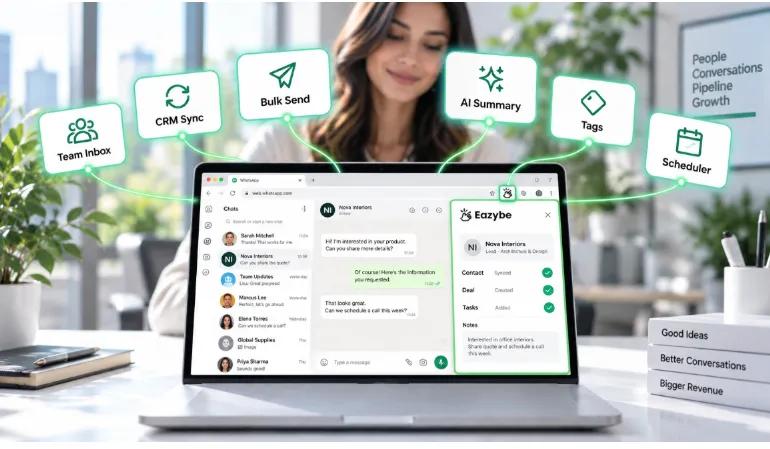
WhatsApp Chrome extension features that matter most
Feature lists all look similar until you ask what each one actually removes from someone's day. These six are the ones that change how a team works.
1. Shared team inbox
Without one, only the phone owner sees the messages, which means the rest of your team is guessing. A shared inbox puts sales, support and ops on the same number, with every conversation visible to everyone who needs it.
- Real time sync across the whole team.
- Assignment, so each chat has a named owner.
- Role based permissions for admins, managers and agents.
- Filters for unread, assigned and urgent.
Ownership is the part that matters most. When a rep leaves, the account stays with the team rather than walking out on a personal handset.
2. CRM integration
This turns WhatsApp conversations into part of the customer record, visible to anyone who opens it rather than trapped in one person's thread.
- Two way sync between WhatsApp and your CRM.
- Contact, deal and ticket mapping.
- AI summaries logged to the CRM timeline.
- Dynamic labels that tag chats from CRM properties like deal stage.
This is where the real time saving sits, because it removes the one step nobody does reliably: a rep typing up what just happened.
3. Bulk messaging with personalisation
Reaching a segment at scale, without anyone typing five hundred messages by hand.
- CSV contact import.
- Variables such as
{{first_name}},{{company}}and{{deal_stage}}. - Rate limiting to stay clear of Meta's spam detection.
- Scheduling so sends land at a sensible hour.
Honest limit: bulk sending through an extension sits under Meta's rate limits. Once you're past roughly ten thousand messages, you want the Business API with approved templates instead.
4. AI intelligence
Nobody reads a two hundred message thread before replying. So, AI does the reading and hands back what mattered.
- A two or three sentence summary of where things stand.
- Intent, separating a support question from a buying signal.
- Urgency, scored from keywords and history.
- Sentiment across the conversation.
- A suggested next action for the agent.
5. Contact management and tagging
Structure is what keeps a growing contact list usable rather than overwhelming.
- Import from CSV, your CRM or Google Sheets.
- Export history to Drive or your CRM.
- Tags by segment, such as VIP, prospect or churned.
- Saved filters like every VIP with an unread message.
6. Message scheduling
Drafting at midnight and sending at nine, which is the difference between a follow up that reads as thoughtful and one that reads as odd.
- Individual messages or full campaigns.
- Timezone support, so it lands in the recipient's morning.
- Recurring sends for regular check ins.
How To Choose The Right WhatsApp Chrome Extension
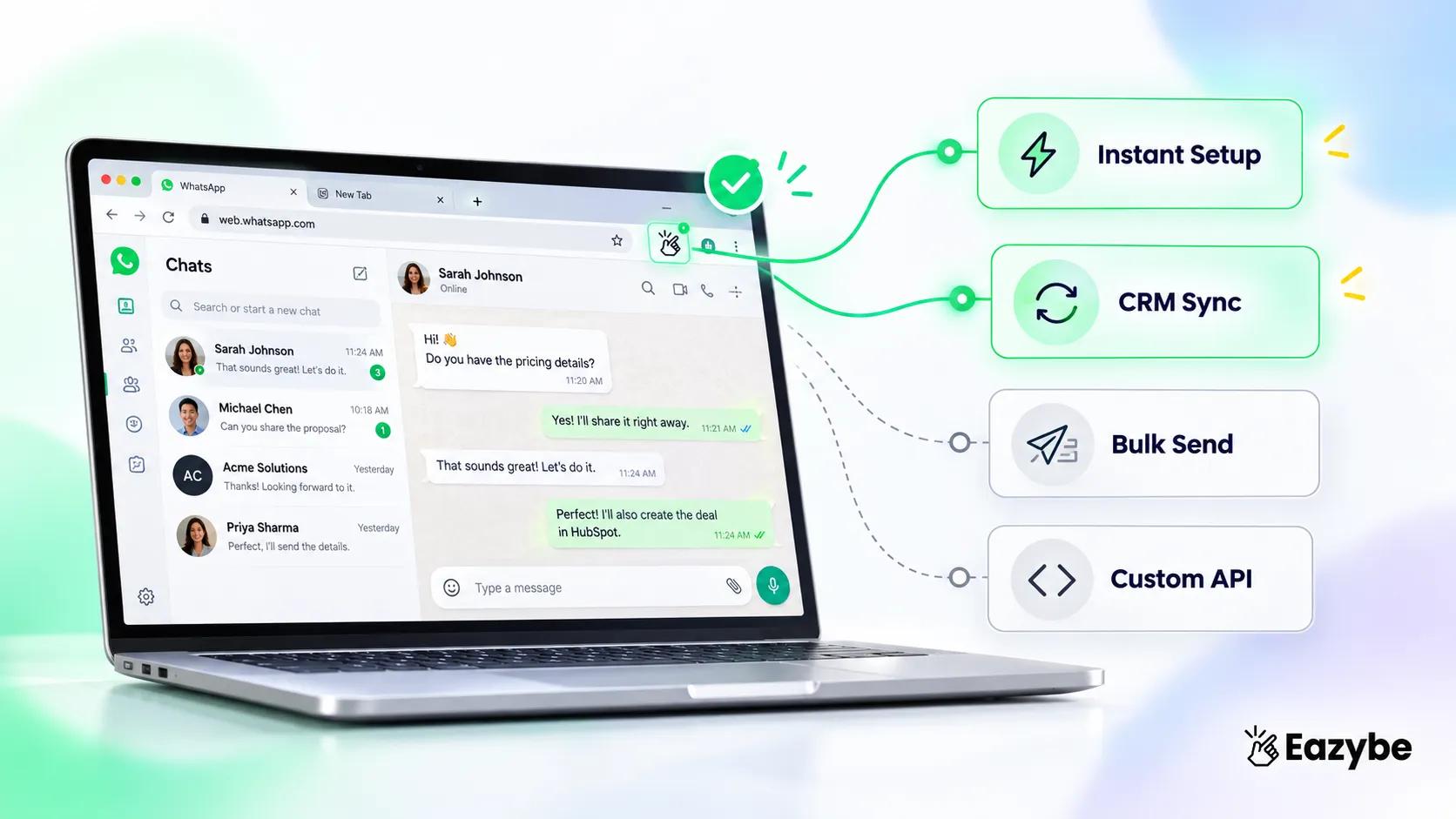
What to check before buying best WhatsApp Chrome extension
Four situations cover most teams, and the right answer changes completely depending on which one you're in:
- You need instant setup with no migration: Eazybe. You scan a QR code and start working, with no business verification, no number move and no downtime, on whatever WhatsApp number you already use.
- You need CRM integration: Eazybe again, and this is the narrower claim. It's the only extension here doing real time CRM sync alongside dynamic labels and AI summaries, rather than dumping raw chats onto a contact record.
- You need bulk messaging only: Wappi or WA Web Plus. Both are lightweight, priced per message, and built for campaigns rather than pipeline, so there's no CRM overhead and no long contract.
- You need custom integrations: WAToolkit. API access, webhooks and JSON export make it the developer-friendly option when you're connecting to something nobody else supports.
The Eazybe WhatsApp AI Agents That Work Inside WhatsApp Web
Features move data around. Agents read it. This is the fourth job from earlier and it's where the difference shows up in a manager's week rather than on a feature list:
- CRM Sync agent: Reads each conversation and writes contacts, deals and notes into your CRM without anyone opening it, so the record reflects what was actually said rather than what a rep found time to type.
- Lead Qualification agent: Pulls out the signals that tell you whether a lead is real. A strong buying signal appears when a prospect mentions a budget or specific number, gives a timeline or decision date, or brings a decision maker into the thread. It also appears when questions shift from features to pricing or a competitor is mentioned.These land as filterable properties, so managers sort by signal instead of gut feel.
- AI Sales agent: An AI sales agent handles the parts of a conversation that don't need a person: product and pricing questions, keeping a new lead warm until a rep picks it up, chasing the follow up someone promised and forgot. The handoff is the important part, because the moment a conversation needs judgement it goes to a human with the full thread attached.
- AI Customer Support agent: The same idea applied to service. AI agents for customer support answer the questions your team types out forty times a week, from order status to policy details. Anything they can't resolve gets routed to the right person rather than left sitting, which is where most support leaks happen.
- Revenue Ops agent: Turns conversation activity into pipeline data, so your forecast runs on the channel where the selling happened rather than on someone's recollection of it.
- Customer Success agent: Watches accounts after the sale and flags the ones going quiet, which is usually the first sign of a renewal problem and almost never spotted until the renewal date arrives.
Worth being straight about the limits. The AI is assistive rather than autonomous. You choose which properties it can write, and a human still owns the record on high value accounts. What it removes is the typing, not the judgement.
Which CRMs This WhatsApp CRM Integration Connects To
An extension that syncs to one CRM is only useful if it happens to be your CRM, which is why the list matters more than the feature itself:
- HubSpot: the HubSpot WhatsApp integration syncs contacts, deals, companies and tickets.
- Salesforce: the Salesforce WhatsApp integration syncs leads, contacts, tasks, events and call logs.
- Zoho CRM: the Zoho WhatsApp integration syncs contacts, leads, deals, notes and tasks.
- Pipedrive: the Pipedrive WhatsApp integration syncs persons, deals, notes and activities.
- Bitrix24: the Bitrix24 WhatsApp integration syncs leads, contacts, activities, comments and tasks.
- LeadSquared: the LeadSquared WhatsApp integration covers lead capture and nurture.
- Freshdesk: the Freshdesk WhatsApp integration brings chats into Freshsales and Freshdesk.
- Google Sheets: the Google Sheets WhatsApp integration works as a spreadsheet-as-CRM.
- Anything else: custom webhooks for the systems nobody builds native connectors for.
Google Sheets deserves a word of its own. Plenty of small teams have no CRM at all, and a Sheet is a perfectly honest place to keep contacts, labels and notes until they need one. It won't hold deal stages or pipeline objects, but for a team of three that was never the point.
How To Set Up Eazybe WhatsApp Chrome Extension
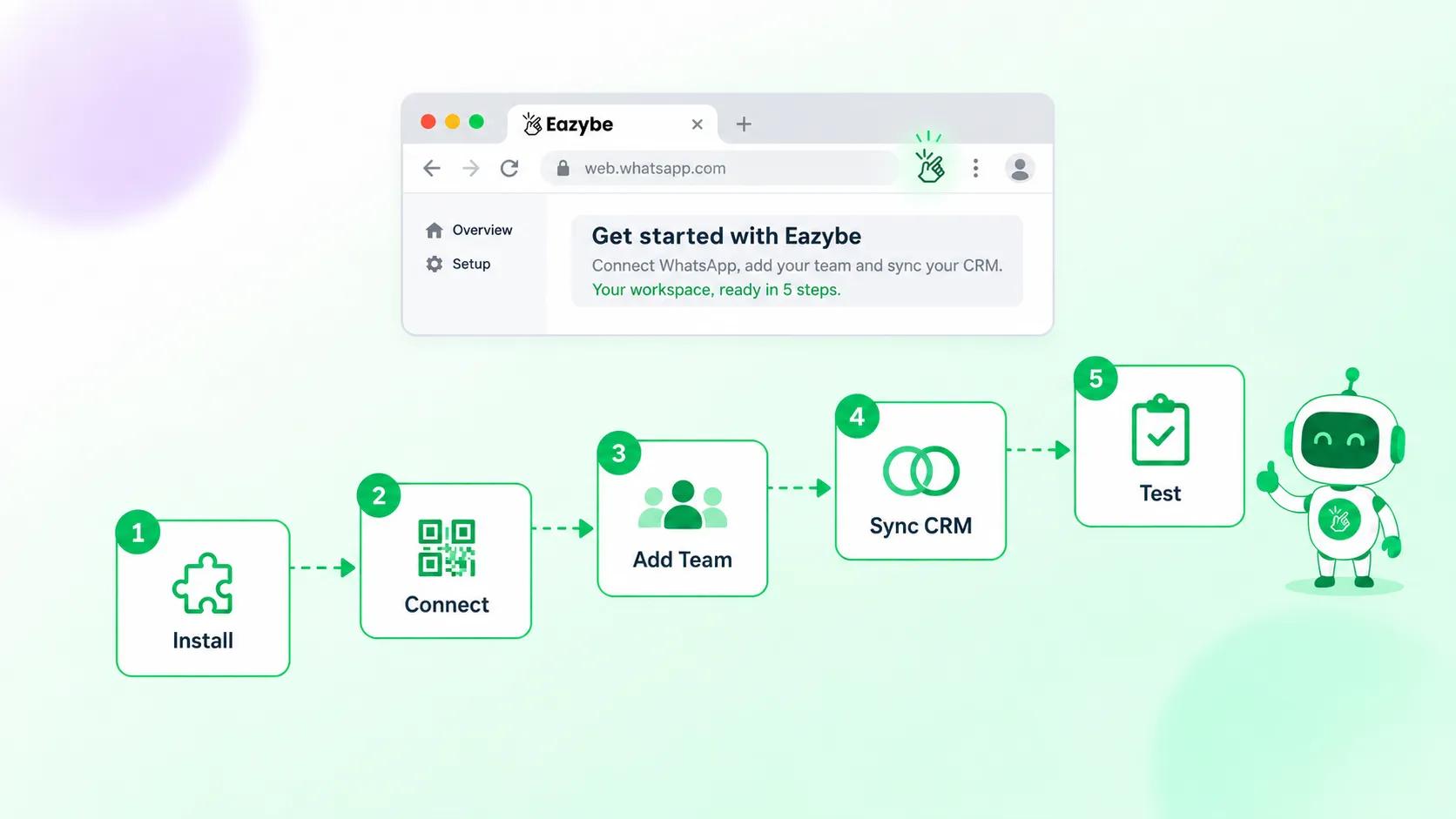
Eazybe WhatsApp extension setup steps
A few minutes, not an implementation project. Nothing about your WhatsApp account changes:
Step 1: Install the extension
- Open the Chrome Web Store
- Search for the Eazybe tool you picked
- Click Add to Chrome
- Check the permissions before accepting
It should ask for access to web.whatsapp.com only, not every site you visit.
Step 2: Connect your number
- Open WhatsApp Web in Chrome
- On your phone, go to Settings, then Linked Devices
- Tap Link a Device and scan the QR code
No number moves and no history is lost.
Step 3: Set up your team
- Invite reps, who install the same extension
- Assign roles across admin, manager and agent
- Set up your working views, usually unassigned and urgent
Step 4: Connect your CRM
- Authorise HubSpot, Salesforce, Zoho or whichever you run
- Map chats to the right contacts or deals
- Pick which properties sync
No CRM? Point it at a Google Sheet instead. And keep the field list short, since syncing everything turns a contact record into noise.
Step 5: Test before you scale
- Import five or ten contacts
- Draft a message using a variable like
{{first_name}} - Send or schedule it
- Check delivery and watch for spam warnings
Most tools start free with no card, so run the test on real work rather than a demo.
How The Eazybe WhatsApp Chrome Extension Works Day To Day
Setup is one thing. What the tool feels like on a Tuesday afternoon is another:
- What a rep sees: A side panel beside the chat, holding the contact record, the notes, the properties and the next follow up. Everything happens in one window. That matters because reps don't skip data entry out of laziness. They skip it because it lives in another tab.
- What a manager sees: Records that match the conversation instead of the rep's memory. Response times per person through Rep Radar and quiet deals surfaced through Revenue Inbox. The most useful view is the one showing conversations waiting on your side, since those are the deals you can rescue this afternoon.
- What the AI agents do on their own:
- Create contacts in your CRM.
- Fill properties from what was said, not what someone typed later.
- Flag buying signals so hot leads surface.
- Turn promised follow ups into dated tasks.
- Raise accounts going quiet.
- Back chats up through Cloud Backup to your Drive or CRM.
Nobody has to remember any of it. And since the agents write only to the properties you chose, the record stays a clean summary rather than a data dump.
Are WhatsApp Chrome Extensions Safe To Install?
You are giving a browser add on access to your customer conversations, so the question deserves an answer.
Every WhatsApp Web extension needs read access to the page. That is normal. Asking for access to every site you visit is not.
Check before installing:
- Access to web.whatsapp.com only, or all sites?
- Do the permissions match what the tool does?
- Is the developer named and contactable?
- How many installs, and how recent are the reviews?
The bigger question is where your chat data goes. Some extensions store conversations on their own servers. Eazybe stores them in your own Google Drive or CRM instead. For security reviews: SOC 2 Type II, GDPR, CCPA, PCI DSS, HubSpot App Partner and Meta Business Partner.
Which WhatsApp Extension Fits Your Team Size?
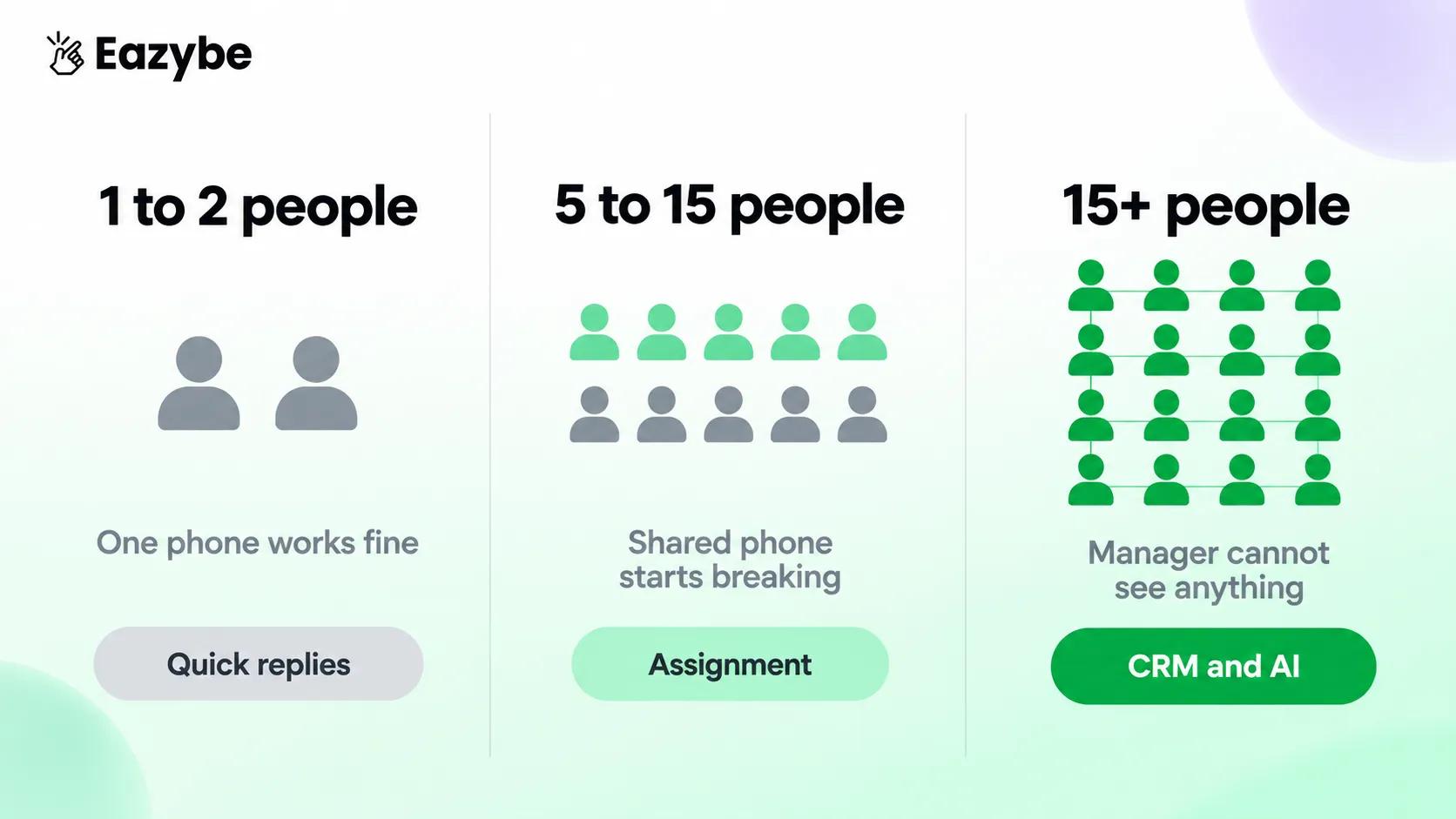
Match the tool to headcount
Headcount decides this more than industry does:
- Solo or two people: You need speed, not structure. Quick replies and scheduling cover almost everything. CRM sync is more than the problem needs.
- Five to fifteen: This is where shared phones break. You need assignment, ownership, and a record of what was said. CRM sync starts paying for itself here.
- Fifteen plus with a CRM: The problem is visibility, not organisation. You need response times per rep and properties that fill without anyone typing. An extension without CRM depth and AI will not hold.
Free WhatsApp Chrome Extensions And What You Give Up
Free tiers usually give you labels, quick replies and limited scheduling. They almost always exclude assignment, shared visibility, CRM sync, reporting and AI.
That split is not accidental. Everything in the second list only matters once more than one person is answering. Which is exactly when it becomes the most valuable part of the product.
Simple test: if you are the only person replying, start free and stay there until that changes.
Honest Limitations Of WhatsApp Chrome Extensions
Four constraints apply to every tool here:
- Browser dependency: Sync runs only while Chrome is open. Keep it open on one machine, or move to the Business API.
- Meta rate limits: Stay around 50 to 100 messages an hour. Larger campaigns need the API with approved templates.
- AI is assistive: Summaries and intent reads handle common cases and miss edge ones. So, review before acting.
- No offline mode: Syncing pauses when the connection drops and resumes when it returns.
Final Verdict: Top Chrome Extension For Sales And CRM Teams
Eazybe is the best WhatsApp Chrome extension for sales teams. It adds what WhatsApp Web lacks: chat assignment, unlimited labels, scheduling and CRM sync across nine platforms, all on your existing number.
The reason is job four. Every extension here can move your chats somewhere else. Eazybe reads them first and writes what mattered into CRM properties you can filter on.
The others still fit certain teams. WAPlus for selling across languages, Zoko for Shopify stores, Wappi for campaigns at volume. But if the real problem is that none of it reaches your CRM, that's the gap Eazybe was built for.
Install Eazybe on WhatsApp Web and connect your CRM in under fifteen minutes. Free to start, no card needed. Only Book A 30 min FREE DEMO and enjenjoy thats it..