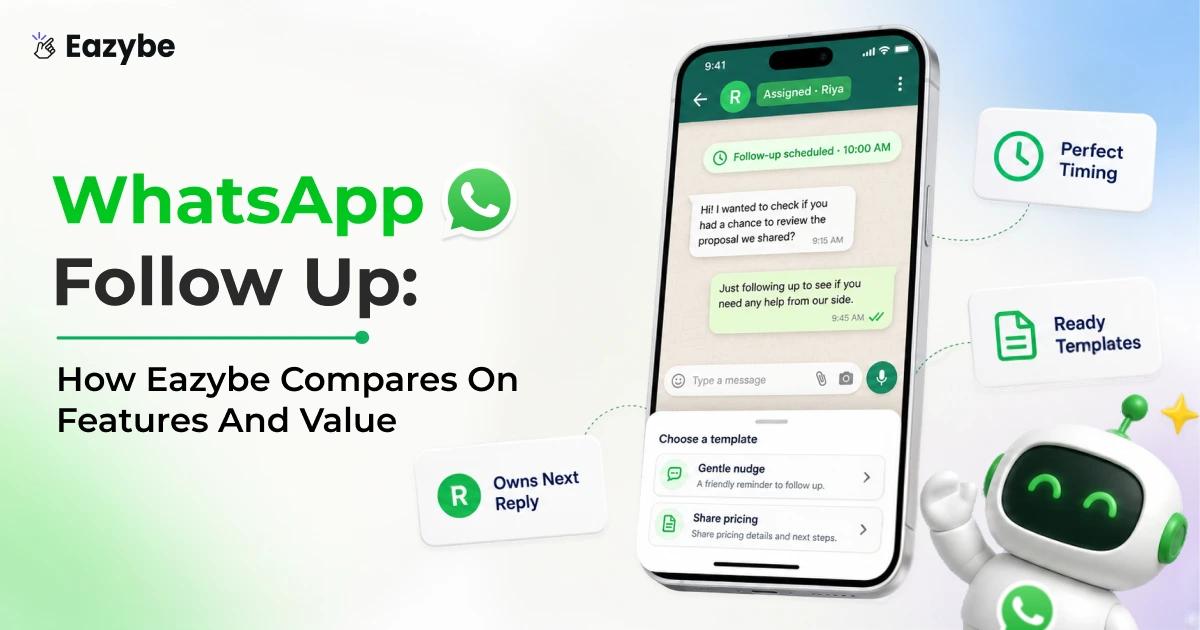


WhatsApp follow up is the message you send when a chat goes quiet and the buyer has not replied. Wait 24 to 72 hours for a sales lead and 30 minutes for a cart and the same day for a missed meeting. After 24 hours of silence only a template approved by Meta will get through. Most teams write a fine message and still lose the deal because nobody remembered to send it.
In this blog, we explain WhatsApp follow up timing and templates and who owns the next message. So, your team stops losing deals to silence. Eazybe - WhatsApp AI Agents help here because they read the whole chat and mark the ones that have gone quiet and then either remind the rep with the context ready or send the approved template for them.
What A WhatsApp Follow Up Is And Why Most Get Missed
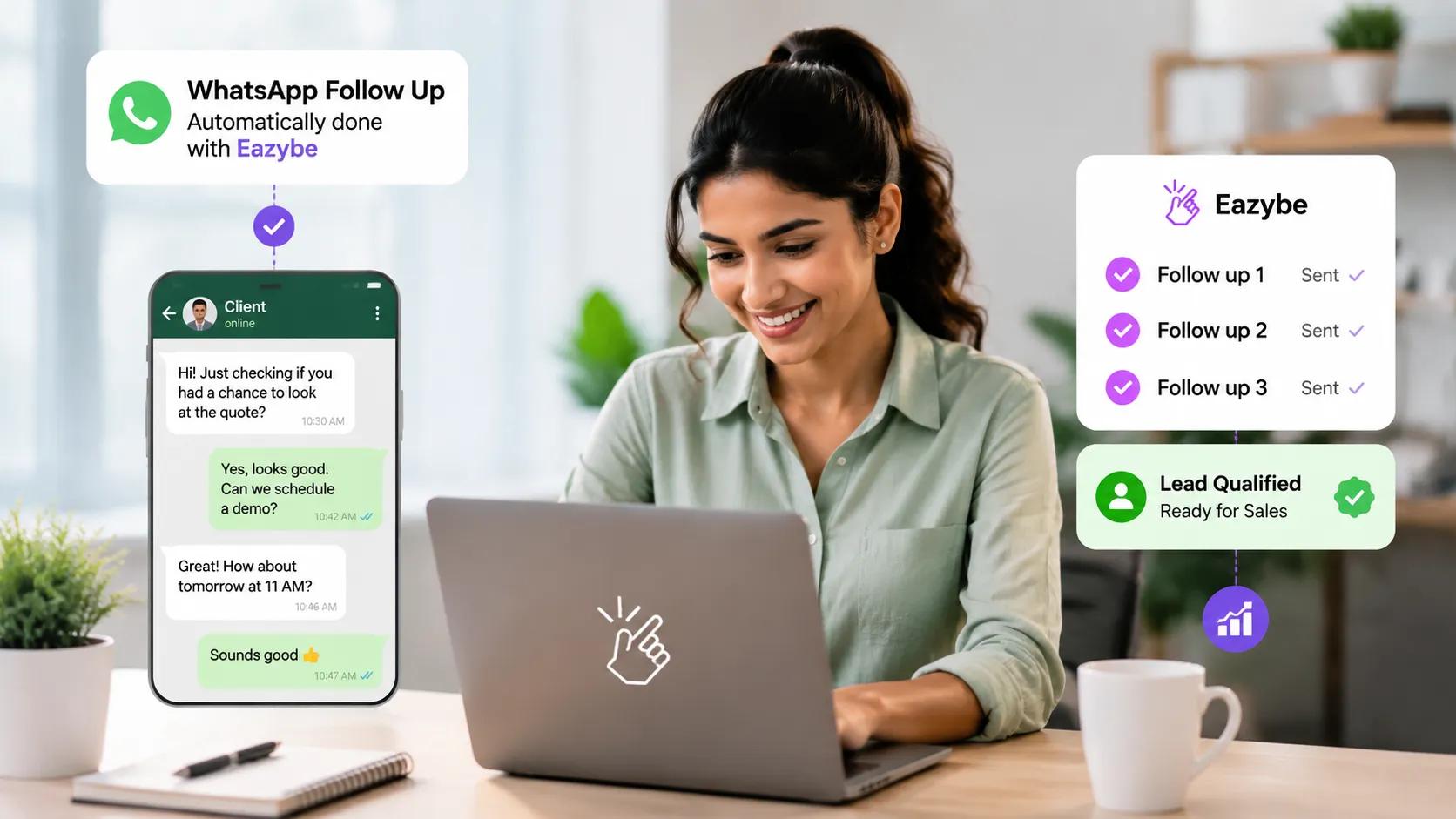
Automated WhatsApp follow-ups run until the lead replies or qualifies.(Source: Oldroyd McElheran and Elkington via Harvard Business Review)
A WhatsApp follow up is the second message you send when a buyer has read your first one and gone quiet. It might be a nudge on a quote or a reminder about a cart or a check in after a demo nobody showed up for.
Most of them never get sent. The chat sits on a rep phone next to family groups and delivery updates so the manager cannot see it and the CRM has no record of it. Nothing marks the thread as pending which means the follow up depends entirely on one person remembering it among forty other open chats.
Why Most WhatsApp Follow Ups Fail
The usual advice tells you to write better copy or add more urgency but the real problem starts much earlier than the message.
Harvard Business Review tested 2241 US companies by sending them fake leads and timing the reply. Only 37 percent got back within an hour while 24 percent took over a day and 23 percent never replied at all. The ones who answered inside that first hour were close to seven times more likely to qualify the lead.
That is not a writing problem because those teams simply did not know a reply was due. WhatsApp makes it worse since the chat sits on a personal phone next to family groups where the manager cannot see it and the CRM has no record of it.
So, nothing ever marks the thread as pending and the follow up never gets planned which makes this a sales efficiency problem long before it is a writing one.
The 24 Hour Window And Your WhatsApp Follow Up
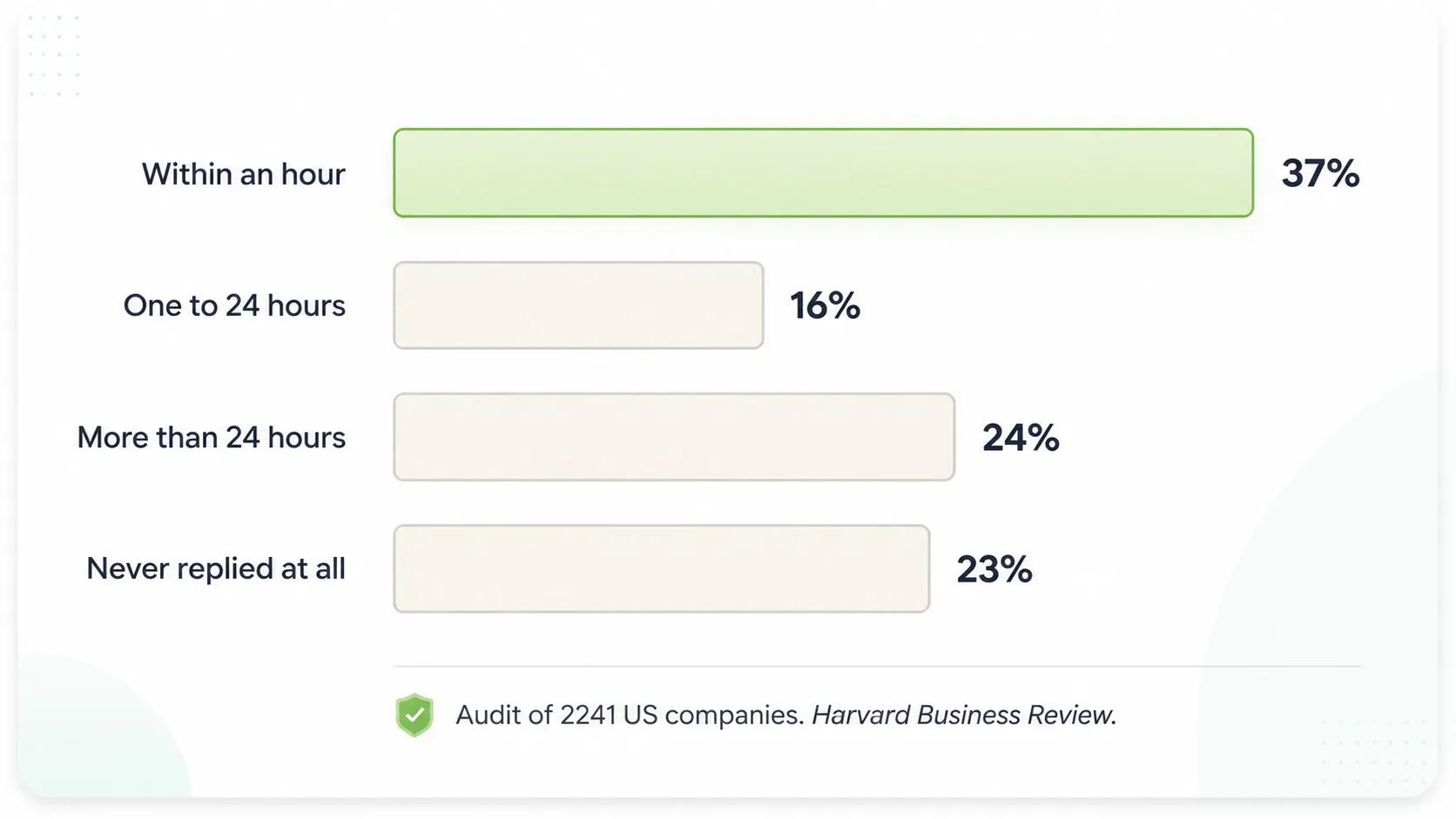
Only 37% of companies reply within an hour — 23% never reply at all.(Source: Meta for Developers , WhatsApp Business Messaging Policy)
Meta opens a 24 hour customer service window the moment someone messages your business and inside that window you can reply freely with any kind of message.
Once that window shuts the rules change. WhatsApp business policy says you may only reach that person with an approved message template and Meta can review or pause or reject any template whenever it wants.
Two things follow from that. Your cheapest and fastest WhatsApp follow up is always the one sent while the window is still open and every template you might need later has to be approved before the day you actually need it. Most WhatsApp business tools let you submit templates in bulk so build the whole set once and stop worrying about it.
WhatsApp Follow Up Timing That Works
Timing depends on what the buyer was doing when they went quiet because someone who left a cart behind is in a very different place to a buyer waiting on budget approval.
- Abandoned cart: First message within 30 minutes and the second at 24 hours.
- New inquiry with no reply: First at 24 hours and the second on day three.
- Demo or meeting no show: Same day and offer two fresh slots.
- Quote sent: Day two and then again on day six.
- Stalled negotiation: Once a week and keep it light.
- Dormant contact: Day one and then day seven.
The mistake sits at both ends since a message sent two hours later reads as pressure while one sent after ten days needs a paragraph of reminder before it can even make its point. Writing it while the conversation is still fresh and letting a scheduler hold it until the right moment solves both.
How Many WhatsApp Follow Ups Are Safe
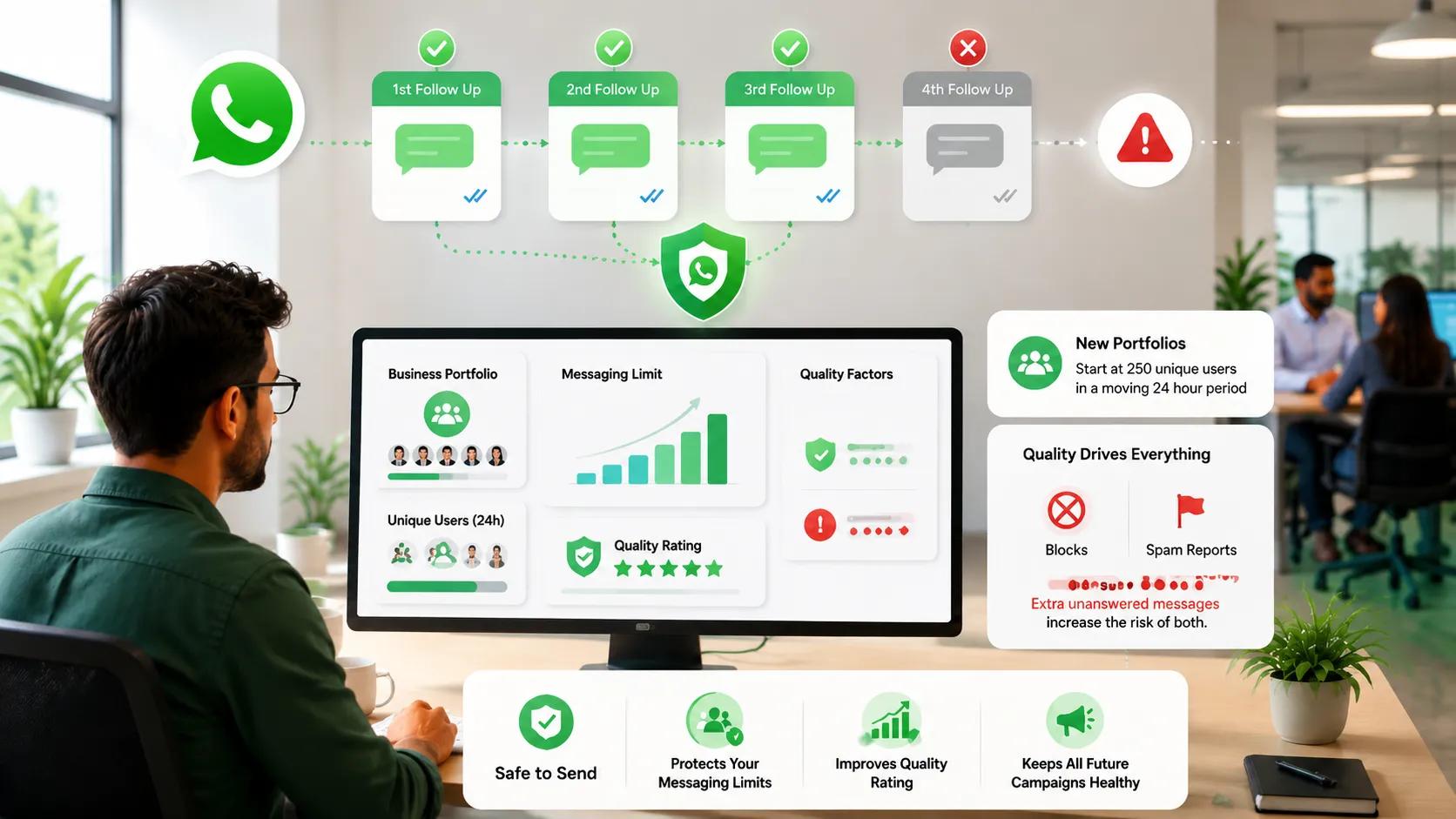
Three follow-ups are safe; extra unanswered messages risk blocks and your quality rating.(Source: Meta for Developers)
Two or three attempts without a reply is the ceiling and that has nothing to do with politeness because it is really about deliverability.
Meta sets messaging limits at the business portfolio level and moves you up or down based on quality. New portfolios start at 250 unique users in a moving 24 hour period and moving to a higher tier needs templates carrying a high quality rating while a low rating blocks you from climbing at all.
Quality is driven by blocks and spam reports and every extra unanswered message raises the odds of both. So, the fourth attempt does not simply fail to convert because it also taxes every campaign you send after it. Any WhatsApp automation you build should cap the attempts by default rather than leaving that decision to whoever sets up the sequence.
WhatsApp Follow Up By Deal Stage
Most guides organise follow ups by industry but, stage is far more useful. Because a single retail business needs six different messages depending on where the buyer stopped moving:
- New inquiry: Goal is any reply at all so ask one easy question.
- Demo no show: Goal is removing friction so assume something came up.
- Quote sent: Goal is surfacing the blocker because price is rarely the real one.
- Negotiation stalled: Goal is finding out who else has to approve it.
- Post purchase: Goal is confidence so confirm what happens next and when.
- Dormant: Goal is permission so give them a clean way to say not now.
Mapping messages to stages like this is the same discipline behind any WhatsApp sales funnel that actually moves people forward.
A message written for the wrong stage still lands but it gets ignored because it answers a question the buyer stopped asking a week ago. Good sales enablement means the rep never has to guess which one to send.
How To Automate Follow Ups On WhatsApp
There are three levels to this and most teams are stuck on the first two.
Manual follow up is personal but it needs somebody to remember. Once a rep has forty open chats the oldest ones always slip first.
Drip campaigns fix that but they are blind. They fire message two on schedule even if the buyer already paid you and most WhatsApp automation tools stop right here.
Agent led automation reads the chat before it does anything. It can see the prospect asked for pricing and never got it and that is the difference between an automated WhatsApp follow up and a relevant one. AI sales agents chase the lead on their own and answer the questions that come back and keep the conversation moving until the lead is ready to buy or clearly says no.
What To Automate In Your WhatsApp Follow Up
- Detection: Threads where the customer spoke last and got nothing back.
- Due dates: A follow up date sitting on every open conversation.
- Reminders: The nudge that lands in front of the rep before the thread goes cold.
- Routine confirmations: Shipping updates and renewal notices and order receipts.
- Escalation: When a deal crosses its threshold with no movement at all.
What Not To Automate In Your WhatsApp Follow Up
- Anything needing a read of the chat: If the answer depends on what was said then a bot should not send it.
- Pricing negotiations: These turn on context that a sequence cannot see.
- Complaints: A templated reply to an unhappy customer makes it worse.
- Anyone who already said no: Chasing them costs you the quality rating.
Automate your follow ups on WhatsApp at the level of timing and routing and leave the judgement calls to a person or to ai sales agents that have actually read the history.
WhatsApp Follow Up When The Rep Owns The Number
Here is the part nobody writes about. In most sales teams the relationship sits on a rep personal WhatsApp account because that is the number the buyer trusts and messages on a Sunday evening.
That works for the relationship and fails the business. The company cannot see the chat and the manager cannot tell which deals went quiet and when the rep leaves the whole history goes with them.
WhatsApp coexistence fixes this. The rep keeps the same number and the same chats while the business connects that number to the WhatsApp Business Platform so the buyer sees no change and the company finally gets visibility.
Making Follow Ups On WhatsApp Visible To Managers
You cannot manage what never surfaces so turn silent threads into a queue instead of hoping somebody remembers.
A shared team inbox does the first half by giving every conversation a named owner and keeping the history with the company rather than the handset.
Rep Radar does the rest. It tracks response time and follow up rate per rep and exports to CSV or PDF so a hunch that leads are going cold becomes a number you can coach against. A WhatsApp team inbox without that reporting only solves half the problem.
WhatsApp Follow Up That Reaches Your CRM
A follow up that never gets logged did not happen as far as your pipeline is concerned. Forecasts run on stage and last activity date so if the last real activity was a WhatsApp message the CRM never saw then the forecast is wrong.
A proper WhatsApp crm setup writes the chat back to the right contact or deal on its own.
- Chats land on the deal: Every message is logged where it belongs so last activity date stays right.
- Works with your CRM: HubSpot Salesforce Zoho Pipedrive Bitrix24 LeadSquared Freshworks Google Sheets and custom webhooks.
- Two way sync: With HubSpot WhatsApp integration a stage change in the CRM can fire the next message.
- Clean handover: With WhatsApp chat sync the next person opens the deal and reads the whole chat. No screenshots.
Automated WhatsApp Follow Up Message Examples
Most template lists sort by use case and give you ten messages that could go to anyone. That is why they get ignored. Every quiet chat has a last message in it and that message usually tells you why the buyer stopped replying.
We went back through recorded sales calls to see what people say just before they go quiet. The same six lines kept coming up so these are written against those instead of against a stage:
- They said they needed to check internally: Hi
{{name}}any word from your side. Happy to hop on a quick call with whoever needs convincing. - They said they would review it with the team: Hi
{{name}}did the team get a look at it. I can send a short summary if that helps you pass it around. - They are waiting on legal or IT: Hi
{{name}}where has the review reached. I can send the security documents across if that unblocks it. - They asked for pricing and went quiet: Hi
{{name}}is the price, the blocker or the timing. Either one is fine to say. - They never opened the demo or proposal: Hi
{{name}}the recording is still sitting there. Want me to walk you through it in ten minutes instead. - They said someone else decides: Hi
{{name}}is there anyone else who should see this first. I can send them a copy directly. - They went cold for a month: Hi
{{name}}it has been a while. We shipped {{feature}} since we last spoke and it fixes the part you were stuck on. - They left a cart behind: Hi
{{name}}your cart is still saved. Should I hold it for 24 hours? - Their plan is about to lapse: Hi
{{name}}your plan renews on {{date}}. Renew here to avoid a break in service. - You want to close the loop: Hi
{{name}}last check in from me. Say later and I will come back next month or say stop and I will close it off.
Save the ones that work as a quick reply so reps stop rewriting the same message forty times a week. Anything sent after the window closes needs template approval first.
What Sales Teams Told Us About WhatsApp Follow Up
Sit in enough sales calls and the same complaint keeps surfacing in different accents:
- Steel distribution, Southern Africa: Fifteen reps on personal WhatsApp against one busy number fed by paid ads. Their words were tracking issues and poor follow up.
- Services firm, East Africa: Five reps and no CRM at all. They named the same two problems unprompted. No visibility and missed follow ups.
- Hospital group, India: Wanted enquiries sorted by urgency with a reply inside 24 hours. Manual CRM entry kept getting in the way.
- Outbound sales, Brazil: Ran WhatsApp with no central control and kept hitting blocks with no way to trace a conversation.
Not one of them blamed their copy. Every one described a visibility or ownership failure. A WhatsApp copilot helps a rep write faster but it does not fix that.
WhatsApp Follow Up Mistakes To Avoid
The expensive errors are process errors rather than writing errors.
Sending the same message twice tells the reader you never looked at the thread. Blasting the whole list instead of segmenting by engagement drags quality down for every campaign after it. Messaging someone who already replied elsewhere makes the team look disconnected.
Two more are worth naming. Skipping the opt out line means people block you instead of leaving quietly and a block costs far more than a quiet exit. And running a sequence with no stop on reply is how a paying customer gets a last chance discount two days after they paid. None of the standard sales closing techniques survive that.
Automating Follow Ups In Eazybe
- Connect the number your team already sells from: Coexistence keeps the rep number and its history intact while the business gets access to it.
- Get your templates approved before you need them: Submit the whole set once so nothing stalls on the day you want to send.
- Build multi step sequences in Message Scheduler: Set your own intervals and switch stop on reply so anyone who answers drops out.
- Give every conversation an owner in the team inbox: An unassigned thread is a thread nobody follows up.
- Connect your CRM: Each follow up then lands on the deal record instead of dying inside the chat.
- Turn on Rep Radar and set a response time threshold: That is what turns a slipping follow up into something a manager can see.
Keep cloud backup running underneath all of it so the history survives a lost phone or a departing rep.
How To Measure WhatsApp Follow Up Performance
Track five things and ignore the rest.
- Time to first follow up: The one that moves revenue most because everything else compounds off it.
- Reply rate by message position: Shows exactly where your sequence stops earning attention.
- Follow ups per closed deal: Gives reps a realistic target instead of a vague instruction to be persistent.
- Unreplied count over time: Tells you whether the queue is being worked or just growing.
- Opt out rate: Your early warning before the quality rating starts slipping.
Expect the reply rate to fall with each position because that is normal. What matters is whether message two and three recover deals that message one lost.
Pulling this from WhatsApp sales performance analytics rather than asking reps to self report is the difference between coaching and guessing.
Final Verdict On WhatsApp Follow Up
A better copy is worth very little if nobody is assigned the next message. Every guide on this topic hands you templates but almost none tell you who is meant to send them or how anyone would even know the thread went quiet.
Fix ownership first and then timing and then wording. A plain follow up that actually goes out will beat a polished one nobody remembered to send.