

WhatsApp CRM integration is one of the most important decisions sales team can make right now. Over 2 billion people use WhatsApp every day. Your leads are there, your customers are there and your competitor are figuring this out fast. If your team is still copying chat notes into the CRM by hand or missing follow-ups because conversations got buried and that is a real problem worth solving.
Eazybe - WhatsApp CRM Integration with WhatsApp AI Agent work inside WhatsApp Web and handle all the repetitive work your team should not be spending time on. Conversations log automatically to your CRM, leads get qualified, deal stages update in real time, and your pipeline clean. In this guide, we cover the 7 best CRM platforms that integrate with WhatsApp and how Eazybe connects each one.
What Is WhatsApp CRM Integration?
WhatsApp CRM integration means every conversation automatically connects to a contact in your CRM. Follow-ups get tracked. Your pipeline stays updated. No one has to do anything extra at the end of the day.
Most businesses already use WhatsApp to talk to customer. But talking and managing those conversation are two very different thing. Right now your team reads messages, replies manually and tries to remember to update the CRM later.
To make this work properly you need the WhatsApp Business API. This is Meta's official way for businesses to connect WhatsApp to outside tools. It is not the same as the regular WhatsApp Business app. The API is what lets platforms build automations, WhatsApp chat sync data and manage conversations at scale. Without it everything stays manual.
Why WhatsApp CRM Integration Actually Matters For Sales Team
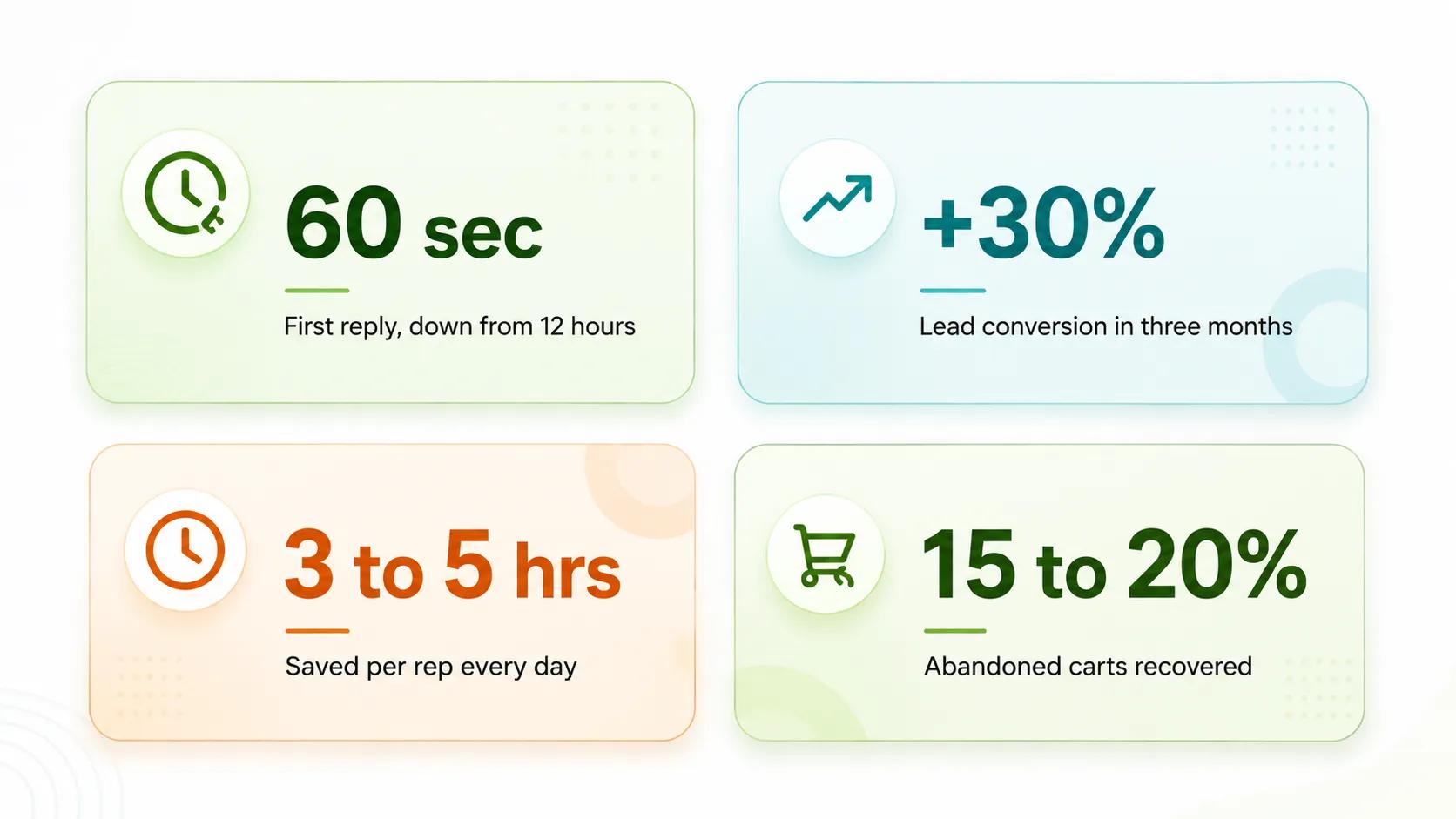
See how WhatsApp CRM integrations improve response times, conversions & sales productivity
The results businesses see after setting this up are pretty consistent. Here is what changes in practice:
- Response time drop from hours to under a minute. The average business takes around 12 hours to reply to a new lead. With WhatsApp automation handling the first response automatically, that drops to less than 60 seconds. 78 percent of customers go with the first business that replies.
- Lead conversion improves by around 30 percent in the first three months for most teams that set up proper WhatsApp CRM integration.
- Your team saves 3 to 5 hours per day per rep. That time was going into manual CRM updates, copy-pasting notes and sending the same follow-up messages over and over again.
- Abandoned cart recovery of 15 to 20 percent for e-commerce teams from a single automated WhatsApp follow-up message.
- CRM data stays clean because updates happen automatically through Eazybe. No more half-filled contact records or outdated deal stages.
- Your team stops switching between tabs. Contact history, deal stage, and last interaction are all visible inside WhatsApp Web without opening anything else.
WhatsApp Business API Requirements Before You Start
Before picking a CRM it helps to understand what you need on the WhatsApp side. The Business API is not something you plug in overnight, but it is not complicated once you know what to prepare.
You need a verified Facebook Business Manager account. Your business needs to be officially registered and go through Meta's verification process. Most legitimate businesses clear this within a few days without any issues.
You also need an official WhatsApp Business Solution Provider to access the API. Eazybe is one of them. When you connect through Eazybe, you skip all the technical complexity. They handle the API layer and you just connect your CRM and start using it.
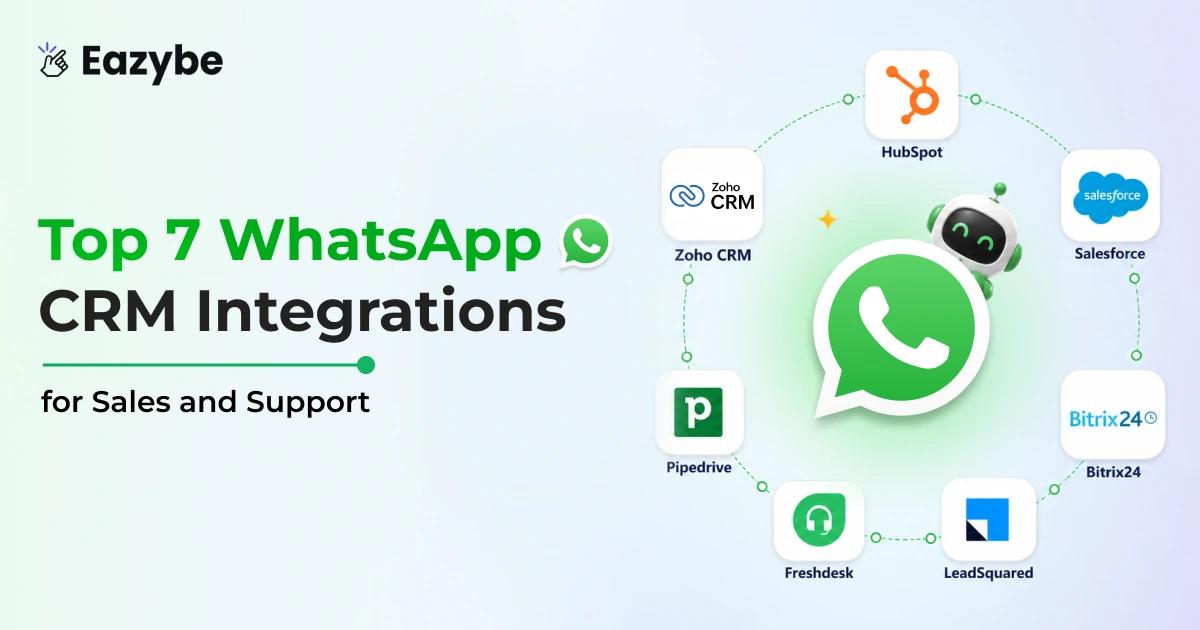
Top 7 WhatsApp CRM Integration Providers At A Glance
Not every CRM works the same way with WhatsApp. Here is a quick look at the top 7 providers and how Eazybe connects each one.
| CRM | Best For | Eazybe Integration |
|---|---|---|
| HubSpot | Sales and marketing teams | Full bi-directional sync |
| Zoho CRM | SMBs and growing teams | Native sync |
| Salesforce | Enterprise teams | Full sync |
| Bitrix24 | All-in-one teams | CRM and tasks sync |
| LeadSquared | Lead-heavy businesses | Lead capture sync |
| Freshdesk | Support teams | Ticket creation sync |
| Pipedrive | Deal-focused sales teams | Pipeline auto-sync |
1. HubSpot WhatsApp Integration: Best For Sales and Marketing Team\
HubSpot WhatsApp Integration
HubSpot is one of the most used CRMs globally. It handle contact management deal pipeline and email marketing in one place. The problem for WhatsApp users has always been that HubSpot does not natively capture WhatsApp conversations. You have chats on your phone then manually log them in HubSpot later. Most reps do not do this consistently.
How WhatsApp CRM Integration Helps HubSpot Users Close More Deal
Eazybe fixes this completely with Hubspot WhatsApp integration. Every WhatsApp conversation logs automatically to the right contact in HubSpot. Deal stages update as conversations move forward. If a lead says they are ready to buy, Eazybe's AI flags it and updates the pipeline without anyone touching the CRM.
How Eazybe Connects WhatsApp to HubSpot
Eazybe's HubSpot integration works in both directions. Your existing WhatsApp HubSpot reporting contacts are accessible inside WhatsApp Web. You can see their lifecycle stage, last activity, and open deals without opening HubSpot at all.
When you have a conversation, it syncs back automatically. New contacts from WhatsApp get created in HubSpot with the full conversation attached as a note.
Benefits of WhatsApp CRM Integration for HubSpot Users
- View HubSpot contact data directly inside WhatsApp Web.
- Every WhatsApp conversation logs automatically as a HubSpot activity.
- Create and update deals from WhatsApp chats without opening HubSpot.
- HubSpot workflows can trigger based on WhatsApp conversation outcomes.
- Quick reply and message templates work with your HubSpot contact segments.
Setup takes about 15 minutes. You connect Eazybe to HubSpot using OAuth. No API keys or developer work needed.
2. Zoho CRM WhatsApp Integration: Best For Growing Businesses
Zoho CRM WhatsApp Integration
Zoho CRM is popular with mid-size businesses because it is affordable and covers most of what a sales team need without an enterprise price tag. The native Zoho WhatsApp setup is limited though. You get basic messaging but no real automation and no conversation sync unless someone builds it manually.
How CRM Integration Helps Zoho Users Manage Leads Better
Eazybe with Zoho WhatsApp integration brings proper CRM sync to WhatsApp without any custom development. Your Zoho contacts appear inside WhatsApp Web, conversations log automatically, and lead stages update as deals move forward.
How Eazybe Connects WhatsApp to Zoho CRM
Eazybe syncs WhatsApp conversations directly into Zoho CRM as activities. When a new lead messages you on WhatsApp, Eazybe creates the contact in Zoho and logs the conversation. If an existing contact messages, it matches them automatically and updates their record. The AI sales agent handles first replies and qualifies the lead based on your criteria and passes hot leads to your team.
Benefits of WhatsApp CRM Integration for Zoho CRM Users
- Native Zoho CRM sync for contacts, leads, and activities with team inbox.
- Auto-create Zoho contacts from new WhatsApp conversations.
- Update lead stages based on how conversations progress.
- AI-powered lead qualification before passing leads to your team.
- Template messaging works with your Zoho contact segments.
3. Salesforce WhatsApp Integration: Best For Enterprise Sales Teams
Salesforce WhatsApp Integration
Salesforce is the CRM large sales organization rely on. It is powerful, deeply customizable, and handles complex sales processes that other CRMs cannot. The challenge is that Salesforce implementations are usually complex. Adding WhatsApp on top of that complexity without the right tool can mean months of custom development work.
Eazybe makes this straightforward. Your Salesforce WhatsApp integration contacts, opportunities, and cases are accessible inside WhatsApp Web. Every conversation syncs back to the right Salesforce record automatically.
How Eazybe Connects WhatsApp to Salesforce
Eazybe connects to Salesforce via the standard REST API. Once connected, your reps can see Salesforce contact and opportunity data directly inside WhatsApp Web. Conversations log as activities opportunity stages update as deals progress and new contacts from WhatsApp appear in Salesforce immediately.
For enterprise WhatsApp teams inbox managing large volumes, Agents handle initial qualification and routing so senior reps only get involved when a lead is genuinely ready.
Benefits of WhatsApp CRM Integration for Salesforce Users
- Full Salesforce contact and opportunity sync inside WhatsApp.
- Conversations auto-log as Salesforce activities and tasks.
- Opportunity stages update based on WhatsApp conversation outcomes.
- AI-powered lead routing to the right rep based on deal size or region.
- Work with both Salesforce Sales Cloud and Service Cloud.
Most teams are up and running within a day. Salesforce has more permission layers than most CRMs, but Eazybe's setup guide walks through each step clearly.
4. Bitrix24 WhatsApp Integration: Best For All-in-One Teams
Bitrix24 WhatsApp Integration
Bitrix24 is popular with teams that want CRM project management and team communication in one place. It is feature rich and has a generous free plan which makes it attractive for smaller teams. The Bitrix24 WhatsApp integration through Eazybe brings the same automatic sync that other CRMs get. Contacts, conversations, and tasks all connect without any manual work.
How Eazybe Connects WhatsApp to Bitrix24
Eazybe syncs WhatsApp contacts and conversations directly into Bitrix24's CRM module. Tasks can be created from WhatsApp conversations. Deals update automatically with Whatsapp Copilot. Team member can be assigned conversations based on workload or expertise. For teams using Bitrix24's built-in communication tools alongside WhatsApp, everything stays in one place.
Benefits of WhatsApp CRM Integration for Bitrix24 Users
- Sync WhatsApp contacts and conversations to Bitrix24 CRM automatically.
- Create and assign tasks from WhatsApp chats.
- Update deals and leads as conversations progress.
- Team inbox with conversation assignment inside WhatsApp Web.
5. LeadSquared WhatsApp Integration: Best For High-Volume Lead Businesses
LeadSquared WhatsApp Integration
LeadSquared is built for businesses that deal with large volumes of inbound leads. Education companies and healthcare providers and financial services teams use it heavily. The CRM is designed around lead capture and nurturing and it has strong automation built in. The challenge is capturing
WhatsApp leads into LeadSquared WhatsApp integration without manual effort.
How Eazybe Connects WhatsApp to LeadSquared
Eazybe captures every WhatsApp conversation and pushes it into LeadSquared as a lead activity. New leads are created automatically when someone messages for the first time. Conversation history syncs as activity notes. AI agents for customer support to qualification agent asks the initial screening questions and fills in
Benefits of CRM Integration for LeadSquared Users
- LeadSquared fields before a human ever gets involved.
- Auto-capture WhatsApp leads into LeadSquared instantly.
- Conversation history syncs as LeadSquared activity notes.
- AI agent handles initial lead qualification and data capture.
- Qualified leads push automatically to the right sales team.
- Track all WhatsApp touchpoints in LeadSquared's lead journey.
6. Freshdesk WhatsApp Integration: Best For Customer Support Teams
Freshdesk WhatsApp Integration
Freshdesk is a support focused CRM. If your team handles customer issues and complaints and service requests Freshdesk is where they live. Adding WhatsApp to Freshdesk WhatsApp integration mean customer can raise a support ticket just by sending a message. No forms, no emails and no hold queues.
How Eazybe Connects WhatsApp to Freshdesk
Eazybe creates Freshdesk tickets automatically from incoming WhatsApp conversations. Customer context like previous tickets account details and order history is visible inside WhatsApp Web when a conversation starts. Agents can resolve issues, update ticket status, and close conversations all without leaving WhatsApp sales funnels. For support teams handling high volumes, Eazybe handles first responses and routes complex issues to the right agent.
Benefits of CRM Integration for Freshdesk Users
- Auto-create Freshdesk tickets from WhatsApp conversations.
- View customer ticket history inside WhatsApp Web.
- Update ticket status and resolution notes directly from WhatsApp.
- AI-powered first response and intelligent ticket routing.
- SLA tracking tied to WhatsApp response times.
7. Pipedrive WhatsApp Integration: Best For Deal-Focused Sales Teams
Pipedrive WhatsApp Integration
Pipedrive is built around one thing - closing deals. The pipeline view is clean, deal tracking is simple and sales reps actually use it. The problem is that WhatsApp conversations and Pipedrive deals have always lived in separate places. Reps radar talk to prospect on WhatsApp then update Pipedrive WhatsApp integration when they get a chance. Which is not always.
How Eazybe Connects WhatsApp to Pipedrive
Eazybe puts your Pipedrive pipeline inside WhatsApp. You can see where a contact sits in your deal stages before you even reply to their message. Conversations sync to Pipedrive as activities. When a deal moves forward based on a WhatsApp sales tracking conversation, Eazybe updates the pipeline stage automatically. For teams managing multiple deals at once, this means your Pipedrive data is always current without anyone doing anything extra.
Benefits of CRM Integration for Pipedrive Users
- View Pipedrive deal stages and contact data inside WhatsApp Web.
- WhatsApp conversations auto-sync to Pipedrive as activities.
- Deal stages update based on conversation sales efficiency outcomes.
- CRM sidebar with full deal history visible during chats.
- Schedule follow-ups in Pipedrive directly from WhatsApp.
How To Set Up WhatsApp CRM Integration Step by Step
The setup process is the same regardless of which CRM you use. Here is how it works with Eazybe is the Best WhatsApp automation tool for crm integration:
- Set up your Whatsapp Business Manager account and complete the Meta verification process. This is required before accessing the WhatsApp Business API.
- Install the Eazybe Chrome extension from the Chrome Web Store.
- Open WhatsApp Web. Eazybe activates automatically and shows you the CRM connection panel on the right side of the screen.
- Connect your CRM using OAuth. No API keys needed for most integrations.
- Set up your message templates and AI agent. Upload your product docs, FAQs or pricing sheets so the AI can answer questions accurately.
- Test with a real conversation. Send a test message, check that it logs correctly in your CRM, and confirm deal stages update properly.
Team Workflow And Permission Management For WhatsApp CRM Integration
Getting the integration set up is one thing. Getting your whole team using it consistently with the right permissions and clear conversation ownership is another thing entirely. This is where a lot of teams run into problems after the initial setup.
Setting Up Multi-Agent Workflows
With this setup incoming WhatsApp conversations can be automatically assigned to the right team member with AI sales agents based on rules you define. You can route based on the contact owner in your CRM, lead source, deal value, or round-robin across your team.
This stops the situation where three reps are looking at the same conversation and nobody knows who should reply.
- Assign conversations automatically based on the CRM contact owner.
- Round-robin assignment for new inbound leads.
- Manual reassignment when a rep is unavailable.
- Conversation ownership tracking so managers can see who handled what.
Permission Levels and Access Control
Not every team member needs access to every conversation or every CRM field. Eazybe gives you three levels of access:
- Admin: Full access to all conversations, all CRM data, integration settings, and team management.
- Manager: Can view team conversations, reassign chats, and access reporting.
- Agent: Can only see conversations assigned to them. CRM data visible is limited to contacts they own.
For compliance-sensitive industries like financial services or healthcare, this level of access control is important. You do not want junior agents seeing sensitive deal notes that are not relevant to their work.
How To Measure ROI And Success Metrics For WhatsApp CRM Integration
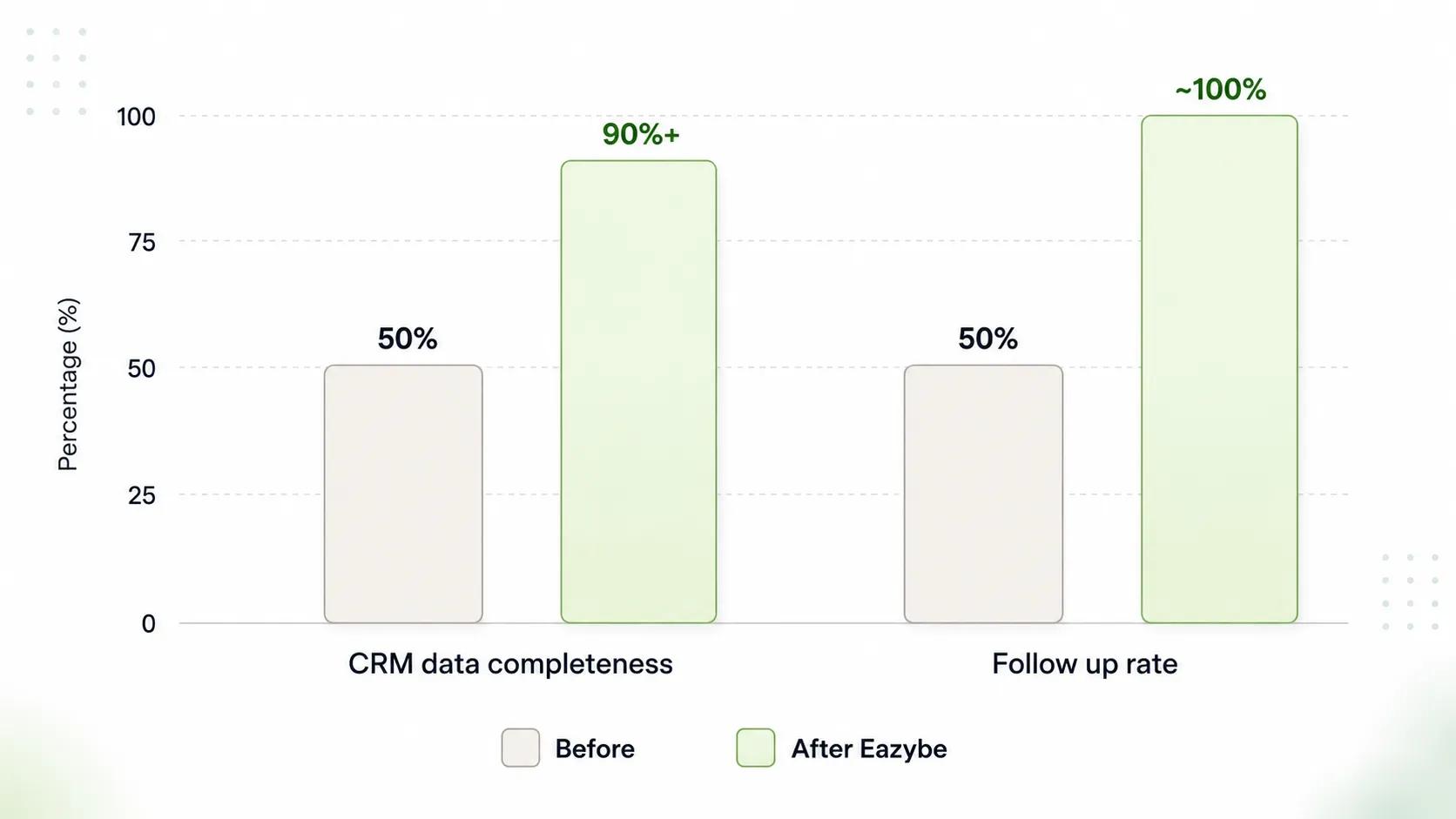
Note: Organizing customer data improves sales performance.
Everyone says WhatsApp integration is worth it. Here is how you actually prove it with a real number.
Key Metrics to Track From Day One:
- First Response Time: How fast your team replies to a new WhatsApp message. Most teams take 2 to 12 hours without integration. With Eazybe it drops to under 1 minute.
- Lead Conversion Rate: Most teams see 20 to 30 percent more conversions within 90 day of setting this up.
- CRM Data Completeness: Before integration most teams have 40 to 60 percent complete contact data. After that it goes above 90 percent.
- Follow-up Rate: Manual follow-ups reach around 50 percent of leads. Automated follow-ups through Eazybe get close to 100 percent.
- Revenue inbox Per Rep: When your team stops doing admin work they sell more. Most teams see 15 to 25 percent growth within 6 month.
How to Set Up Reporting the Right Way
Before you start, pull your current numbers. First response time, conversion rate, and CRM data completeness. Save them. After 30, 60, and 90 days compare against those numbers. That is sales enablement and how you show real ROI.
Tag WhatsApp as a separate activity source in your CRM so you can track it on its own away from email and phone.
Common WhatsApp CRM Integration Challenges And How To Fix Them
Most problems after setup are simple to fix. Here is what to watch for:
- Duplicate contacts: Happens when the same number exists in different formats in your CRM. Standardize your phone number format before connecting and turn on Eazybe's duplicate detection.
- Templates getting rejected: Usually because the message is too vague. Be specific. Instead of "We have a great offer" write "Your free trial ends on [date]. Here is how to continue."
- Team not logging conversations: This is a habit issue. Set one rule scheduler . If it happened on WhatsApp, Eazybe logged it. Stop manual logging completely.
- AI giving wrong answers: Your knowledge base is outdated. Update your pricing, FAQs, and product docs every month.
- Slow CRM sync: A permissions issue. Make sure Eazybe has write access to contacts, activities, and deals in your CRM settings.
Compliance And Data Privacy For WhatsApp CRM Integration
If you are talking to customers in the EU or anywhere that has data laws, GDPR and CCPA apply to your WhatsApp conversations as well. Here is what you need to sort out.
- Get consent before you message anyone. If someone did not opt in, do not message them. Simple as that.
- Decide how long you keep chat data in your CRM. Old data you do not need anymore should be deleted. Set a rule for it and forget about it.
- If a customer asks you to delete their data, that includes their WhatsApp conversations saved in your CRM. Make sure your team knows this.
- Both Eazybe and your CRM handle customer data. Make sure both have a Data Processing Agreement signed. Most providers have this ready, you just need to ask.
Final Thoughts On WhatsApp CRM Integration
If your team is already on WhatsApp talking to customer the only question is how long you are going to keep doing it without a proper setup.
All 7 CRMs on this list do the job well. Which one works best depends on your team and how you sell. HubSpot for sales and marketing and HubSpot conversation analytics. Zoho if you want value. Salesforce for larger teams. Bitrix24, LeadSquared Freshdesk and Pipedrive all have their place depending on what you do day to day.
Pick the one that fits your team and connect it to WhatsApp and stop losing conversation that should be turning into deals.