
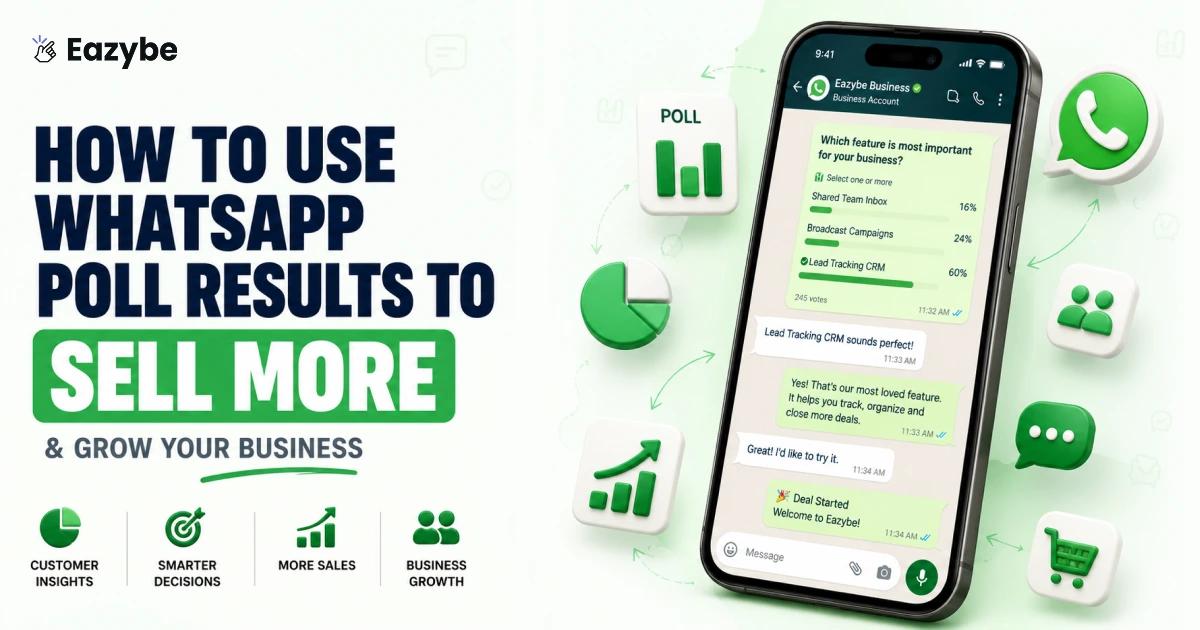


WhatsApp polls give you something most businesses pay for — direct answers from real customers. Yet most businesses look at the results once and forget about them. The votes sit there buried under new messages while all that useful information goes nowhere.
That is where things change. Eazybe - WhatsApp AI Agents With CRM Integration you can save who voted for what, send follow ups automatically and reach the right person when you have exactly what they asked for. No manual work. No forgetting. Just your poll results actually doing something useful.
What Is A WhatsApp Poll?
A WhatsApp poll is a simple feature that let you ask a question and give people a few options to vote on. People tap their choice and you can see the results instantly.
WhatsApp has over 2 billion active users worldwide and polls get responses far faster than emails or Google Forms because people are already on the app every day. No forms. No links. No extra tools. Just a question inside WhatsApp. And the best part is when you use those answers the right way it can directly help you How to increase sales.
Why Your WhatsApp Poll Results Go To Waste?
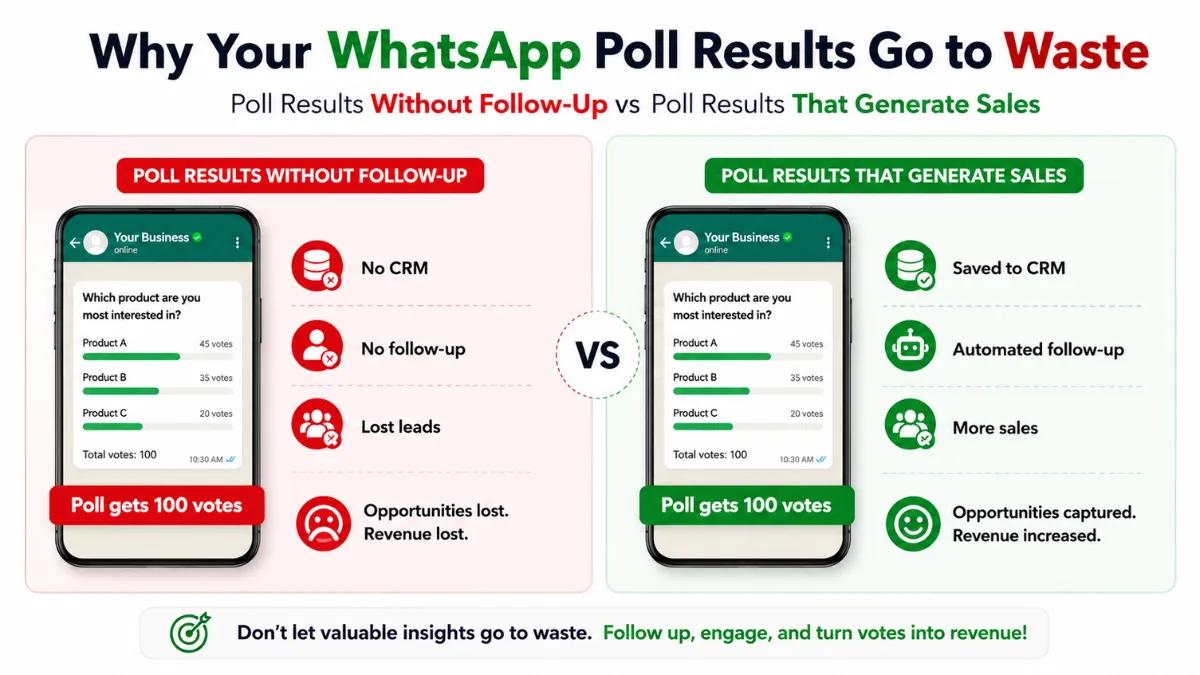
Think about the last poll you ran. People voted for free. No ads. No surveys. No money spent. But did you follow up? Did you save their answers? Did you message the people who showed interest?
Most businesses do not. The poll ends and everyone moves on. Those votes just sit there doing nothing.
A WhatsApp poll is free customer research. And when you connect it with a WhatsApp CRM every vote gets saved automatically so you never lose that data. The businesses that act on their poll results are the ones that actually grow.
Suggested Read: 19 Sales Closing Techniques That Turn Conversations Into Conversions
What Your WhatsApp Poll Results Are Really Telling You
Not every poll gives you the same thing. It depends on what you ask. Here is a quick look.
| What You Ask | What You Learn | What You Can Do |
|---|---|---|
| Which product do you like more? | Customer preference | Launch what people actually want |
| How was your experience with us? | Satisfaction level | Fix what is broken |
| What feature should we add next? | Product demand | Build features people will pay for |
| Which price range works for you? | Budget comfort | Set the right price |
| What content do you want from us? | Audience interest | Post stuff people actually read |
And this is where an AI sales agent helps. It reads your poll results and follows up with the right person automatically. Someone voted for a product. The agent messages them. Someone picked a price range. The agent sends the right offer. No manual work. Just results turning into sales.
How To Turn WhatsApp Poll Results Into Real Sales With Eazybe
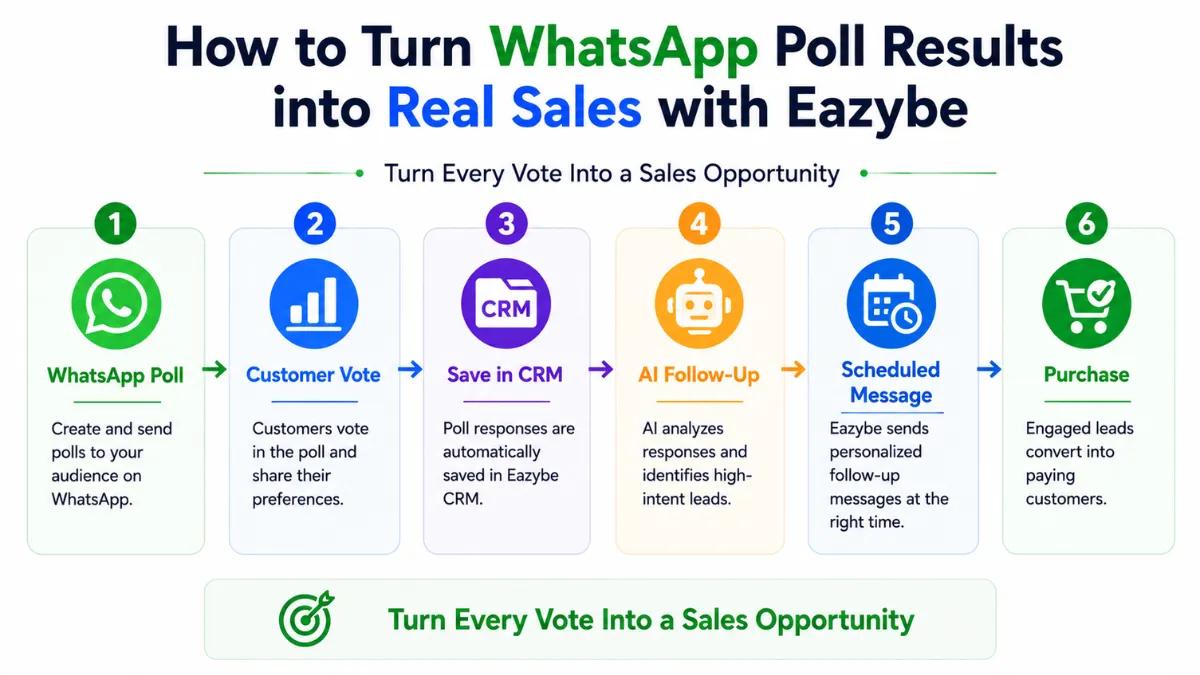
Running a poll is easy. What comes after is the hard part. Following up with voters, remembering who said what and managing hundreds of conversations at the same time is where most businesses lose track.
Eazybe works right inside your WhatsApp Web and handles all of that for you. And with WhatsApp Coexistence you and your team can manage the same WhatsApp number from multiple devices at the same time. No missed conversations. No one person handles everything alone. Everyone can see and reply from their own screen while Eazybe keeps it all organized in one place.
Here is what Eazybe gives you after your poll ends.
- CRM Integration: Save every voter preference directly into HubSpot, Zoho, Salesforce or Google Sheets so nothing gets lost.
- AI Sales Agent: Automatically follows up with voters and sends the right message to the right person without any manual work.
- Scheduled Messages: Write your follow up today and set it to go out on any day and time you choose.
- Quick Replies and Templates: Answer common questions from voters in one tap instead of typing the same reply over and over.
- Reminders: Set a reminder on any chat so you never forget to follow up with an interested buyer.
Also Read: Top 10 WhatsApp Business Description Sample For Your Business Profile
Save WhatsApp Poll Voter Preferences Directly Into Your CRM
Someone voted for Product A in your poll. With Eazybe you save that preference straight into your CRM in one click. HubSpot, Zoho, Salesforce, Google Sheets whatever you use. When Product A is ready you already know exactly who wants it. No guessing. No scrolling through old chats. Just open your CRM and the answer is right there.
And with WhatsApp Copilot you get AI suggestions right inside the chat telling you the best way to follow up with that voter. So you are not just saving the data you are also getting help on what to say next.
Never Miss A Follow Up After Your WhatsApp Poll Again
You told your group you will share the results on Friday. Life gets busy. Friday comes and goes and nobody hears from you. That looks bad.
With WhatsApp automation tools you write the message today and schedule it for Friday. It goes out on its own. Your customers see someone who keeps their word and that builds trust. And trust is what brings people back to buy again.
WhatsApp Poll Responses Answered Faster With Quick Replies
After a poll people start asking questions. When is that product coming? Can you tell me more. What about the other option?
You cannot type the same reply 50 times. With quick reply templates you set up answers once and send them in one tap. Fast, clean and you save hours every single week.
Must Read: WhatsApp Sales Funnel: How To Manage Leads, Follow-Ups And Closings In One Chat
WhatsApp Poll Got A Negative Vote? Here Is What To Do
Someone voted not happy in your feedback poll. That person needs attention. But you have 20 other things going on and you forget. A day passes. Then another. And that customer quietly moves on to someone else.
With WhatsApp business tools you set a reminder on that chat right away. When it pops up you follow up. That one conversation could save a customer you were about to lose.
Here is what reminders help you do:
- Never forget to follow up with an unhappy voter
- Flag chats that need urgent attention
- Keep a note on what each person voted
- Reach out before they leave a bad review
- Follow up with interested voters before they lose interest
The follow up is where the sale happens or where the customer decides to leave. Reminders make sure you never miss it.
Manage WhatsApp Poll Results Across Your Team
Your Whatsapp poll blew up. 300 responses came in. Some want to buy. Some have complaints. Some just want more information. Without a system one person ends up handling everything and things start going wrong.
With WhatsApp Team Inbox every chat gets assigned to the right person. Sales handles buyers. Support handles complaints. No one gets left waiting.
And with WhatsApp Bulk Message Sender you can reach all your voters at once. Share the results. Announce the winning product. Send an offer to people who voted for a specific option. All in one go.
Here is how it helps your team:
- Assign chats to the right person instantly
- Sales talks only to people ready to buy
- Support handles unhappy voters before they leave
- Send bulk messages to voters with the right offer
- Every voter gets a reply without anyone getting overwhelmed
One poll. Many responses. One team handling it all without the chaos.
A Real Example Of Using WhatsApp Poll Results To Drive Sales
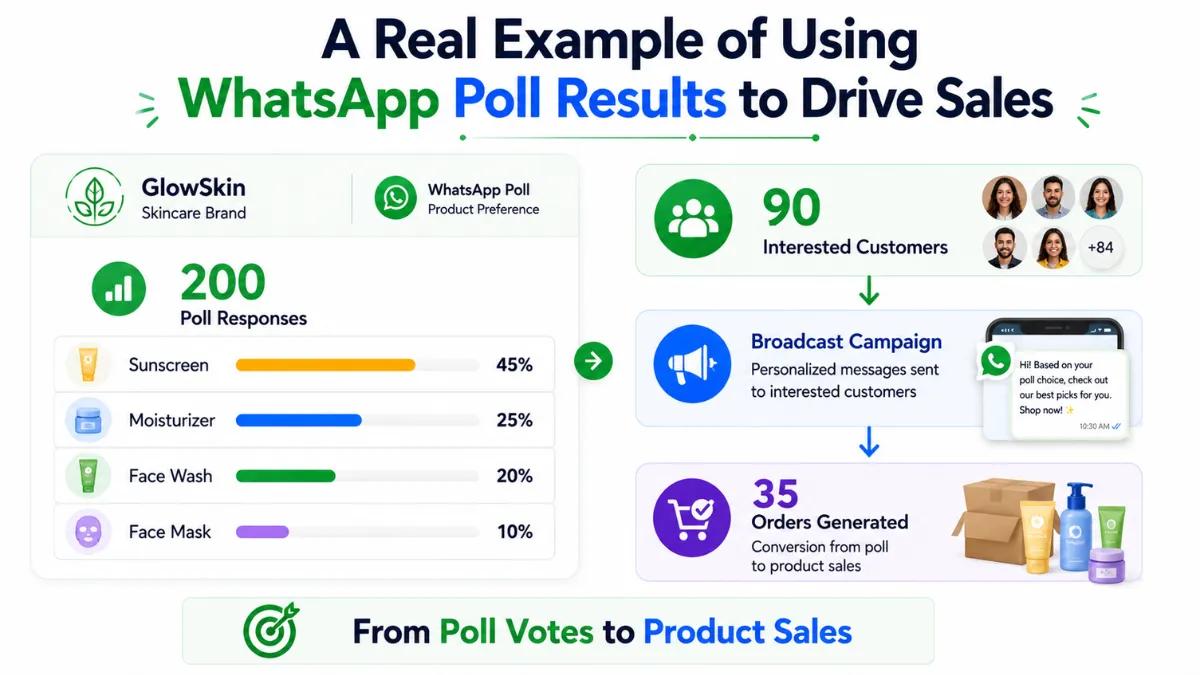
You sell skincare products. You run a poll in your customer group asking which product to launch next. Face wash, sunscreen, moisturizer and face mask are the options.
200 people voted. Sunscreen wins with 45% of the votes. That is 90 people who already told you what they want to buy. Here is what you do next.
- Save everyone who voted for sunscreen into your CRM
- Use WhatsApp Chat Sync to make sure every conversation and vote is saved and nothing gets missed across your team
- Schedule a message for next week saying the sunscreen is coming based on their votes
- When the product is ready send a broadcast to those 90 people with a link to buy
- Track your sales efficiency by seeing how many of those 90 people actually opened the message and bought
People buy. Because you gave them exactly what they asked for. You did not guess. You listened and you followed up. That is how a simple WhatsApp poll turns into actual revenue.
Quick Tips To Get Better WhatsApp Poll Results
These small changes can make a big difference in how many people vote and how useful those votes actually are.
- Keep your question short. If people have to read it twice they will skip it.
- Stick to 4 or 5 options max. Too many choices and people just do not pick.
- Post your poll when your group is most active. Mornings and evenings usually work best.
- Always share the results after the poll. People vote more when they know their opinion matters.
- Save voter data in your CRM so you can use it when you actually need it.
- Set reminders for follow ups. The follow up is where the sale happens.
- Use WhatsApp poll analytics to see when your audience is most active and what kind of questions get the most responses.
Small steps. But they make your polls work a lot harder for your business.
Conclusion: How To Create A Poll In WhatsApp
A WhatsApp poll takes 30 seconds to create. But the real value is not in creating it. It is in what you do after people vote.
Most businesses see 70% picked Option A and move on. That is a wasted opportunity. The businesses that actually grow are the ones who save voter preferences, follow up on time and reach back out when they have something those voters want.
Eazybe helps you do all of that. CRM integration, scheduled messages, quick replies, reminders, team inbox, WhatsApp broadcast message, bulk message sender, WhatsApp coexistence and AI sales agent. Everything you need to turn poll results into real sales is already there.
So the next time you run a WhatsApp poll do not just read the results. Save So the next time you run a WhatsApp poll do not just read the results. Save them. Send a WhatsApp broadcast to the right voters with the right offer. Follow up. Close the loop.
That is how a simple poll becomes a real part of your business growth.